Crouching Camper
Member
- Messages
- 5
- Reaction score
- 0
- Points
- 1
Hello, first post here. I have been learning SCCM with the help of this site and now I can do software updates, ADM, OSD, etc. But I recently notice something strange when deploying Windows 10 using different method will resulting in having different Windows update policy.
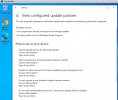
I first push an OSD using PXE and task sequence, which basically install OS, then CM client, then Chrome. Nothing else. When I go to Windows update and look for the policy, I got this:
[1] Intranet Update Service for detecting Updates
[2] Allow connecting to Windows Update Internet locations
[3] Disable all online services for Windows updates except managed services
[4] Do not connect to any Windows Update Internet locations
[5] Do not allow update deferral policies to cause scans against Windows Update
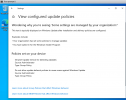
Then I install another Windows 10 VM interactively, join domain, push CM client install. Then I got only 2 Windows update policies:
[1] Intranet Update Service for detecting Updates
[5] Do not allow update deferral policies to cause scans against Windows Update
Anybody has experienced this? I tried to look for those extra GPO for the first VM (I think it is in local group policy) but only [1] and [5] are found.
So where is [2] [3] [4]? and what causes the difference??
Thx in Adv
I first push an OSD using PXE and task sequence, which basically install OS, then CM client, then Chrome. Nothing else. When I go to Windows update and look for the policy, I got this:
[1] Intranet Update Service for detecting Updates
[2] Allow connecting to Windows Update Internet locations
[3] Disable all online services for Windows updates except managed services
[4] Do not connect to any Windows Update Internet locations
[5] Do not allow update deferral policies to cause scans against Windows Update
Then I install another Windows 10 VM interactively, join domain, push CM client install. Then I got only 2 Windows update policies:
[1] Intranet Update Service for detecting Updates
[5] Do not allow update deferral policies to cause scans against Windows Update
Anybody has experienced this? I tried to look for those extra GPO for the first VM (I think it is in local group policy) but only [1] and [5] are found.
So where is [2] [3] [4]? and what causes the difference??
Thx in Adv
Attachments
Last edited: