Forums on Intune, SCCM, and Windows 11

Welcome to the forums. Register a free account today to become a member! Once signed in, you'll be able to participate on this site by adding your topics and posts, as well as connect with other members through your own private inbox!

SOLVED Verify site server permissions to publish to Active Directory

  • Thread starter Thread starter Rients
  • Start date Start date
  • Replies Replies 5
  • Views Views 8K

Rients

Member
Messages
5
Reaction score
0
Points
1
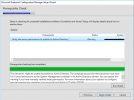
When im trying to install SCCM 2002 it gives this warning (Screenshot attached). I had SCCM 2002 installed before, but it gave the same kind of warning/critical message about SMS_SITE_COMPONENT_MANAGER that couldt publish in AD.

I have 2 DC's running. I did Delegate Control on the System Management container and gave it FULL control permissions to the SCCM computer account and then extended the AD with the extadsch file like the Step by Step tutorial from this website.

Can somebody help me with a solution? Searching for days...
Thanks
 

Attachments

  • SCCM Warning.png
    SCCM Warning.png
    39.2 KB · Views: 17
If you have done the required steps, you can ignore that prerequisite check warning and install Configuration Manager.
 
Thanks for the quick response! Im installing it again right now. But im afraid the warning will stay. We will see whats happening. Thanks Prajwal!
 
Yes that warning will stay but it won't prevent the installation. Since you mentioned that "I did Delegate Control on the System Management container and gave it FULL control permissions to the SCCM computer account and then extended the AD with the extadsch file" So don't worry, you have done your steps. Go ahead and install the configuration manager.
 
Thanks guys! I can finally see the files in the System Management container right now, thanks you so much for the help!
 

Forum statistics

Threads
7,186
Messages
28,048
Members
18,326
Latest member
landry

Trending content

Back
Top