- Messages
- 321
- Solutions
- 4
- Reaction score
- 58
- Points
- 28
Managing A average size SCCM infra is a big deal . So we have to keep the site communication on board. Today i will show basic things to check for Replication issues , Common issues and troubleshooting steps
What is Site Replication (CB)?
Changes happening over sites should be replicated to DB .Configuration Manager database replication uses SQL Server to transfer data. It uses this method to merge changes in its site database with the information from the database at other sites in the hierarchy. Configuration Manager site to site communication uses SSB (SQL Server Service Broker) feature to replicate data between the site databases instead of the file based replication used in previous version of Configuration Manager.We can monitor the DB replication
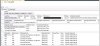
navigate to monitoring--> Database Replication

Ground Level Check
We can troubleshoot SQL replication issue by following below approach.
First step for troubleshooting replication should be to use the Replication Link Analyzer.
In the Configuration Manager console, start by viewing the current status of the replication links.
1. Click Monitoring -->Overview --> Site Hierarchy.
If the link icon is green, everything is fine. If it is not green, continue with this procedure to use the Replication Link Analyzer to troubleshoot
2.Click Monitoring | Overview | Database Replication.
3.Select the link.
In the lower portion of the window, you can see the detailed status of this link. This information includes whether the replication is active, and the status of the global data replication link and the site data replication link.
4.Right-click on the failed site code to open the Replication Link Analyzer Wizard.To be able to use the replication link analyzer you need to have the permissions to monitor the database replication within ConfigurationManager 2012 and the account must have SA access to the SQL databases.
The Replication Link Analyzer Wizard can also be started from the command line by using the following syntax:
“%path%Microsoft Configuration ManagerAdminConsolebinMicrosoft.ConfigurationManager.ReplicationLinkAnalyzer.Wizard.exe <source site server FQDN> <destination site server FQDN>”
5.Follow the wizard to remediate if necessary, and then review the result files:
ReplicationLinkAnalysis.log
ReplicationLinkAnalysis.xml
6.The Replication Link Analyzer works by examining both sites and checking whether:
The SMS service is running
The SMS Replication Configuration Monitor component is running
The ports required for SQL replication are enabled
The SQL version is supported
The network is available between the two sites
There is enough space for the SQL database
The SSB service configuration exists
The SSB service certificate exists
There are any known errors in SQL log files
There are any replication queues disabled
Time is in sync
The transmission of data is stuck
A key conflict exists
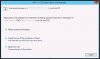
The steps logged in the ReplicationLinkAnalysis.log and ReplicationAnalysis.xml files saved on the desktop. If any one of the steps is failed, you will see the following screens to fix the issue:
initiated rep.link analyzer

Reset Queued messages

2. Investigating log files: -
If you are still having difficulties after using the Replication Link Analyzer, your next step should be to check the following two log files for all involved sites:
rcmctrl.log
replmgr.log
3.Performing SQL queries: -
If you are still unable to find the root cause of the issue, you need to run SQL queries using Microsoft SQL Server Management Studio on the central administration site or primary site or even the failed secondary site to get more information. Specifically, you should:
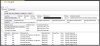
Run the SPDiagDRS (CAS or Primary) / Exec SPDiagDRS (for Secondary site) by using SQL Server Management Studio. The resulting output contains useful information about the general status of the database replication, the current replication link status, and the last sync time for each replication group.
For the successful replication, the SiteStatus should be in Active mode.
Site in maintenance mode
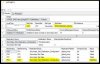
Active Site
4.Re-initiating replication: -
Re-initiating replication by sending a subscription invalid message should be the last step to try, because it causes all the data to be re-replicated between the sites, which will generate a lot of network traffic.
To re-initiate the global data, run the following SQL command:
EXEC SPDrsSendSubscriptionInvalid ‘SiteCode’, ‘SiteCode’, ‘Configuration Data’
Note- Do the 4th steps at last , cause if we will force initiate the replication lots of bandwidth could be used
What is Site Replication (CB)?
Changes happening over sites should be replicated to DB .Configuration Manager database replication uses SQL Server to transfer data. It uses this method to merge changes in its site database with the information from the database at other sites in the hierarchy. Configuration Manager site to site communication uses SSB (SQL Server Service Broker) feature to replicate data between the site databases instead of the file based replication used in previous version of Configuration Manager.We can monitor the DB replication
navigate to monitoring--> Database Replication
Ground Level Check
- Verify all required ports are allowed / blocked.
- Is SQL server and services running?
- Is the SMS_EXECUTIVE service running?
- Is the network between the sites available?
- Is there enough space in the Configuration Manager 2012 databases?
- Does the broker configuration exist?
- Are the replication queues disabled?
- Is the transmission of data stuck?
We can troubleshoot SQL replication issue by following below approach.
- Replication Link Analyzer.
- Investigating Log files.
- Performing SQL queries
- Re-initiating replication.
First step for troubleshooting replication should be to use the Replication Link Analyzer.
In the Configuration Manager console, start by viewing the current status of the replication links.
1. Click Monitoring -->Overview --> Site Hierarchy.
If the link icon is green, everything is fine. If it is not green, continue with this procedure to use the Replication Link Analyzer to troubleshoot
2.Click Monitoring | Overview | Database Replication.
3.Select the link.
In the lower portion of the window, you can see the detailed status of this link. This information includes whether the replication is active, and the status of the global data replication link and the site data replication link.
4.Right-click on the failed site code to open the Replication Link Analyzer Wizard.To be able to use the replication link analyzer you need to have the permissions to monitor the database replication within ConfigurationManager 2012 and the account must have SA access to the SQL databases.
The Replication Link Analyzer Wizard can also be started from the command line by using the following syntax:
“%path%Microsoft Configuration ManagerAdminConsolebinMicrosoft.ConfigurationManager.ReplicationLinkAnalyzer.Wizard.exe <source site server FQDN> <destination site server FQDN>”
5.Follow the wizard to remediate if necessary, and then review the result files:
ReplicationLinkAnalysis.log
ReplicationLinkAnalysis.xml
6.The Replication Link Analyzer works by examining both sites and checking whether:
The SMS service is running
The SMS Replication Configuration Monitor component is running
The ports required for SQL replication are enabled
The SQL version is supported
The network is available between the two sites
There is enough space for the SQL database
The SSB service configuration exists
The SSB service certificate exists
There are any known errors in SQL log files
There are any replication queues disabled
Time is in sync
The transmission of data is stuck
A key conflict exists
The steps logged in the ReplicationLinkAnalysis.log and ReplicationAnalysis.xml files saved on the desktop. If any one of the steps is failed, you will see the following screens to fix the issue:
initiated rep.link analyzer
Reset Queued messages
2. Investigating log files: -
If you are still having difficulties after using the Replication Link Analyzer, your next step should be to check the following two log files for all involved sites:
rcmctrl.log
replmgr.log
3.Performing SQL queries: -
If you are still unable to find the root cause of the issue, you need to run SQL queries using Microsoft SQL Server Management Studio on the central administration site or primary site or even the failed secondary site to get more information. Specifically, you should:
Run the SPDiagDRS (CAS or Primary) / Exec SPDiagDRS (for Secondary site) by using SQL Server Management Studio. The resulting output contains useful information about the general status of the database replication, the current replication link status, and the last sync time for each replication group.
For the successful replication, the SiteStatus should be in Active mode.
Site in maintenance mode
Active Site
4.Re-initiating replication: -
Re-initiating replication by sending a subscription invalid message should be the last step to try, because it causes all the data to be re-replicated between the sites, which will generate a lot of network traffic.
To re-initiate the global data, run the following SQL command:
EXEC SPDrsSendSubscriptionInvalid ‘SiteCode’, ‘SiteCode’, ‘Configuration Data’
Note- Do the 4th steps at last , cause if we will force initiate the replication lots of bandwidth could be used