Forums on Intune, SCCM, and Windows 11

Welcome to the forums. Register a free account today to become a member! Once signed in, you'll be able to participate on this site by adding your topics and posts, as well as connect with other members through your own private inbox!

SOLVED SCCM clients can not connect to Management Point

  • Thread starter Thread starter tiduseQ
  • Start date Start date
  • Replies Replies 11
  • Views Views 56K
  • Tags Tags
    sccm
Status
Not open for further replies.

tiduseQ

Member
Messages
11
Reaction score
2
Points
3
UPDATE: TrendMicro (antivirus) indirectly stopped repair of Management Point through MSI. Disabling Trend solved the issue.

Hello,
I have posted here today, but can no longer find my post - if I have offended any rule please at least send me a PM. I will post again in the meantime.
We are moving from SCCM 2012 to SCCM CB and we have separate server with new version and separate server for SQL database. We have configured both SCCM "service" account and server computer account with proper AD and SQL privileges per Microsoft instructions. The Management Point component keeps throwing errors that it failed HTTP communication with error 500. I will post logs below, but here is general error description:
"MP Control Manager detected management point is not responding to HTTP requests. The HTTP status code and text is 500, Internal Server Error."

I can not find any IIS configuration information for Management Point other than "reinstall MS to correct IIS settings" and we have tried it.

I am willing to provide any logs and information about my configuration that you would think could help to determine the reason. Could you please help me configure it properly?
 

Attachments

Last edited:
SCCM uses the local system account, so, What do you mean by SCCM service account?
 
We have created "DOM\sccm2016adm" account that is local admin on server and was used to install whole application. It is added to local admins group and is "Full Administrator" security role in SCCM. It is basically a single account rather than wide range of different accounts per roles as listed here (https://docs.microsoft.com/en-us/sccm/core/plan-design/hierarchy/accounts). We have added it to proper AD groups, given share access and made SQL database administrator along with proper role inside database.
 
So to be clear you have NOT grant the computer account access to SQL server?
 
First of, thank you in advance Garth for your help. You and Prajwal are great people to help others around forums and I have seen your posts in various places before. I appreciate it a lot!
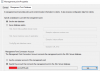
Second, the computer account is added inside SQL database alongside for sccmadm for sure, but I'd have to confirm windows privileges for sccm server computer account. I've made a screen of MP settings to confirm that we are trying to force SCCM to use different account that is authorized for windows and sql database for sure. Should we instead change these settings? If yes, where should we add sccm computer account to make sure it's authorized and privileged enough?
EDIT: Or should we use "SCCMSERVER\System" account as well?
 

Attachments

  • screenMPproperties.png
    screenMPproperties.png
    17.1 KB · Views: 182
Is there a reason why you are not using the more secure computer account for this? what you done is not typical.
 
I have been on a sick leave for a week, so reply is delayed.
On default, the setting has not been changed. But since it is not working and we have tried various fixes here and there, this setting has been modified on the way. The MP was not working when this setting was "use the computer account of the management point". It is not a problem to revert this setting as the machine account should have similar privileges to the currently used account.

We have found server errors on the server hosting sccm. Can this be the cause of our problem?
 

Attachments

  • screen5.png
    screen5.png
    11.5 KB · Views: 155
Starting the service throws error in Server Manager:
Event filter with query "SELECT * FROM __InstanceOperationEvent WHERE TargetInstance ISA "ccm_siteassignment"" could not be reactivated in namespace "//./root/ccm/Policy/Machine" because of error 0x80041010. Events cannot be delivered through this filter until the problem is corrected.

EDIT: I Have checked event log and it appears that SOMETHING tried to repair when I tried starting the service, but I got no more information on that. Screen attached.
 

Attachments

  • screen6.png
    screen6.png
    14.6 KB · Views: 98
Last edited:
Update:
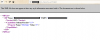
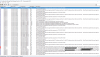
When we start the service in Server Manager it briefly starts, what is reflected in log (Green lines in screenshot mark the starting of service) and then stops after few minutes. While it's running, the XML is available at http://<ServerName>/sms_mp/.sms_aut?mplist (second screenshot). While the service was running, the client was able to communicate briefly and I believe it was not available before (third screenshot).
Do you have any idea why the service would stop?
EDIT: I guess the service starts and stops on regular basis as per Management Point log (screen8)? It is still marked as Critical Status, though.
 

Attachments

  • screen7.png
    screen7.png
    139.6 KB · Views: 105
  • XML MP2.png
    XML MP2.png
    70.6 KB · Views: 104
  • clients1.png
    clients1.png
    12.7 KB · Views: 88
  • screen8.png
    screen8.png
    138.8 KB · Views: 108
Last edited:
Update: I've found in log that management point could not be reinstalled by component manager. Googled the issue and found this technet thread:

https://social.technet.microsoft.co...-2012-r2-to-r2-sp1?forum=configmanagergeneral

Apparently our TrendMicro (antivirus) stopped component manager from stopping wmi service and therefore it could not proceed with reinstallation or postinstall configuration of management point. Stopping Trend for the duration of repair (retried every 70 minutes according to log) solved the issue. The SCCMEXEC service is now constantly running and clients are connecting. The service was being killed by SCCM itself for repair/reinstall apparently.

EDIT: Logs that pointed the problem for anyone having similar issue:
Monitoring > Site Status > Management Point > Log
Severity,Type,Site code,Date / Time,System,Component,Message ID,Description,Thread ID,Process ID

Error,Milestone,SITE,22.01.2019 13:44:13,SCCMSERVER.DOMAIN,SMS_PROVIDERS,1020,Site Component Manager failed to reinstall this component on this site system. Solution: Review the previous status messages to determine the exact reason for the failure. Site Component Manager will automatically retry the reinstallation in 60 minutes. To force Site Component Manager to immediately retry the reinstallation, stop and restart Site Component Manager using the Configuration Manager Service Manager.,9300,3120

Error,Detail,SITE,22.01.2019 13:44:13,SCCMSERVER.DOMAIN,SMS_PROVIDERS,1090,Site Component Manager could not stop the winmgmt service on site system "\\SCCMSERVER.DOMAIN". Possible cause: Site Component Manager does not have sufficient access rights to administer the site system. Solution: Verify that the Site System Connection accounts are properly configured to allow the site to administer the site system. If this problem persists, refer to your ConfigMgr Documentation or the Microsoft Knowledge Base for further troubleshooting information.,9300,3120
 
Last edited:
Status
Not open for further replies.

Forum statistics

Threads
7,165
Messages
27,967
Members
18,269
Latest member
alexshem

Trending content

Back
Top