Forums on Intune, SCCM, and Windows 11

Welcome to the forums. Register a free account today to become a member! Once signed in, you'll be able to participate on this site by adding your topics and posts, as well as connect with other members through your own private inbox!

SOLVED Windows 11 - Some clients not receiving updates

Greg Shafer

Member
Messages
20
Solutions
1
Reaction score
1
Points
3
Hoping someone can help here, as I am at a brick wall. I have a handful of Win11 workstations (mix of 23H2 and 24H2) that are not receiving updates. No issues with the majority of my 11 clients, but there are a few that check into SCCM and report as compliant in the update deployment, but shows no updates installed. My machine specifically has shown compliant for the last 2 months. Looking at WUAHandler.log, I see the following:
Code:
CWuaHandler::SetCategoriesForStateReportingExclusion called with E0789628-CE08-4437-BE74-2495B842F43B;E0789628-CE08-4437-BE74-2495B842F43B,A38C835C-2950-4E87-86CC-6911A52C34A3; for leaves and E0789628-CE08-4437-BE74-2495B842F43B,A38C835C-2950-4E87-86CC-6911A52C34A3; for bundles    WUAHandler    3/12/2025 7:54:49 AM    17132 (0x42EC)
Its a WSUS Update Source type ({20DA0E5B-3B51-492B-B1B6-3E67DD68DB83}), adding it.    WUAHandler    3/12/2025 8:19:25 AM    5660 (0x161C)
Intune authority detected in CSP.    WUAHandler    3/12/2025 8:19:25 AM    19384 (0x4BB8)
Workloads flag retrieved 2147479807    WUAHandler    3/12/2025 8:19:25 AM    19384 (0x4BB8)
Existing WUA Managed server was already set (http://SERVERREMOVED.domainremoved.com:8530), skipping Group Policy registration.    WUAHandler    3/12/2025 8:19:26 AM    5660 (0x161C)
Added Update Source ({20DA0E5B-3B51-492B-B1B6-3E67DD68DB83}) of content type: 2    WUAHandler    3/12/2025 8:19:26 AM    5660 (0x161C)
Scan results will include all superseded updates.    WUAHandler    3/12/2025 8:19:26 AM    5660 (0x161C)
Search Criteria is (DeploymentAction=* AND Type='Software') OR (DeploymentAction=* AND Type='Driver')    WUAHandler    3/12/2025 8:19:26 AM    5660 (0x161C)
Async searching of updates using WUAgent started.    WUAHandler    3/12/2025 8:19:26 AM    5660 (0x161C)
Async searching completed.    WUAHandler    3/12/2025 8:27:06 AM    28768 (0x7060)
Successfully completed scan.    WUAHandler    3/12/2025 8:27:07 AM    11844 (0x2E44)
Its a WSUS Update Source type ({20DA0E5B-3B51-492B-B1B6-3E67DD68DB83}), adding it.    WUAHandler    3/12/2025 8:27:08 AM    16788 (0x4194)
Intune authority detected in CSP.    WUAHandler    3/12/2025 8:27:08 AM    21764 (0x5504)
Workloads flag retrieved 2147479807    WUAHandler    3/12/2025 8:27:08 AM    21764 (0x5504)
Existing WUA Managed server was already set (http://SERVERREMOVED.domainremoved:8530), skipping Group Policy registration.    WUAHandler    3/12/2025 8:27:08 AM    16788 (0x4194)
Added Update Source ({20DA0E5B-3B51-492B-B1B6-3E67DD68DB83}) of content type: 2    WUAHandler    3/12/2025 8:27:08 AM    16788 (0x4194)
Scan results will include all superseded updates.    WUAHandler    3/12/2025 8:27:08 AM    16788 (0x4194)
Search Criteria is (DeploymentAction=* AND Type='Software') OR (DeploymentAction=* AND Type='Driver')    WUAHandler    3/12/2025 8:27:08 AM    16788 (0x4194)
Async searching of updates using WUAgent started.    WUAHandler    3/12/2025 8:27:08 AM    16788 (0x4194)
Async searching completed.    WUAHandler    3/12/2025 8:34:44 AM    30072 (0x7578)
Successfully completed scan.    WUAHandler    3/12/2025 8:34:45 AM    16444 (0x403C)
CWuaHandler::SetCategoriesForStateReportingExclusion called with E0789628-CE08-4437-BE74-2495B842F43B;E0789628-CE08-4437-BE74-2495B842F43B,A38C835C-2950-4E87-86CC-6911A52C34A3; for leaves and E0789628-CE08-4437-BE74-2495B842F43B,A38C835C-2950-4E87-86CC-6911A52C34A3; for bundles    WUAHandler    3/12/2025 10:43:41 AM    18072 (0x4698)
If I go directly to Windows Update, I can patch with no issues. At some point, we will start to test updates via Intune, but we are not to that point yet. Any thoughts as to what other logs I can check since the deployment package itself is created and deploying to the majority of other workstations?
 
Hoping someone can help here, as I am at a brick wall. I have a handful of Win11 workstations (mix of 23H2 and 24H2) that are not receiving updates. No issues with the majority of my 11 clients, but there are a few that check into SCCM and report as compliant in the update deployment, but shows no updates installed. My machine specifically has shown compliant for the last 2 months. Looking at WUAHandler.log, I see the following:
Code:
CWuaHandler::SetCategoriesForStateReportingExclusion called with E0789628-CE08-4437-BE74-2495B842F43B;E0789628-CE08-4437-BE74-2495B842F43B,A38C835C-2950-4E87-86CC-6911A52C34A3; for leaves and E0789628-CE08-4437-BE74-2495B842F43B,A38C835C-2950-4E87-86CC-6911A52C34A3; for bundles    WUAHandler    3/12/2025 7:54:49 AM    17132 (0x42EC)
Its a WSUS Update Source type ({20DA0E5B-3B51-492B-B1B6-3E67DD68DB83}), adding it.    WUAHandler    3/12/2025 8:19:25 AM    5660 (0x161C)
Intune authority detected in CSP.    WUAHandler    3/12/2025 8:19:25 AM    19384 (0x4BB8)
Workloads flag retrieved 2147479807    WUAHandler    3/12/2025 8:19:25 AM    19384 (0x4BB8)
Existing WUA Managed server was already set (http://SERVERREMOVED.domainremoved.com:8530), skipping Group Policy registration.    WUAHandler    3/12/2025 8:19:26 AM    5660 (0x161C)
Added Update Source ({20DA0E5B-3B51-492B-B1B6-3E67DD68DB83}) of content type: 2    WUAHandler    3/12/2025 8:19:26 AM    5660 (0x161C)
Scan results will include all superseded updates.    WUAHandler    3/12/2025 8:19:26 AM    5660 (0x161C)
Search Criteria is (DeploymentAction=* AND Type='Software') OR (DeploymentAction=* AND Type='Driver')    WUAHandler    3/12/2025 8:19:26 AM    5660 (0x161C)
Async searching of updates using WUAgent started.    WUAHandler    3/12/2025 8:19:26 AM    5660 (0x161C)
Async searching completed.    WUAHandler    3/12/2025 8:27:06 AM    28768 (0x7060)
Successfully completed scan.    WUAHandler    3/12/2025 8:27:07 AM    11844 (0x2E44)
Its a WSUS Update Source type ({20DA0E5B-3B51-492B-B1B6-3E67DD68DB83}), adding it.    WUAHandler    3/12/2025 8:27:08 AM    16788 (0x4194)
Intune authority detected in CSP.    WUAHandler    3/12/2025 8:27:08 AM    21764 (0x5504)
Workloads flag retrieved 2147479807    WUAHandler    3/12/2025 8:27:08 AM    21764 (0x5504)
Existing WUA Managed server was already set (http://SERVERREMOVED.domainremoved:8530), skipping Group Policy registration.    WUAHandler    3/12/2025 8:27:08 AM    16788 (0x4194)
Added Update Source ({20DA0E5B-3B51-492B-B1B6-3E67DD68DB83}) of content type: 2    WUAHandler    3/12/2025 8:27:08 AM    16788 (0x4194)
Scan results will include all superseded updates.    WUAHandler    3/12/2025 8:27:08 AM    16788 (0x4194)
Search Criteria is (DeploymentAction=* AND Type='Software') OR (DeploymentAction=* AND Type='Driver')    WUAHandler    3/12/2025 8:27:08 AM    16788 (0x4194)
Async searching of updates using WUAgent started.    WUAHandler    3/12/2025 8:27:08 AM    16788 (0x4194)
Async searching completed.    WUAHandler    3/12/2025 8:34:44 AM    30072 (0x7578)
Successfully completed scan.    WUAHandler    3/12/2025 8:34:45 AM    16444 (0x403C)
CWuaHandler::SetCategoriesForStateReportingExclusion called with E0789628-CE08-4437-BE74-2495B842F43B;E0789628-CE08-4437-BE74-2495B842F43B,A38C835C-2950-4E87-86CC-6911A52C34A3; for leaves and E0789628-CE08-4437-BE74-2495B842F43B,A38C835C-2950-4E87-86CC-6911A52C34A3; for bundles    WUAHandler    3/12/2025 10:43:41 AM    18072 (0x4698)
If I go directly to Windows Update, I can patch with no issues. At some point, we will start to test updates via Intune, but we are not to that point yet. Any thoughts as to what other logs I can check since the deployment package itself is created and deploying to the majority of other workstations?
Hi
I can confirm that we have the exact same issue.

Patching with WSUS, Windows Update for Business or download it manually and install from Update Catalog works.

On a few clients, it works from SCCM. On some clients the download of the cumulative update begins, but it stops. Deltadownload.log shows a lot of activity while downloading. But on failing clients theres no activity here.

It's only the cumulative update that we have an issue with, other patches like 3rd party with Patch My PC and 365 apps applies normally.
 
Hi
I can confirm that we have the exact same issue.

Patching with WSUS, Windows Update for Business or download it manually and install from Update Catalog works.

On a few clients, it works from SCCM. On some clients the download of the cumulative update begins, but it stops. Deltadownload.log shows a lot of activity while downloading. But on failing clients theres no activity here.

It's only the cumulative update that we have an issue with, other patches like 3rd party with Patch My PC and 365 apps applies normally.
We are not using any third party patching utilities in SCCM. Unfortunately, still have no resolution here outside of patching manually. Really hoping someone has seen this issue before and has an idea of the root cause. I have seen posts about a specific 24H2 buiid (November 2024, I think) that had patch issues with SCCM, however, we skipped that version because of the reported issues.
 
We are not using any third party patching utilities in SCCM. Unfortunately, still have no resolution here outside of patching manually. Really hoping someone has seen this issue before and has an idea of the root cause. I have seen posts about a specific 24H2 buiid (November 2024, I think) that had patch issues with SCCM, however, we skipped that version because of the reported issues.
We see the issue on both newly installed computers (the have the 2025-02 Cumulative Update in the reference image), and on computers upgraded from Windows 11 23H2 and Windows 10. We also have computers that the patching works normally...
 
Hoping someone can help here, as I am at a brick wall. I have a handful of Win11 workstations (mix of 23H2 and 24H2) that are not receiving updates. No issues with the majority of my 11 clients, but there are a few that check into SCCM and report as compliant in the update deployment, but shows no updates installed. My machine specifically has shown compliant for the last 2 months. Looking at WUAHandler.log, I see the following:
Code:
CWuaHandler::SetCategoriesForStateReportingExclusion called with E0789628-CE08-4437-BE74-2495B842F43B;E0789628-CE08-4437-BE74-2495B842F43B,A38C835C-2950-4E87-86CC-6911A52C34A3; for leaves and E0789628-CE08-4437-BE74-2495B842F43B,A38C835C-2950-4E87-86CC-6911A52C34A3; for bundles    WUAHandler    3/12/2025 7:54:49 AM    17132 (0x42EC)
Its a WSUS Update Source type ({20DA0E5B-3B51-492B-B1B6-3E67DD68DB83}), adding it.    WUAHandler    3/12/2025 8:19:25 AM    5660 (0x161C)
Intune authority detected in CSP.    WUAHandler    3/12/2025 8:19:25 AM    19384 (0x4BB8)
Workloads flag retrieved 2147479807    WUAHandler    3/12/2025 8:19:25 AM    19384 (0x4BB8)
Existing WUA Managed server was already set (http://SERVERREMOVED.domainremoved.com:8530), skipping Group Policy registration.    WUAHandler    3/12/2025 8:19:26 AM    5660 (0x161C)
Added Update Source ({20DA0E5B-3B51-492B-B1B6-3E67DD68DB83}) of content type: 2    WUAHandler    3/12/2025 8:19:26 AM    5660 (0x161C)
Scan results will include all superseded updates.    WUAHandler    3/12/2025 8:19:26 AM    5660 (0x161C)
Search Criteria is (DeploymentAction=* AND Type='Software') OR (DeploymentAction=* AND Type='Driver')    WUAHandler    3/12/2025 8:19:26 AM    5660 (0x161C)
Async searching of updates using WUAgent started.    WUAHandler    3/12/2025 8:19:26 AM    5660 (0x161C)
Async searching completed.    WUAHandler    3/12/2025 8:27:06 AM    28768 (0x7060)
Successfully completed scan.    WUAHandler    3/12/2025 8:27:07 AM    11844 (0x2E44)
Its a WSUS Update Source type ({20DA0E5B-3B51-492B-B1B6-3E67DD68DB83}), adding it.    WUAHandler    3/12/2025 8:27:08 AM    16788 (0x4194)
Intune authority detected in CSP.    WUAHandler    3/12/2025 8:27:08 AM    21764 (0x5504)
Workloads flag retrieved 2147479807    WUAHandler    3/12/2025 8:27:08 AM    21764 (0x5504)
Existing WUA Managed server was already set (http://SERVERREMOVED.domainremoved:8530), skipping Group Policy registration.    WUAHandler    3/12/2025 8:27:08 AM    16788 (0x4194)
Added Update Source ({20DA0E5B-3B51-492B-B1B6-3E67DD68DB83}) of content type: 2    WUAHandler    3/12/2025 8:27:08 AM    16788 (0x4194)
Scan results will include all superseded updates.    WUAHandler    3/12/2025 8:27:08 AM    16788 (0x4194)
Search Criteria is (DeploymentAction=* AND Type='Software') OR (DeploymentAction=* AND Type='Driver')    WUAHandler    3/12/2025 8:27:08 AM    16788 (0x4194)
Async searching of updates using WUAgent started.    WUAHandler    3/12/2025 8:27:08 AM    16788 (0x4194)
Async searching completed.    WUAHandler    3/12/2025 8:34:44 AM    30072 (0x7578)
Successfully completed scan.    WUAHandler    3/12/2025 8:34:45 AM    16444 (0x403C)
CWuaHandler::SetCategoriesForStateReportingExclusion called with E0789628-CE08-4437-BE74-2495B842F43B;E0789628-CE08-4437-BE74-2495B842F43B,A38C835C-2950-4E87-86CC-6911A52C34A3; for leaves and E0789628-CE08-4437-BE74-2495B842F43B,A38C835C-2950-4E87-86CC-6911A52C34A3; for bundles    WUAHandler    3/12/2025 10:43:41 AM    18072 (0x4698)
If I go directly to Windows Update, I can patch with no issues. At some point, we will start to test updates via Intune, but we are not to that point yet. Any thoughts as to what other logs I can check since the deployment package itself is created and deploying to the majority of other workstations?
I had a similar issue with the Jan cumulative update. MECM showed most machines compliant despite not having the update installed. It wasnt showing in Software Center either. I never truly learned how far spread it was. A reinstall of the client fixed it for me and the other machines with issues. Microsoft could not tell me why it happened or even if my reporting was still incorrect or not. Reporting seemed a lot better in Feb but its something I will have to continue to monitor. I have updated to 2409 now and Im hoping the upgrade (repairs everyone's client)
 
I had a similar issue with the Jan cumulative update. MECM showed most machines compliant despite not having the update installed. It wasnt showing in Software Center either. I never truly learned how far spread it was. A reinstall of the client fixed it for me and the other machines with issues. Microsoft could not tell me why it happened or even if my reporting was still incorrect or not. Reporting seemed a lot better in Feb but its something I will have to continue to monitor. I have updated to 2409 now and Im hoping the upgrade (repairs everyone's client)
Thank you Jason. For the client reinstall, did you do a full rip and replace of the client or just reinstall over the existing? I have not pushed 2409 yet (still running 2403).
 
I had a similar issue with the Jan cumulative update. MECM showed most machines compliant despite not having the update installed. It wasnt showing in Software Center either. I never truly learned how far spread it was. A reinstall of the client fixed it for me and the other machines with issues. Microsoft could not tell me why it happened or even if my reporting was still incorrect or not. Reporting seemed a lot better in Feb but its something I will have to continue to monitor. I have updated to 2409 now and Im hoping the upgrade (repairs everyone's client)
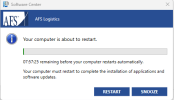
Looks like we might have a winner here. Removed/reinstalled the client from my workstation and this morning I was presented with the restart prompt from Software Center. Thank you, Jason!
1743084343165.png
 
did you remove it from the client manually? or did you use the option to uninstall first in Configuration Manager?
I ran everything from Config Manager. I made a manual device collection of all affected devices for simplicity, selected all of the devices in the group, bulk selected "Install client". From there, I made sure check both "Always install the client software" as well as "Uninstall existing CM client before client is installed". So far, I have had 100% success.
 
We see the issue on both newly installed computers (the have the 2025-02 Cumulative Update in the reference image), and on computers upgraded from Windows 11 23H2 and Windows 10. We also have computers that the patching works normally...
Hi

Configuring the GPO: "Specify source service for specific classes of Windows Update" seems to solve our problem
 

Forum statistics

Threads
7,132
Messages
27,852
Members
18,148
Latest member
therealLawrence
Back
Top