Forums on Intune, SCCM, and Windows 11

Welcome to the forums. Register a free account today to become a member! Once signed in, you'll be able to participate on this site by adding your topics and posts, as well as connect with other members through your own private inbox!

SOLVED Upgrade 2010 stuck in Post Installation - Client Package

  • Thread starter Thread starter Mre
  • Start date Start date
  • Replies Replies 8
  • Views Views 5K
Status
Not open for further replies.

Mre

Member
Messages
7
Solutions
1
Reaction score
0
Points
1
Hi,

I would like to know if anyone here could help me with my current issue on SCCM build 2010.

I upgraded our server from 2006 to 2010 without an issue, the server is 2010, the console is 2010, however the upgrade process in general is stuck on “installing” as it does not finish the last 4 POST installation tasks where it has to update the client package and enable the features.
I can’t see any issues in the hman.log or cmupdate.log.

Restarting all services and server does not “jumpstart” the process and it remains stuck, inactive, on the last steps.
Has anyone ever experienced such a behavior? Any ideas where I should look to find a solution?

I attached an extract of the hman.log file, this is what it does over and over, not sure if it’s linked to the issue or normal 2010 behavior.

Thanks for your time
Mre
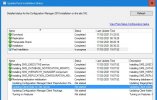
 

Attachments

  • hman-extract.log
    hman-extract.log
    1.4 KB · Views: 7
  • Post_installation_Stuck.JPG
    Post_installation_Stuck.JPG
    81.7 KB · Views: 18
Solution
Hi,

Just to give this post an ending. After reviewing the logs, MS support saw that my installation actually finished but just did not reset the installing status.
So I was asked to run

update CM_updatepackages set State = '196612' where PackageGuid like '6B4F84B7-5555-48B0-AECC-74FB5A8AA24B'


On my database where the PackageGUid was the one from my 2010 upgrade.
That triggered hman to continue and process the Post install.
My agent package got updated and my clients are now slowly upgrading the agent client locally.


best regards.
A server restart usually solves this issue. I faced this issue in my lab several times and a server restart fixed the issue.
 
Hi,
Thanks for your reply, Indeed it usually solves those kind of issues and after waiting a couple of hours (you shall not rush an SCCM server) when the SCCM server was showing "finished" in the Monitoring log, I rebooted the server, waited for the other day and rebooted again. Safe to say that I don't think rebooting is solving this issue, unfortunately.
 
Unfortunately not. Just a repeat every 300sec of the attached hman.log. I'm not sure if it's possible to "replay" the entire upgrade on a system that is upgraded 99.9%
 
I can understand the situation. It's like the update is installed but not fully and log files also don't help much. There should some ways to fix this by getting in to the database but I really don't want to do that. So I would suggest log a ticket MS support and see what they say.
 
ya, you are right before I kill my working SCCM, I better ask them to have a look. Will update here in case they find the solution. Thanks for your help.
 
Hi,

Just to give this post an ending. After reviewing the logs, MS support saw that my installation actually finished but just did not reset the installing status.
So I was asked to run

update CM_updatepackages set State = '196612' where PackageGuid like '6B4F84B7-5555-48B0-AECC-74FB5A8AA24B'


On my database where the PackageGUid was the one from my 2010 upgrade.
That triggered hman to continue and process the Post install.
My agent package got updated and my clients are now slowly upgrading the agent client locally.


best regards.
 
Solution
Status
Not open for further replies.

Forum statistics

Threads
7,184
Messages
28,032
Members
18,320
Latest member
superglue
Back
Top