Good day all,
I am a relative SCCM noob and I am in the process of creating a SCCM home lab of which the specs are below;
1 4 core 16 gb ram server running 2012 r2 (to be the same as at work) called GagaSccm, domain joined, static IP, IIS installed, DHCP installed and configured
SQL Server Standard 2017 installed with an instance called GagaSccm
Installed SCCM 1802 and updated to 1810 (same version as at work)
Imported 2 windows images Win 10 Pro and Server 2016
ADK and Win Pe installed
2 task sequences created and deployed to "All unknown computers"
So here is my problem;
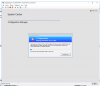
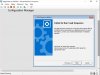
When I try to PXE boot, I get to the SCCm page and I select my task sequence only to get the error below;
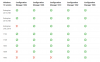
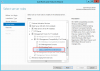
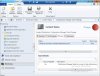
I tried troubleshooting the DP (single DP) and I see the following;
Can someone please suggest a fix which does not rely on reinstalling everything?
I am a relative SCCM noob and I am in the process of creating a SCCM home lab of which the specs are below;
1 4 core 16 gb ram server running 2012 r2 (to be the same as at work) called GagaSccm, domain joined, static IP, IIS installed, DHCP installed and configured
SQL Server Standard 2017 installed with an instance called GagaSccm
Installed SCCM 1802 and updated to 1810 (same version as at work)
Imported 2 windows images Win 10 Pro and Server 2016
ADK and Win Pe installed
2 task sequences created and deployed to "All unknown computers"
So here is my problem;
When I try to PXE boot, I get to the SCCm page and I select my task sequence only to get the error below;
I tried troubleshooting the DP (single DP) and I see the following;
Can someone please suggest a fix which does not rely on reinstalling everything?