
ChaseMcFadden
New Member
- Messages
- 3
- Solutions
- 1
- Reaction score
- 1
- Points
- 3
Hi Everyone,
I have a distribution point, DHCP server, & a physical port used for PXE booting all on the same subnet. When a device attempts to PXE boot I can see the PXE request making it to the distribution point but the client device has an IP of 0.0.0.0 and never it makes it through to the WinPE environment.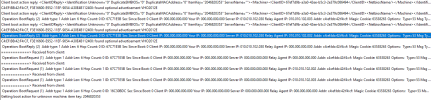
On the DHCP server I can see where the device above was assigned an IP but it appears the IP is not making its way back to the client.

On this subnet is a redundant IP Helper pointing to the DHCP server; could this be the issue? Any thoughts or suggestions are greatly appreciated! I can provide more info if needed! Thank you!
I have a distribution point, DHCP server, & a physical port used for PXE booting all on the same subnet. When a device attempts to PXE boot I can see the PXE request making it to the distribution point but the client device has an IP of 0.0.0.0 and never it makes it through to the WinPE environment.
On the DHCP server I can see where the device above was assigned an IP but it appears the IP is not making its way back to the client.
On this subnet is a redundant IP Helper pointing to the DHCP server; could this be the issue? Any thoughts or suggestions are greatly appreciated! I can provide more info if needed! Thank you!

