Dear all,
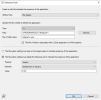
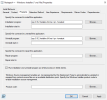
- Does anyone know how I can deploy a new version of Notepad++ and uninstall all older versions (without restart)? Because when i run this commands i install new verision but older version still exist on devices...
- Is it possible to create a query or role to collect all devices with all existing Notepad++ versions, so that I can deploy the new version to them?
I have downloaded the .msi installer of the new version from the official Notepad++ website.
Aleksa,
I haven't seen this particular app have an issue, but when this occurs, we use PowerShell to delete any old versions prior to installing (in the same script).
Our code looks like this:
$RegUninstallPaths = @(
'HKLM:\SOFTWARE\Microsoft\Windows\CurrentVersion\Uninstall',
'HKLM:\SOFTWARE\Wow6432Node\Microsoft\Windows\CurrentVersion\Uninstall'
)
# If we want to keep a specific version
# $VersionsToKeep = @('Java 8 Update 261')
# Find the version(s), if installed
$VersionsToKeep = @('')
Get-CimInstance -ClassName 'Win32_Process' | Where-Object {$_.ExecutablePath -like '*Program Files\Java*'} |
Select-Object @{n='Name';e={$_.Name.Split('.')[0]}} | Stop-Process -Force
Get-process -Name *iexplore* | Stop-Process -Force -ErrorAction SilentlyContinue
# $UninstallSearchFilter = {($_.GetValue('DisplayName') -like '*Java*') -and (($_.GetValue('Publisher') -eq 'Oracle Corporation')) -and ($VersionsToKeep -notcontains $_.GetValue('DisplayName'))}
$UninstallSearchFilter = {($_.GetValue('DisplayName') -like '*Java*') -and (($_.GetValue('Publisher') -eq 'Oracle Corporation'))}
# Uninstall unwanted versions and clean up program files
foreach ($Path in $RegUninstallPaths) {
if (Test-Path $Path) {
Get-ChildItem $Path | Where-Object $UninstallSearchFilter |
foreach {
Start-Process 'C:\Windows\System32\msiexec.exe' "/X$($_.PSChildName) /qn" -Wait
}
}
}
Hope this gets you started on item 1.