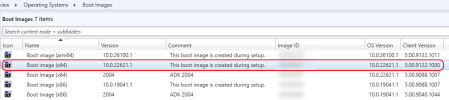
Hello everyone! I have an SCCM server that I upgraded yesterday and have run into problems. I was following the guide here to upgrade from 2409 to 2509, but unfortunately I think I ran into a problem with updated antivirus/EDR software settings (SentinelOne) that might have interfered with the latter part of the upgrade.
1) Ran pre-reqs on the SCCM server and everything passed OK.
2) The SCCM server itself upgraded to 2509 OK as far as I can tell. Console is 5.2509.1036.1200. Site version 5.0.9141.1000
3) Monitoring > Site Status: everything green.
4) Monitoring > Component Status: everything green except for SMS_DISTRIBUTION_MANAGER.
3) My problem is the clients and my distribution points. I know after the main server upgrade that ConfigMgr will proceed with upgrading the DPs and clients.
The DPs all had reports of SentinelOne blocking activity during the upgrade.
In SCCM, under Administration > Overview > Distribution Points, all my DPs are listed as being on 5.00.9141.1000. However, on the DPs themselves, the ConfigMgr control panel no longer shows up.
Reviewing the messages and errors in SMS_DISTRIBUTION_MANAGER, I see the following. (I attached SMS_DISTMGR.log below and removed the actual names of the servers and domain.)
My DPs are all Windows 11 based as it's all I need for our usage.
I made a brand new Windows 11 VM for use as a DP and have been unable to install the SCCM client on it.
And on a new PC, I was unable to push install the updated SCCM client. Checking the ccmsetup.log, I see the following errors:
I've had to rebuild a DP a number of times in the past and have never had a problem until now. And I've never had a problem installing the SCCM client on a workstation before, until now.
On existing workstations, the ConfigMgr control panel still opens up OK, but it is on 5.0.9132.1011, not 5.00.9141.1011 as on the SCCM server itself.
But I can't seem to update exiting clients, nor install the client on PCs that don't already have it.
Hopefully there's someone out there who's faced the same scenario! My mistake for not double-checking the antivirus exclusions more closely, but again, I now have a brand new PC and a brand new DP that won't take the client or settings. It doesn't even have Sentinel on it yet. Thanks in advance for any help you can provide.
1) Ran pre-reqs on the SCCM server and everything passed OK.
2) The SCCM server itself upgraded to 2509 OK as far as I can tell. Console is 5.2509.1036.1200. Site version 5.0.9141.1000
3) Monitoring > Site Status: everything green.
4) Monitoring > Component Status: everything green except for SMS_DISTRIBUTION_MANAGER.
3) My problem is the clients and my distribution points. I know after the main server upgrade that ConfigMgr will proceed with upgrading the DPs and clients.
The DPs all had reports of SentinelOne blocking activity during the upgrade.
In SCCM, under Administration > Overview > Distribution Points, all my DPs are listed as being on 5.00.9141.1000. However, on the DPs themselves, the ConfigMgr control panel no longer shows up.
Reviewing the messages and errors in SMS_DISTRIBUTION_MANAGER, I see the following. (I attached SMS_DISTMGR.log below and removed the actual names of the servers and domain.)
My DPs are all Windows 11 based as it's all I need for our usage.
I made a brand new Windows 11 VM for use as a DP and have been unable to install the SCCM client on it.
And on a new PC, I was unable to push install the updated SCCM client. Checking the ccmsetup.log, I see the following errors:
Failed to read assigned site code from registry. Error code = 0x80070002Unable to load profiler: 0x80070002Failed to connect to machine policy namespace. 0x8004100eFailed to get DP locations as the expected version from MP 'sccmserver.domain.com'. Error 0x87d00215Failed to get DP locations as the expected version from MP 'http://sccmserver.domain.com'. Error 0x87d00215Failed to get client version for sending state messages. Error 0x8004100eMP 'sccmserver.domain.com' didn't return DP locations for client package with the expected version. RetryingI've had to rebuild a DP a number of times in the past and have never had a problem until now. And I've never had a problem installing the SCCM client on a workstation before, until now.
On existing workstations, the ConfigMgr control panel still opens up OK, but it is on 5.0.9132.1011, not 5.00.9141.1011 as on the SCCM server itself.
But I can't seem to update exiting clients, nor install the client on PCs that don't already have it.
Hopefully there's someone out there who's faced the same scenario! My mistake for not double-checking the antivirus exclusions more closely, but again, I now have a brand new PC and a brand new DP that won't take the client or settings. It doesn't even have Sentinel on it yet. Thanks in advance for any help you can provide.