Forums on Intune, SCCM, and Windows 11

Welcome to the forums. Register a free account today to become a member! Once signed in, you'll be able to participate on this site by adding your topics and posts, as well as connect with other members through your own private inbox!

SOLVED Intune Windows 10 KIOSK machine

MJ-Tech

Well-Known Member
Messages
217
Solutions
25
Reaction score
21
Points
18

I have a requirement to create a KIOSK machine (Big monitors for display alone) where we need to run\show only powerpoint slides\MP4 videos\company updates.

As described in the MS forum- https://docs.microsoft.com/en-us/mem/intune/configuration/kiosk-settings-windows , i have enrolled the Win 10 devices, applied Kiosk configurations and enabled Auto logon in the Intune portal.

Output:
Auto Logon
is performed correctly.
After logging on, the Edge is automatically started and opens the specific home page.

But our Expectation is:
Instead of a web browser, we need to play the PPT presentation or run Mp4 file in loop mode.

Tried below options,

  • MP4: Exported PPTX file to video. Added the URL - http:\\xx\test.mp4 in the configuration profile. It is steaming correctly but once the video timeline is over, not looping the video.
  • PPT slides: I Exported PPTX file to Test.ppsx and added it in the configuration profile, http:\\xx\test.ppsx file, not working as expected (Download failed)
Please refer the screenshots below.

Suggestion please?


Configuration profile:
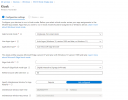
1648570920931.png

Deployment profile:

1648571019621.png
Enabled Auto-Logon:

1648571598932.png
 
The first option "Exported PPTX file to video" should work fine. All you need to figure out is how to loop the video, is that correct?.
 
Yes, correct.
I tried this option as well,

After enable this option "Browse at kiosk", If you open the URL - http:\\server\test.pptx, it tries to download the file instead of playing the slides automatically.

Also due to the KIOSK restrictions, browser (Edge or KIOSK browser) is not allowing any files to download.

For your reference, I have opened the URL - http:\\server\test.pptx in my testing machine. the file is downloaded but not playing the slides.
1648730653850.png
 
Created a simple HTML page and embedded the video with auto resolution.
 
Solution

Forum statistics

Threads
7,135
Messages
27,867
Members
18,154
Latest member
maurie
Back
Top