
HI all,
I'm fairly new to packaging and I am having issues deploying Adobe Pro DC through SCCM as an application. I'm pointing the install to:
SCCM Server Name\SoftwareLibrary\Adobe\AdobeDC_Pro_18_A01\Source\Adobex64\Build\adobex64.msi. The install is using the the silent switch.
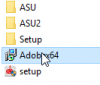
I then do everything as normal, i.e distribute the content, then deploy. Then the install just hangs on installing. The logs files show that the deployment has been picked up, but it never installs. Am I using the correct install path?
Any help would be great.
Thanks
I'm fairly new to packaging and I am having issues deploying Adobe Pro DC through SCCM as an application. I'm pointing the install to:
SCCM Server Name\SoftwareLibrary\Adobe\AdobeDC_Pro_18_A01\Source\Adobex64\Build\adobex64.msi. The install is using the the silent switch.
I then do everything as normal, i.e distribute the content, then deploy. Then the install just hangs on installing. The logs files show that the deployment has been picked up, but it never installs. Am I using the correct install path?
Any help would be great.
Thanks


