Forums on Intune, SCCM, and Windows 11

Welcome to the forums. Register a free account today to become a member! Once signed in, you'll be able to participate on this site by adding your topics and posts, as well as connect with other members through your own private inbox!

SOLVED SCCM Report Issue

MJ-Tech

Well-Known Member
Messages
217
Solutions
25
Reaction score
21
Points
18
Hello All,

Could you please assist with the issue I'm encountering in Report Server Configuration Manager?

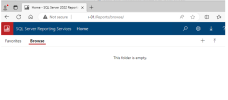
I have configured the Report Server Configuration Manager, and both the web service URL and web portal URL are working fine. However, I can't find any inbuilt queries listed in the portal.

Note: All SQL Server, Reporting Server, and SCCM are hosted on the same server.
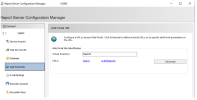
1709725535063.png


Output – Web portal URL:


1709725546242.png


1709725576779.png

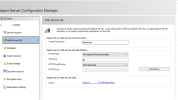
Output – Web service URL:

1709725584547.png


When I check SCCM -> Monitoring -> Reporting, the dashboard shows a different link than what I'm seeing in Report Server Configuration Manager,
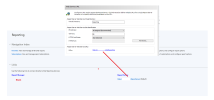
1709725599766.png
When I tried to create a custom report, I encountered an HTTP 404 error. I have reinstalled the Reporting SQL Server and reconfigured both the web portal and service URLs, but the issue still persists,
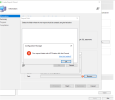
1709725622782.png
 
Hello All,

Could you please assist with the issue I'm encountering in Report Server Configuration Manager?

I have configured the Report Server Configuration Manager, and both the web service URL and web portal URL are working fine. However, I can't find any inbuilt queries listed in the portal.

Note: All SQL Server, Reporting Server, and SCCM are hosted on the same server.

View attachment 5962


Output – Web portal URL:


View attachment 5963


View attachment 5964

Output – Web service URL:

View attachment 5965


When I check SCCM -> Monitoring -> Reporting, the dashboard shows a different link than what I'm seeing in Report Server Configuration Manager,
View attachment 5966
When I tried to create a custom report, I encountered an HTTP 404 error. I have reinstalled the Reporting SQL Server and reconfigured both the web portal and service URLs, but the issue still persists,

View attachment 5967
Did you add it as a reporting point within ConfigMgr? is it showing as healthy in ConfigMgr?
 
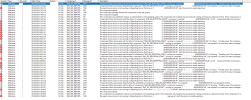
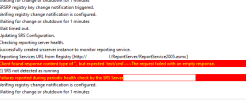
You are correct. This morning, I noticed a few errors in the status message viewer, but they were automatically fixed after restarting the server, and the service is now running. However, the srsrp.log is showing the error: 'The request failed with HTTP status 404: Not Found
1709736901167.png

1709737123640.png
 
After following the steps below, it seems that the issue 'The request failed with HTTP status 404: Not Found' has been resolved,

Option 1: change ReportServerUri parameter at registry key HKEY_LOCAL_MACHINE\SOFTWARE\Microsoft\SMS\SRSRP
Like this: http://server:**/ReportServer
Option 2: remove/install ConfigMgr reporting service point


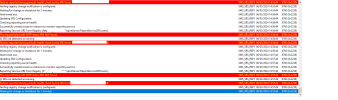
but another issue has appeared in srsrp.log,

1709822144226.png

If anyone experience with this error, please let me know
 
After following the steps below, it seems that the issue 'The request failed with HTTP status 404: Not Found' has been resolved,

Option 1: change ReportServerUri parameter at registry key HKEY_LOCAL_MACHINE\SOFTWARE\Microsoft\SMS\SRSRP
Like this: http://server:**/ReportServer
Option 2: remove/install ConfigMgr reporting service point


but another issue has appeared in srsrp.log,

View attachment 5972

If anyone experience with this error, please let me know
The screenshot clearly shows that the URL is 404. Have you check the URL? have you check the health of SSRS? What troubleshooting have you done?
 
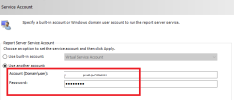
After changing the virtual service account to a domain account, it started working as expected,
1709824334567.png
 
Solution
Back
Top