
Hello,
We're experiencing an issue in our environment post 2111 install - Clients that upgraded to the latest version (5.00.9068.1008) cannot be remote controlled. Clients that did not upgrade (5.00.9058.1047) work fine and will connect.
Below is a sample of a log from a client I tried to connect to... Any help would be greatly appreciated
CmRcService.log
Incoming connection IP address: xx.xx.xx.xx Port: 59928 IsLocationConnection: false CmRcService 1/12/2022 12:02:58 PM 11336 (0x2C48)
Ready to start the security handshake. CmRcService 1/12/2022 12:02:58 PM 11336 (0x2C48)
=== Starting security handshake === CmRcService 1/12/2022 12:02:59 PM 11336 (0x2C48)
=== Security handshake completed [0x10000000] === CmRcService 1/12/2022 12:02:59 PM 11336 (0x2C48)
The viewer is a member of the Local Administrators group who are allowed to use Remote control. CmRcService 1/12/2022 12:02:59 PM 11336 (0x2C48)
The user(domain\user) is authorized for Remote Control CmRcService 1/12/2022 12:02:59 PM 11336 (0x2C48)
Session allowed: Full Control CmRcService 1/12/2022 12:02:59 PM 11336 (0x2C48)
=== Session Info === CmRcService 1/12/2022 12:02:59 PM 11336 (0x2C48)
Authorized viewer user: domain\user CmRcService 1/12/2022 12:02:59 PM 11336 (0x2C48)
Viewer address: xx.xx.xx.xx:59928 CmRcService 1/12/2022 12:02:59 PM 11336 (0x2C48)
Host address: xx.xx.xx.xx:2701 CmRcService 1/12/2022 12:02:59 PM 11336 (0x2C48)
Connection completed (ID = 1) (OnConnectionCompleted) CmRcService 1/12/2022 12:03:00 PM 11284 (0x2C14)
The connection has been terminated (ID = 1). (OnConnectionTerminated) CmRcService 1/12/2022 12:03:28 PM 11284 (0x2C14)
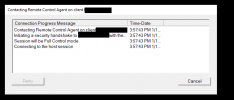
The console hangs here for all of our support staff:
We're experiencing an issue in our environment post 2111 install - Clients that upgraded to the latest version (5.00.9068.1008) cannot be remote controlled. Clients that did not upgrade (5.00.9058.1047) work fine and will connect.
Below is a sample of a log from a client I tried to connect to... Any help would be greatly appreciated
CmRcService.log
Incoming connection IP address: xx.xx.xx.xx Port: 59928 IsLocationConnection: false CmRcService 1/12/2022 12:02:58 PM 11336 (0x2C48)
Ready to start the security handshake. CmRcService 1/12/2022 12:02:58 PM 11336 (0x2C48)
=== Starting security handshake === CmRcService 1/12/2022 12:02:59 PM 11336 (0x2C48)
=== Security handshake completed [0x10000000] === CmRcService 1/12/2022 12:02:59 PM 11336 (0x2C48)
The viewer is a member of the Local Administrators group who are allowed to use Remote control. CmRcService 1/12/2022 12:02:59 PM 11336 (0x2C48)
The user(domain\user) is authorized for Remote Control CmRcService 1/12/2022 12:02:59 PM 11336 (0x2C48)
Session allowed: Full Control CmRcService 1/12/2022 12:02:59 PM 11336 (0x2C48)
=== Session Info === CmRcService 1/12/2022 12:02:59 PM 11336 (0x2C48)
Authorized viewer user: domain\user CmRcService 1/12/2022 12:02:59 PM 11336 (0x2C48)
Viewer address: xx.xx.xx.xx:59928 CmRcService 1/12/2022 12:02:59 PM 11336 (0x2C48)
Host address: xx.xx.xx.xx:2701 CmRcService 1/12/2022 12:02:59 PM 11336 (0x2C48)
Connection completed (ID = 1) (OnConnectionCompleted) CmRcService 1/12/2022 12:03:00 PM 11284 (0x2C14)
The connection has been terminated (ID = 1). (OnConnectionTerminated) CmRcService 1/12/2022 12:03:28 PM 11284 (0x2C14)
The console hangs here for all of our support staff:

