
In the month of January 2026, Microsoft Intune gets PowerShell script installer support for Win32 apps. The Intune updates for January 2026 (service release 2601) should be automatically rolled out to all the tenants across major regions such as APAC, NASA, and EMEA. In the Intune admin center, go to Tenant Administration and select the Tenant Status tab to see the current service release of your tenant. For more information on previously released updates, read the article on Intune monthly updates.
The Intune release for January 2026 includes the following new features and enhancements.
For more details, refer to Microsoft documentation on New Features and changes in Intune January 2026 Update.
The Intune release for January 2026 includes the following new features and enhancements.
1. PowerShell script installer for Win32 apps
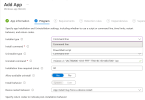
When uploading a Win32 app to Intune, you can upload a PowerShell script as the installer instead of using a traditional command line. This script can be uploaded or edited directly within the Intune admin center's Win32 app configuration, eliminating the need to embed it in the .intunewin file payload. Intune automatically packages the script alongside the app content and executes it in the same context as the app installer. This approach allows for more advanced setup workflows, such as performing prerequisite checks, making configuration changes, or executing post-installation tasks. The installation outcome is displayed in the Intune admin center, based on the return code from the script.