
Stefan_19911
Member
- Messages
- 11
- Reaction score
- 0
- Points
- 1
Dear community
We roled the Agent from Manage Engine out in our company, we want to use it to patch third party product, as inventory tool and for better remote support. It shoulkd replace SCCM in the future.
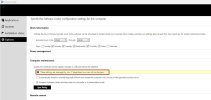
On at least 50% of all PC i know have a yellow warning in Software Center that says that the settings are controlled by the IT (Screenshot) .
When i have this message i can not install any SCCM applications in Software center anymore. It says " i have insufficent permission"
Does any SCCM specialist know what the exact problem is ? Is this because Manage Engine overwrites some SCCM values or does SCCM / Windows somehow recognize that there is an other Software deployment Tool Agent ( MAnage Engine) present ?
We roled the Agent from Manage Engine out in our company, we want to use it to patch third party product, as inventory tool and for better remote support. It shoulkd replace SCCM in the future.
On at least 50% of all PC i know have a yellow warning in Software Center that says that the settings are controlled by the IT (Screenshot) .
When i have this message i can not install any SCCM applications in Software center anymore. It says " i have insufficent permission"
Does any SCCM specialist know what the exact problem is ? Is this because Manage Engine overwrites some SCCM values or does SCCM / Windows somehow recognize that there is an other Software deployment Tool Agent ( MAnage Engine) present ?


