

MJ-Tech
Well-Known Member
- Messages
- 217
- Solutions
- 25
- Reaction score
- 21
- Points
- 18
Dear Support,
All of our Windows 10 devices are managed through SCCM and Microsoft Intune, with shared workloads piloted through Intune. Below are the details from one of our testing devices,
Here is the testing device details,

Co-management configuration settings:
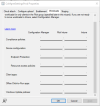
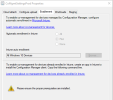
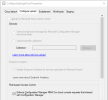
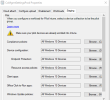
As per the instructions provided at https://www.prajwaldesai.com/upgrade-to-windows-11-22h2-using-intune/, I have created a profile under "Update rings for Windows 10 and later" and manually synced it from the company portal, Intune device console, and Account or Work School > Info > Sync. However, I do not see any prompts or progress regarding the Windows 10 upgrade.
I verified in event viewer, Application and Services Logs > Microsoft > Windows > DeviceManagement-Enterprise-Diagnostics-Provider -> admin, I see there was an error “MDM Session : OMA-DM message failed to be sent. Result: (Unknown Win32 Error code: 0x801901ad)” I checked in google the error message indicates that, the device was unable to sync because of network connection issues so restarted the device to see if this error get rid from the event viewer but I got another issue in event viewer ,
“MDM ConfigurationManager: Command failure status. Configuration Source ID: (E97E6844-D6DA-4626-8E08-2981CAC4E66F), Enrollment Name: (MDMDeviceWithAAD), Provider Name: (Policy), Command Type: (Add: from Replace or Add), CSP URI: (./Device/Vendor/MSFT/Policy/ConfigOperations/ADMXInstall/Receiver/Properties/Policy/FakePolicy/Version), Result: (The system cannot find the file specified.).”
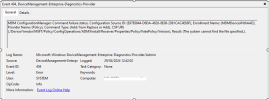
Not sure whether because of this error windows 11 upgrade is failed?
Dsregcmd /status ,
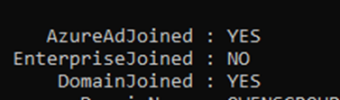
WUfB Policy registry entries and values:
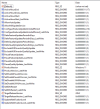
Could you please assist in providing guidance on how to upgrade Windows 10 for hybrid devices?
All of our Windows 10 devices are managed through SCCM and Microsoft Intune, with shared workloads piloted through Intune. Below are the details from one of our testing devices,
Here is the testing device details,
Co-management configuration settings:
As per the instructions provided at https://www.prajwaldesai.com/upgrade-to-windows-11-22h2-using-intune/, I have created a profile under "Update rings for Windows 10 and later" and manually synced it from the company portal, Intune device console, and Account or Work School > Info > Sync. However, I do not see any prompts or progress regarding the Windows 10 upgrade.
I verified in event viewer, Application and Services Logs > Microsoft > Windows > DeviceManagement-Enterprise-Diagnostics-Provider -> admin, I see there was an error “MDM Session : OMA-DM message failed to be sent. Result: (Unknown Win32 Error code: 0x801901ad)” I checked in google the error message indicates that, the device was unable to sync because of network connection issues so restarted the device to see if this error get rid from the event viewer but I got another issue in event viewer ,
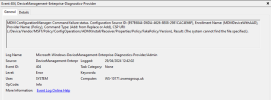
“MDM ConfigurationManager: Command failure status. Configuration Source ID: (E97E6844-D6DA-4626-8E08-2981CAC4E66F), Enrollment Name: (MDMDeviceWithAAD), Provider Name: (Policy), Command Type: (Add: from Replace or Add), CSP URI: (./Device/Vendor/MSFT/Policy/ConfigOperations/ADMXInstall/Receiver/Properties/Policy/FakePolicy/Version), Result: (The system cannot find the file specified.).”
Not sure whether because of this error windows 11 upgrade is failed?
Dsregcmd /status ,
WUfB Policy registry entries and values:
Could you please assist in providing guidance on how to upgrade Windows 10 for hybrid devices?
Attachments
Last edited:


