Forums on Intune, SCCM, and Windows 11

Welcome to the forums. Register a free account today to become a member! Once signed in, you'll be able to participate on this site by adding your topics and posts, as well as connect with other members through your own private inbox!

SOLVED Unable to open SCCM reports using the Web interface although Power BI reports work fine

Status
Not open for further replies.

Ahmed Hassan

Member
Messages
16
Solutions
1
Reaction score
0
Points
1
I am using PBIRS and can open any report from the console, but when I try to open the reports from the web interface I always get "Sys.WebForms.PageRequestManagerServerErrorException: An unknown error occurred while processing the request on the server. The status code returned from the server was: 503"
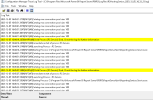
I have removed everything and installed the reporting service from scratch. I tried to create a new reporting database but with no luck. RSHosting Service.log.png
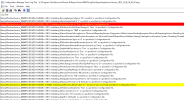
Reporting Services Service.log.png
 
Solution
I have done the removal PBRS and deleted its db, rebooted, and reinstalled many times with no luck.
currently, the problem has been solved and the solution was to install the latest cumulative update for the .Net framework. after the installation of the update and restarting the server, all reports working again.
Many thanks for your support.
Neither of those screenshots are showing errors.

It doesn't make sense that report (SSRS) work within the console but not within a browsers. As the console gets both the data and RDLs from the PBRS website.
 
I have noticed that the below error appears whenever I try to generate a report from the web. it seems the .Net framework component gets corrupted. I have tried the .Net repair tool with no luck.

Application: ReportingServicesService.exe
Framework Version: v4.0.30319
Description: The process was terminated due to an internal error in the .NET Runtime at IP 00007FFFA616BBC9 (00007FFFA6140000) with exit code 80131506.
 
I have noticed that the below error appears whenever I try to generate a report from the web. it seems the .Net framework component gets corrupted. I have tried the .Net repair tool with no luck.

Application: ReportingServicesService.exe
Framework Version: v4.0.30319
Description: The process was terminated due to an internal error in the .NET Runtime at IP 00007FFFA616BBC9 (00007FFFA6140000) with exit code 80131506.
This sounds like PBRS is corrupted, I would remove PBRS and delete it's db, reboot and reinstall.
 
I have done the removal PBRS and deleted its db, rebooted, and reinstalled many times with no luck.
currently, the problem has been solved and the solution was to install the latest cumulative update for the .Net framework. after the installation of the update and restarting the server, all reports working again.
Many thanks for your support.
 
Solution
Status
Not open for further replies.
Back
Top