Forums on Intune, SCCM, and Windows 11

Welcome to the forums. Register a free account today to become a member! Once signed in, you'll be able to participate on this site by adding your topics and posts, as well as connect with other members through your own private inbox!

PENDING Unable to download SCCM servicing updates manifest.cab cant be empty

  • Thread starter Thread starter Sys-Man
  • Start date Start date
  • Replies Replies 22
  • Views Views 14K

Sys-Man

Member
Messages
13
Reaction score
0
Points
1
Hello,
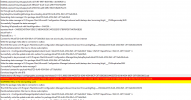
For some reason I am having an issue in downloading either version 2107 or 2111 of config manager form the updates and servicing page. The status reports that the download has started but if I check the dmpdownloader log if have the following errors.
1643362845220.png

I successfully managed to download 2103 and all its hotfixes yesterday.
I have tried the steps here - https://www.prajwaldesai.com/fix-sccm-update-stuck-downloading-state/ - the versions went from the updates and servicing page, then appeared a few hours later but will still not download.
I have tried all sorts of firewall and internet filtering rules, made sure the server is connecting with TLS.12. tried with HTTPS being decrypted and inspected and without.
I have followed some instructions about installing some missing cipher suites.
All over the above has not worked.

For info, currently running version 2103 site version 5.0.9049.1000 with all hotfixes. Server 2019
If anyone has any pointers or solutions that would be most appreciated.

Thanks
 
Can you copy the link that is in the log file and paste in the browser and check if the .cab file downloads?
 
Hello Prajwal,

Thank you for replying.

Yes on the server I can browse to the url and it asks me if I want to download the file.

1643370977046.png
Thanks
 
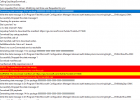
I have now got some more from the log file with the following error. I had the error previously before I did the reset link I posted above, which is what led me down the TLS and cipher keys route.
Browsing to the link in the log I get a "This site is not secure" warning 1643371211705.pngThanks
 
I think the process has not come to an end and this is the final error I get
1643378604727.png

I can browse to the url required on my normal workstation fine but just not on the server.
 
Hi all,

Just seeing if anyone can offer anymore assistance with this.

I've updated the OS to server 2022 now and that hasn't fixed it.
Here are the errors
Download manifest.cab SMS_DMP_DOWNLOADER 12/07/2022 11:44:20 9932 (0x26CC) Redirected to URL https://configmgrbits.azureedge.net/adminuicontent/ConfigMgr.AdminUIContent.cab SMS_DMP_DOWNLOADER 12/07/2022 11:44:20 9932 (0x26CC) Got fwdlink and recreating the httprequest/response SMS_DMP_DOWNLOADER 12/07/2022 11:44:20 9932 (0x26CC) ERROR: Failed to download Admin UI content payload with exception: The underlying connection was closed: Could not establish trust relationship for the SSL/TLS secure channel. SMS_DMP_DOWNLOADER 12/07/2022 11:44:20 9932 (0x26CC) Failed to call AdminUIContentDownload. error = Error -2146233079 SMS_DMP_DOWNLOADER 12/07/2022 11:44:20 9932 (0x26CC)
ERROR: GetSccmConnectedServiceUrl Exception System.Net.WebException: The underlying connection was closed: Could not establish trust relationship for the SSL/TLS secure channel. ---> System.Security.Authentication.AuthenticationException: The remote certificate is invalid according to the validation procedure.~~ at System.Net.Security.SslState.StartSendAuthResetSignal(ProtocolToken message, AsyncProtocolRequest asyncRequest, Exception exception)~~ at System.Net.Security.SslState.CheckCompletionBeforeNextReceive(ProtocolToken message, AsyncProtocolRequest asyncRequest)~~ at System.Net.Security.SslState.ProcessReceivedBlob(Byte[] buffer, Int32 count, AsyncProtocolRequest asyncRequest)~~ at System.Net.Security.SslState.StartReceiveBlob(Byte[] buffer, AsyncProtocolRequest asyncRequest)~~ at System.Net.Security.SslState.CheckCompletionBeforeNextReceive(ProtocolToken message, AsyncProtocolRequest asyncRequest)~~ at System.Net.Security.SslState.ProcessReceivedBlob(Byte[] buffer, Int32 count, AsyncProtocolRequest asyncRequest)~~ at System.Net.Security.SslState.StartReceiveBlob(Byte[] buffer, AsyncProtocolRequest asyncRequest)~~ at System.Net.Security.SslState.CheckCompletionBeforeNextReceive(ProtocolToken message, AsyncProtocolRequest asyncRequest)~~ at System.Net.Security.SslState.ProcessReceivedBlob(Byte[] buffer, Int32 count, AsyncProtocolRequest asyncRequest)~~ at System.Net.Security.SslState.StartReceiveBlob(Byte[] buffer, AsyncProtocolRequest asyncRequest)~~ at System.Net.Security.SslState.CheckCompletionBeforeNextReceive(ProtocolToken message, AsyncProtocolRequest asyncRequest)~~ at System.Net.Security.SslState.ProcessReceivedBlob(Byte[] buffer, Int32 count, AsyncProtocolRequest asyncRequest)~~ at System.Net.Security.SslState.StartReceiveBlob(Byte[] buffer, AsyncProtocolRequest asyncRequest)~~ at System.Net.Security.SslState.CheckCompletionBeforeNextReceive(ProtocolToken message, AsyncProtocolRequest asyncRequest)~~ at System.Net.Security.SslState.ProcessReceivedBlob(Byte[] buffer, Int32 count, AsyncProtocolRequest asyncRequest)~~ at System.Net.Security.SslState.StartReceiveBlob(Byte[] buffer, AsyncProtocolRequest asyncRequest)~~ at System.Net.Security.SslState.CheckCompletionBeforeNextReceive(ProtocolToken message, AsyncProtocolRequest asyncRequest)~~ at System.Net.Security.SslState.ForceAuthentication(Boolean receiveFirst, Byte[] buffer, AsyncProtocolRequest asyncRequest, Boolean renegotiation)~~ at System.Net.Security.SslState.ProcessAuthentication(LazyAsyncResult lazyResult)~~ at System.Threading.ExecutionContext.RunInternal(ExecutionContext executionContext, ContextCallback callback, Object state, Boolean preserveSyncCtx)~~ at System.Threading.ExecutionContext.Run(ExecutionContext executionContext, ContextCallback callback, Object state, Boolean preserveSyncCtx)~~ at System.Threading.ExecutionContext.Run(ExecutionContext executionContext, ContextCallback callback, Object state)~~ at System.Net.Tls SMS_DMP_DOWNLOADER 12/07/2022 11:12:31 796 (0x031C)

I have tried all sorts of things, from firewall rules, Baltimore certificates, web filtering exceptions and loads of things.

Any help someone can give will be very much appreicated.

Thanks
 
I have now got some more from the log file with the following error. I had the error previously before I did the reset link I posted above, which is what led me down the TLS and cipher keys route.
Browsing to the link in the log I get a "This site is not secure" warning View attachment 4229Thanks
This one is a warning and not an error. Ignore it.
 
Hi all,

Just seeing if anyone can offer anymore assistance with this.

I've updated the OS to server 2022 now and that hasn't fixed it.
Here are the errors
Download manifest.cab SMS_DMP_DOWNLOADER 12/07/2022 11:44:20 9932 (0x26CC) Redirected to URL https://configmgrbits.azureedge.net/adminuicontent/ConfigMgr.AdminUIContent.cab SMS_DMP_DOWNLOADER 12/07/2022 11:44:20 9932 (0x26CC) Got fwdlink and recreating the httprequest/response SMS_DMP_DOWNLOADER 12/07/2022 11:44:20 9932 (0x26CC) ERROR: Failed to download Admin UI content payload with exception: The underlying connection was closed: Could not establish trust relationship for the SSL/TLS secure channel. SMS_DMP_DOWNLOADER 12/07/2022 11:44:20 9932 (0x26CC) Failed to call AdminUIContentDownload. error = Error -2146233079 SMS_DMP_DOWNLOADER 12/07/2022 11:44:20 9932 (0x26CC)
ERROR: GetSccmConnectedServiceUrl Exception System.Net.WebException: The underlying connection was closed: Could not establish trust relationship for the SSL/TLS secure channel. ---> System.Security.Authentication.AuthenticationException: The remote certificate is invalid according to the validation procedure.~~ at System.Net.Security.SslState.StartSendAuthResetSignal(ProtocolToken message, AsyncProtocolRequest asyncRequest, Exception exception)~~ at System.Net.Security.SslState.CheckCompletionBeforeNextReceive(ProtocolToken message, AsyncProtocolRequest asyncRequest)~~ at System.Net.Security.SslState.ProcessReceivedBlob(Byte[] buffer, Int32 count, AsyncProtocolRequest asyncRequest)~~ at System.Net.Security.SslState.StartReceiveBlob(Byte[] buffer, AsyncProtocolRequest asyncRequest)~~ at System.Net.Security.SslState.CheckCompletionBeforeNextReceive(ProtocolToken message, AsyncProtocolRequest asyncRequest)~~ at System.Net.Security.SslState.ProcessReceivedBlob(Byte[] buffer, Int32 count, AsyncProtocolRequest asyncRequest)~~ at System.Net.Security.SslState.StartReceiveBlob(Byte[] buffer, AsyncProtocolRequest asyncRequest)~~ at System.Net.Security.SslState.CheckCompletionBeforeNextReceive(ProtocolToken message, AsyncProtocolRequest asyncRequest)~~ at System.Net.Security.SslState.ProcessReceivedBlob(Byte[] buffer, Int32 count, AsyncProtocolRequest asyncRequest)~~ at System.Net.Security.SslState.StartReceiveBlob(Byte[] buffer, AsyncProtocolRequest asyncRequest)~~ at System.Net.Security.SslState.CheckCompletionBeforeNextReceive(ProtocolToken message, AsyncProtocolRequest asyncRequest)~~ at System.Net.Security.SslState.ProcessReceivedBlob(Byte[] buffer, Int32 count, AsyncProtocolRequest asyncRequest)~~ at System.Net.Security.SslState.StartReceiveBlob(Byte[] buffer, AsyncProtocolRequest asyncRequest)~~ at System.Net.Security.SslState.CheckCompletionBeforeNextReceive(ProtocolToken message, AsyncProtocolRequest asyncRequest)~~ at System.Net.Security.SslState.ProcessReceivedBlob(Byte[] buffer, Int32 count, AsyncProtocolRequest asyncRequest)~~ at System.Net.Security.SslState.StartReceiveBlob(Byte[] buffer, AsyncProtocolRequest asyncRequest)~~ at System.Net.Security.SslState.CheckCompletionBeforeNextReceive(ProtocolToken message, AsyncProtocolRequest asyncRequest)~~ at System.Net.Security.SslState.ForceAuthentication(Boolean receiveFirst, Byte[] buffer, AsyncProtocolRequest asyncRequest, Boolean renegotiation)~~ at System.Net.Security.SslState.ProcessAuthentication(LazyAsyncResult lazyResult)~~ at System.Threading.ExecutionContext.RunInternal(ExecutionContext executionContext, ContextCallback callback, Object state, Boolean preserveSyncCtx)~~ at System.Threading.ExecutionContext.Run(ExecutionContext executionContext, ContextCallback callback, Object state, Boolean preserveSyncCtx)~~ at System.Threading.ExecutionContext.Run(ExecutionContext executionContext, ContextCallback callback, Object state)~~ at System.Net.Tls SMS_DMP_DOWNLOADER 12/07/2022 11:12:31 796 (0x031C)

I have tried all sorts of things, from firewall rules, Baltimore certificates, web filtering exceptions and loads of things.

Any help someone can give will be very much appreicated.

Thanks
If no changes were made to firewall and if the previous updates worked fine, try restarting the server once.
 
HI,

Thanks for the replies,
I have manually downloaded the manifest cab, that worked, its another file its getting stuck on.
Redirected to URL https://configmgrbits.azureedge.net/adminuicontent/ConfigMgr.AdminUIContent.cab SMS_DMP_DOWNLOADER 18/07/2022 11:20:30 28044 (0x6D8C) Got fwdlink and recreating the httprequest/response SMS_DMP_DOWNLOADER 18/07/2022 11:20:30 28044 (0x6D8C) STATMSG: ID=9701 SEV=E LEV=M SOURCE="SMS Server" COMP="SMS_DMP_DOWNLOADER" SYS=KRUSTY.HELES.PLYMOUTH.SCH.UK SITE=HLS PID=3392 TID=28044 GMTDATE=Mon Jul 18 10:20:36.597 2022 ISTR0="" ISTR1="" ISTR2="" ISTR3="" ISTR4="" ISTR5="" ISTR6="" ISTR7="" ISTR8="" ISTR9="" NUMATTRS=0 LE=0X0 SMS_DMP_DOWNLOADER 18/07/2022 11:20:36 28044 (0x6D8C) ERROR: Failed to download Admin UI content payload with exception: The underlying connection was closed: Could not establish trust relationship for the SSL/TLS secure channel. SMS_DMP_DOWNLOADER 18/07/2022 11:20:36 28044 (0x6D8C) Failed to call AdminUIContentDownload. error = Error -2146233079 SMS_DMP_DOWNLOADER 18/07/2022 11:20:36 28044 (0x6D8C)

If I visit the url in internet explorer it gives me a this site is not secure message with the option to continue under the more information. Strange thing is if I visit this url or another server it works fine. Both are running on the same internet connection, through the same firewall, both running on the same virtual host, both built at the same time and up until recently were exactly the same os with the same updates installed (this problem started before I update the OS)

It seems the issue have progressed a bit now and as well as not being able to download SCCM servicing update, I have just noticed that July's software updates have not appeared in the all software updates list as well (June's did and this issue started before then
Thanks.
 
Again just for 100% clarity, you download the cab file use the local system account?
Next, if it works on one server and not another based on what you said, you are likely missing SU that add more root certs to your server.
 
Hi Gareth,
I can download the cab files by copying and pasting the address into Internet explorer. How ever I don't have an issue with the manifest.cab file now, its the one recently posted. You like talks about downloading a software update manually, I am trying to download the service update for SCCM.

I would have thought something to do with the certs as well but all servers were on the same updates, so I don't know why the would have been different?
Really cant see how I'm going to get round this one without a new server?
 
Hi Gareth,
I can download the cab files by copying and pasting the address into Internet explorer. How ever I don't have an issue with the manifest.cab file now, its the one recently posted. You like talks about downloading a software update manually, I am trying to download the service update for SCCM.

I would have thought something to do with the certs as well but all servers were on the same updates, so I don't know why the would have been different?
Really cant see how I'm going to get round this one without a new server?
Contact me using my site contact form and I will take a look at it when I am free.
 
Hi Gareth,
I can download the cab files by copying and pasting the address into Internet explorer. How ever I don't have an issue with the manifest.cab file now, its the one recently posted. You like talks about downloading a software update manually, I am trying to download the service update for SCCM.

I would have thought something to do with the certs as well but all servers were on the same updates, so I don't know why the would have been different?
Really cant see how I'm going to get round this one without a new server?
It is important to know if you use local system account because a Proxy server can get in the way. So did you launch IE with the local system account? aka use psexec to open a cmd then open IE from the CMD and then download the cab file.
 
Hi Gareth,

So I launched i.e. with psexec using -s and -i - Same result when trying to download - https://configmgrbits.azureedge.net/adminuicontent/ConfigMgr.AdminUIContent.cab - a message saying this site is not secure.

All our servers go through the same connection, so one couldn't have a proxy server while another one did.
Is there a way of downloading the config manage update manually?
Thanks
 
so in the browser when you look at the certificate for the site. What issues does it show? aka is the cert valid? What OS version are you use? Have you gone online and download ALL SU for this server?
 
The error the page gives is
This site isn’t secure
Your PC doesn’t trust this website’s security certificate.
Error Code: DLG_FLAGS_INVALID_CA
But its nothing to do with the actual page as a) its a Microsoft update service and b) it works on ever other server
I'm guessing like you said I'm missing some kind of certs somewhere.

I've tried windows update manually but it wont connect, it says you device is missing important security and quality fixes but then just says it can connect to the service, which is probably due to the same issue that config manager is having......

Thanks
 
Hi Gareth,

yeah I have tried all of those things. reset all internet settings to default etc. Just so confusing why its working on one and not another.

Thanks
 
Ive done a full VM restore back to 2019 - Server is now downloading software updates for clients, but still not servicing updates for SCCM :(
 
Back
Top