Hello,
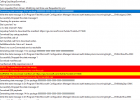
For some reason I am having an issue in downloading either version 2107 or 2111 of config manager form the updates and servicing page. The status reports that the download has started but if I check the dmpdownloader log if have the following errors.
I successfully managed to download 2103 and all its hotfixes yesterday.
I have tried the steps here - https://www.prajwaldesai.com/fix-sccm-update-stuck-downloading-state/ - the versions went from the updates and servicing page, then appeared a few hours later but will still not download.
I have tried all sorts of firewall and internet filtering rules, made sure the server is connecting with TLS.12. tried with HTTPS being decrypted and inspected and without.
I have followed some instructions about installing some missing cipher suites.
All over the above has not worked.
For info, currently running version 2103 site version 5.0.9049.1000 with all hotfixes. Server 2019
If anyone has any pointers or solutions that would be most appreciated.
Thanks
For some reason I am having an issue in downloading either version 2107 or 2111 of config manager form the updates and servicing page. The status reports that the download has started but if I check the dmpdownloader log if have the following errors.
I successfully managed to download 2103 and all its hotfixes yesterday.
I have tried the steps here - https://www.prajwaldesai.com/fix-sccm-update-stuck-downloading-state/ - the versions went from the updates and servicing page, then appeared a few hours later but will still not download.
I have tried all sorts of firewall and internet filtering rules, made sure the server is connecting with TLS.12. tried with HTTPS being decrypted and inspected and without.
I have followed some instructions about installing some missing cipher suites.
All over the above has not worked.
For info, currently running version 2103 site version 5.0.9049.1000 with all hotfixes. Server 2019
If anyone has any pointers or solutions that would be most appreciated.
Thanks