Hi there
I'm on SCCM 2016 1806 with Hotfix from 26.09.2018 installed.
I have a task sequence where I deploy a fresh clean Windows 10 Image (directly from the original ISO File). I use an unattend.xml to skip OOBE and to set my keyboard layout. I want to install several applications within the task sequence.
I have to test computers, a Intel Nuc and a Lenove Carbon X1. On the intel nuc the TS works perfectly fine, installs all applications and everything else. On the Lenovo Notebook the TS gets stuck at an application...
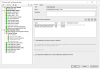
This is how my TS looks:
How can i troubleshoot this? Or are there any suggestions what I could try?
Thanks for your answers
Janis
I'm on SCCM 2016 1806 with Hotfix from 26.09.2018 installed.
I have a task sequence where I deploy a fresh clean Windows 10 Image (directly from the original ISO File). I use an unattend.xml to skip OOBE and to set my keyboard layout. I want to install several applications within the task sequence.
I have to test computers, a Intel Nuc and a Lenove Carbon X1. On the intel nuc the TS works perfectly fine, installs all applications and everything else. On the Lenovo Notebook the TS gets stuck at an application...
This is how my TS looks:
How can i troubleshoot this? Or are there any suggestions what I could try?
Thanks for your answers
Janis