TecnicoOne
New Member
- Messages
- 4
- Reaction score
- 0
- Points
- 1
Good Morning,
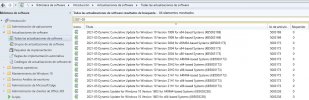
I have a problem apparently with System Center, which after having synchronized all the updates, it shows me everything as (0) in required. This causes the ADR (Automatic Deployment Rules) not to detect what each Windows 10 computer or client really needs.
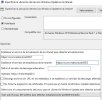
I can deploy other updates from Windows Server 2019, Office, Defender Definitions, but not from Windows 10. To investigate a bit since I am new to this world of System Center, I opened the Wsus console and verified that the computers I have or clients, if they appear with necessary or required updates and for which I do not understand why SCCM does not detect that the customers need such updates.


To provide some more information, I have my laboratory set up under Windows Server 2019 data Center as well as the SQL database and all of it virtualized in Hyper-V and with PKI infrastructure.
I can deploy applications, operating systems, etc, but the patches of Windows 10, I do not get it.
If someone has or has had this same problem, please give me some light or help.
Thank you
I have a problem apparently with System Center, which after having synchronized all the updates, it shows me everything as (0) in required. This causes the ADR (Automatic Deployment Rules) not to detect what each Windows 10 computer or client really needs.
I can deploy other updates from Windows Server 2019, Office, Defender Definitions, but not from Windows 10. To investigate a bit since I am new to this world of System Center, I opened the Wsus console and verified that the computers I have or clients, if they appear with necessary or required updates and for which I do not understand why SCCM does not detect that the customers need such updates.
To provide some more information, I have my laboratory set up under Windows Server 2019 data Center as well as the SQL database and all of it virtualized in Hyper-V and with PKI infrastructure.
I can deploy applications, operating systems, etc, but the patches of Windows 10, I do not get it.
If someone has or has had this same problem, please give me some light or help.
Thank you