Forums on Intune, SCCM, and Windows 11

Welcome to the forums. Register a free account today to become a member! Once signed in, you'll be able to participate on this site by adding your topics and posts, as well as connect with other members through your own private inbox!

PENDING *Solved* Domain Join during OSD failing for certain models

  • Thread starter Thread starter Omegis
  • Start date Start date
  • Replies Replies 4
  • Views Views 24K

Omegis

New Member
Messages
4
Reaction score
0
Points
1
Having an issue with only certain hardware models not joining the domain during OSD. We have one task sequence for all models that installs drivers via wmi query.

Thing is, the apply drivers section is after the apply network settings so I can't figure out what else is different among them other than drivers, which shouldn't be an issue due to the location of steps.

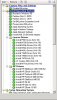
Does anyone have any suggestions or advice? Also, what should word/command should I be looking for in the smsts.log for the domain join function? I've attached a picture of the task sequence steps. Thanks for any help!!
 

Attachments

  • Task Sequence.PNG
    Task Sequence.PNG
    72.6 KB · Views: 164
Getting the following in the netsetup.log

03/26/2019 09:44:52:438 -----------------------------------------------------------------
03/26/2019 09:44:52:438 NetpDoDomainJoin
03/26/2019 09:44:52:438 NetpDoDomainJoin: using new computer names
03/26/2019 09:44:52:438 NetpDoDomainJoin: NetpGetNewMachineName returned 0x0
03/26/2019 09:44:52:438 NetpMachineValidToJoin: 'MININT-6LSMNQQ'
03/26/2019 09:44:52:438 NetpMachineValidToJoin: status: 0x0
03/26/2019 09:44:52:438 NetpJoinWorkgroup: joining computer 'MININT-6LSMNQQ' to workgroup 'WORKGROUP'
03/26/2019 09:44:52:438 NetpValidateName: checking to see if 'WORKGROUP' is valid as type 2 name
03/26/2019 09:44:52:438 NetpCheckNetBiosNameNotInUse for 'WORKGROUP' [ Workgroup as MACHINE] returned 0x0
03/26/2019 09:44:52:438 NetpValidateName: name 'WORKGROUP' is valid for type 2
03/26/2019 09:44:52:438 NetpJoinWorkgroup: status: 0x0
03/26/2019 09:44:52:438 NetpDoDomainJoin: status: 0x0
 
Here is a snip of the smsts.log pertaining to network settings, the no adapters found message is also present on computers that join successfully during OSD.

==============================[ OSDNetSettings.exe ]=========================== OSDNetSettings 3/26/2019 10:02:37 AM 800 (0x0320)
Command line: "osdnetsettings.exe" configure OSDNetSettings 3/26/2019 10:02:37 AM 800 (0x0320)
Setting %SystemRoot% to "C:\WINDOWS" OSDNetSettings 3/26/2019 10:02:37 AM 800 (0x0320)
Loading existing answer file "C:\WINDOWS\panther\unattend\unattend.xml" OSDNetSettings 3/26/2019 10:02:37 AM 800 (0x0320)
Configuring global network settings OSDNetSettings 3/26/2019 10:02:37 AM 800 (0x0320)
Join type: 0 OSDNetSettings 3/26/2019 10:02:37 AM 800 (0x0320)
Joining domain: ***.domain.com OSDNetSettings 3/26/2019 10:02:37 AM 800 (0x0320)
Join OU: LDAP://OU=* Computers,OU=*-,OU=*,DC=,DC=*,DC=com OSDNetSettings 3/26/2019 10:02:37 AM 800 (0x0320)
Getting namespace "Microsoft-Windows-UnattendedJoin" for architecture "amd64" OSDNetSettings 3/26/2019 10:02:37 AM 800 (0x0320)
DNS domain: OSDNetSettings 3/26/2019 10:02:37 AM 800 (0x0320)
DNS domain search order: OSDNetSettings 3/26/2019 10:02:37 AM 800 (0x0320)
IP filter sec enabled: false OSDNetSettings 3/26/2019 10:02:37 AM 800 (0x0320)
No adapters found in environment. Performing global configuration only. OSDNetSettings 3/26/2019 10:02:37 AM 800 (0x0320)
Writing configuration information to C:\WINDOWS\panther\unattend\unattend.xml OSDNetSettings 3/26/2019 10:02:37 AM 800 (0x0320)
Successfully saved configuration information to C:\WINDOWS\panther\unattend\unattend.xml OSDNetSettings 3/26/2019 10:02:37 AM 800 (0x0320)
Configuring "OSDNetSettings.exe finalize" to run on first boot OSDNetSettings 3/26/2019 10:02:37 AM 800 (0x0320)
OSDNetSettings finished: 0x00000000 OSDNetSettings 3/26/2019 10:02:37 AM 800 (0x0320)
Process completed with exit code 0 TSManager 3/26/2019 10:02:37 AM 1036 (0x040C)
!--------------------------------------------------------------------------------------------! TSManager 3/26/2019 10:02:37 AM 1036 (0x040C)
Successfully completed the action (Apply Network Settings) with the exit win32 code 0 TSManager 3/26/2019 10:02:37 AM 1036 (0x040C)
 
Can you upload screenshot of Apply Windows Settings step and Apply network settings.
Thank you for the reply Prajwal, and all of your work on the site!

I seem to have gotten the issue fixed, decided to disable "Apply Network Settings" and used "Join Work Group or Domain" placed right after "Setup Windows and Config Manager"

Here's a screen shot of the task sequence now. I believe it had something to do with NIC delay within WinPE for certain models.

Per this MS post(https://blogs.technet.microsoft.com/inside_osd/2007/06/22/joining-a-domain-during-an-os-deployment)

Apply Network Settings(osdsettings.exe) performs the join within WinPE. Where as Join Workgroup or Domain (osdjoin.exe) after the "Setup Windows and configuration manager" step does this within the actual windows operating system.

There is an advantage with Join Work Group or Domain vs Apply Network Settings in terms of logging.

Join actually logs failures and errors to task sequence manager, Apply Network settings does not. All Apply Network Settings cares about is writing to the unattend.xml and reports success even if join fails
 

Attachments

  • task sequence.PNG
    task sequence.PNG
    44.6 KB · Views: 420

Forum statistics

Threads
7,165
Messages
27,965
Members
18,264
Latest member
markmumford

Trending content

Back
Top