
crossuranium
New Member
- Messages
- 2
- Reaction score
- 0
- Points
- 1
Hi,
I recently set up Software Center applications for employees in a specific User Collection. In our environment, we prefer technicians to install the applications rather than users, so we do it this way. We have two physical locations and two Distribution Points / Boundary groups for each. Right now Software Center only displays apps on one of the locations, the primary one. Again, all apps are deployed to our All Technicians User Collection so that we can remote into any PC and the apps are available to install whenever. But it only displays the apps on computers that are set to the primary distribution point. I am trying to fix this issue because we need the other technicians on the other location to be able to use Software Center. It also seems like it's not making the proper connection because the order of the tabs, Applications, Operating Systems, and Installation status, isn't the same on both of them. Any ideas?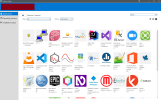
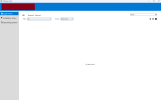
I recently set up Software Center applications for employees in a specific User Collection. In our environment, we prefer technicians to install the applications rather than users, so we do it this way. We have two physical locations and two Distribution Points / Boundary groups for each. Right now Software Center only displays apps on one of the locations, the primary one. Again, all apps are deployed to our All Technicians User Collection so that we can remote into any PC and the apps are available to install whenever. But it only displays the apps on computers that are set to the primary distribution point. I am trying to fix this issue because we need the other technicians on the other location to be able to use Software Center. It also seems like it's not making the proper connection because the order of the tabs, Applications, Operating Systems, and Installation status, isn't the same on both of them. Any ideas?


