Forums on Intune, SCCM, and Windows 11

Welcome to the forums. Register a free account today to become a member! Once signed in, you'll be able to participate on this site by adding your topics and posts, as well as connect with other members through your own private inbox!

SOLVED Server 2025 doesn't show any updates

Burnacid

Member
Messages
5
Solutions
1
Reaction score
2
Points
3
Hi all

I'm having an issue updating any Server 2025 servers in our environment with SCCM.
We have a CAS setup with a few sites. The site containing server 2025 has a SUP on Server 2025. Most of the other servers in the SCCM environment are still Server 2016 (we are in the process of getting them upgraded)

Product Microsoft Server Operating System-24H2 is enabled
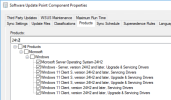
1764915199107.png
WSUS of the SUP shows it has the data for Server 2025 updates
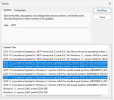
1764915297106.png
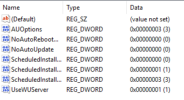
The endpoints in question have updates managed through SCCM enabled in the client settings. And they show the regkeys for WSUS pointing to the correct SUP.
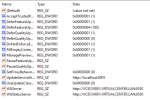
1764915444767.png1764915463479.png

Deployments of the devices show windows updates are deployed to the machine
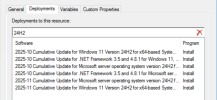
1764915563533.png

On the system though I do not see any Server 2025 updates. Though SQL updates that are available for this server are visible.
get-wmiobject -query "SELECT * FROM CCM_UpdateStatus" -namespace "root\ccm\SoftwareUpdates\UpdatesStore" | sort-object -Property Title | SELECT title, UniqueID, Status

title UniqueID Status
----- -------- ------
Configuration Manager Client (5.00.9135.1006) 87b227c0-da80-48c3-97de-c9c528f73a2d Installed
MSXML 6.0 RTM Security Update (925673) c9661380-d343-4079-bb30-e526cd343ece Installed
MSXML 6.0 RTM Security Update (925673) 07609d43-d518-4e77-856e-d1b316d1b8a8 Installed
Security Update for SQL Server 2022 RTM CU (KB5068406) d7175ee4-2406-4a55-9e35-51e18452eadc Installed
Security Update for SQL Server 2022 RTM CU (KB5068406) 48c38250-dab5-4a0e-aefc-4d1664a69ec5 Installed
SQL Server 2022 RTM Cumulative Update (CU) 22 KB5068450 a8974d42-c982-48b4-9c67-1b48e226b811 Installed
SQL Server 2022 RTM Cumulative Update (CU) 22 KB5068450 9295d92c-7c24-4cb1-a342-caf817fb2559 Installed
SQL Server Management Studio 20.2.1 caaf8db9-1079-47b8-9d69-b48a5c2a0629 Missing
SQL Server Management Studio 20.2.1 4a052f60-2343-460d-894c-1b2c10fc30c2 Missing

This example is of a server that runs on 26100.4061 (CU of May 2025)
I've also tested to update servers by hand to October 2025 and hope the November update would be availble after. That wasn't the case.

I've already reinstalled WSUS and the SUP. I'm running out of ideas.
We are on CM 2503 + KB33177653. Anyone any clue what I can try more?
 
Solution
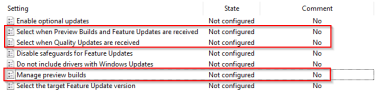
Might have found a possible fix. These 3 settings seem to throw stuff into a not working state when they are set through GPO

1765291371474.png

They used to be Enabled and Manage preview builds was Disabled. I've set them to Not configured. 1 of my test machines now is able to see updates. So I'll investigate the rest. I'll report back with the results in due time
Have these servers got the latest ssu's installed?
That is why I've tried updating one of them manually with the CU of October. As the CU has the SSU packaged. But even after updating with the CU from 1 month ago. The CU of the latest month (November) is not seen. The SUP server is patched until November
 
if you use psinfo -s?

So maybe the problem is not that they are not getting installed but something is lying to you :)

This is of a machine that is not updated recently: May 2025

Code:
Uptime:                    1 day 12 hours 31 minutes 27 seconds
Kernel version:            Windows Server 2025 Standard, Multiprocessor Free
Product type:              Standard Edition
Product version:           6.3
Service pack:              0
Kernel build number:       26100
Registered organization:
Registered owner:          Windows User
IE version:                9.0000
System root:               C:\WINDOWS
Processors:                4
Processor speed:           2.8 GHz
Processor type:            Intel(R) Xeon(R) Gold 6326 CPU @
Physical memory:           4096 MB
Video driver:              VMware SVGA 3D
Applications:
BCD and Boot 10.1.26100.2454
Browser for SQL Server 2022 16.0.1000.6
Cisco Secure Endpoint 8.5.0.30551
Integration Services 16.0.5491.7
Kits Configuration Installer 10.1.26100.2454
Microsoft Analysis Services OLE DB Provider 16.0.5143.0
Microsoft Edge 142.0.3595.76
Microsoft Edge WebView2 Runtime 122.0.2365.106
Microsoft Help Viewer 2.3 2.3.28307
Microsoft SQL Server Management Studio - 20.2 20.2.30.0
Microsoft Visual C++ 2015-2022 Redistributable (x64) - 14.42.34438 14.42.34438.0
Microsoft Visual C++ 2015-2022 Redistributable (x86) - 14.42.34438 14.42.34438.0
Microsoft Visual C++ 2022 X86 Additional Runtime - 14.42.34438 14.42.34438
Microsoft Visual C++ 2022 X86 Minimum Runtime - 14.42.34438 14.42.34438
Microsoft Visual Studio Tools for Applications 2019 16.0.31110
Microsoft Visual Studio Tools for Applications 2019 x86 Hosting Support 16.0.31110
Npcap OEM 1.10
OA3Tool 10.1.26100.2454
OACheck 10.1.26100.2454
OATool 10.1.26100.2454
Oscdimg (DesktopEditions) 10.1.26100.2454
Oscdimg (OnecoreUAP) 10.1.26100.2454
SQL Server Management Studio 20.2.30.0
SQL Server Management Studio Language Pack - English 20.2.30.0
SSMS Post Install Tasks 20.2.30.0
SecureClientUI 5.1.8.1358
Tanium Client 7.7.3.8231 7.7.3.8231
Toolkit Documentation 10.1.26100.2454
Visual Studio 2017 Isolated Shell for SSMS 15.0.28307.421
Windows Assessment and Deployment Kit 10.1.26100.2454
Windows Assessment and Deployment Kit Windows Preinstallation Environment Add-ons 10.1.26100.2454
Windows Deployment Customizations 10.1.26100.2454
Windows Deployment Image Servicing and Management - Headers and Libraries 10.1.26100.2454
Windows Deployment Image Servicing and Management Tools (DesktopEditions) 10.1.26100.2454
Windows Deployment Image Servicing and Management Tools (OnecoreUAP) 10.1.26100.2454
Windows Deployment Tools 10.1.26100.2454
Windows Deployment Tools Environment 10.1.26100.2454
Windows PE Boot Files (DesktopEditions) 10.1.26100.2454
Windows PE Boot Files (OnecoreUAP) 10.1.26100.2454
Windows PE Optional Packages (DesktopEditions) 10.1.26100.2454
Windows PE Scripts 10.1.26100.2454
Windows PE wims (DesktopEditions) 10.1.26100.2454
Windows System Image Manager 10.1.26100.2454

This is the machine we manually updated

Code:
Uptime:                    10 days 3 hours 46 minutes 1 second
Kernel version:            Windows Server 2025 Standard, Multiprocessor Free
Product type:              Standard Edition
Product version:           6.3
Service pack:              0
Kernel build number:       26100
Registered organization:
Registered owner:
IE version:                9.0000
System root:               C:\WINDOWS
Processors:                4
Processor speed:           2.8 GHz
Processor type:            Intel(R) Xeon(R) Gold 6326 CPU @
Physical memory:           4096 MB
Video driver:              VMware SVGA 3D
Applications:
Appman Auto Sequencer 10.1.26100.2454
BCD and Boot 10.1.26100.2454
Browser for SQL Server 2022 16.0.1000.6
Cisco Secure Endpoint 8.5.0.30551
Imaging And Configuration Designer (DesktopEditions) 10.1.26100.2454
Imaging And Configuration Designer (OnecoreUAP) 10.1.26100.2454
Imaging Designer (DesktopEditions) 10.1.26100.2454
Imaging Designer (OnecoreUAP) 10.1.26100.2454
Imaging Tools Support (DesktopEditions) 10.1.26100.2454
Imaging Tools Support (OnecoreUAP) 10.1.26100.2454
Integration Services 16.0.5491.7
Kits Configuration Installer 10.1.26100.2454
Microsoft Analysis Services OLE DB Provider 16.0.5143.0
Microsoft Edge 142.0.3595.76
Microsoft Edge WebView2 Runtime 132.0.2957.140
Microsoft Help Viewer 2.3 2.3.28307
Microsoft SQL Server Management Studio - 20.2 20.2.30.0
Microsoft Visual C++ 2015-2022 Redistributable (x64) - 14.42.34433 14.42.34433.0
Microsoft Visual C++ 2015-2022 Redistributable (x64) - 14.42.34438 14.42.34438.0
Microsoft Visual C++ 2015-2022 Redistributable (x86) - 14.42.34438 14.42.34438.0
Microsoft Visual C++ 2022 X86 Additional Runtime - 14.42.34438 14.42.34438
Microsoft Visual C++ 2022 X86 Minimum Runtime - 14.42.34438 14.42.34438
Microsoft Visual Studio Tools for Applications 2019 16.0.31110
Microsoft Visual Studio Tools for Applications 2019 x86 Hosting Support 16.0.31110
Npcap OEM 1.10
OA3Tool 10.1.26100.2454
OACheck 10.1.26100.2454
OATool 10.1.26100.2454
OEM Test Certificates (OnecoreUAP) 10.1.26100.2454
Oscdimg (DesktopEditions) 10.1.26100.2454
Oscdimg (OnecoreUAP) 10.1.26100.2454
SQL Server Management Studio 20.2.30.0
SQL Server Management Studio Language Pack - English 20.2.30.0
SSMS Post Install Tasks 20.2.30.0
SecureClientUI 5.1.8.1358
SolarWinds Agent 2024.2.0.1965 124.2.1965.0
Supply Chain Trust Tools ADK 10.1.26100.2454
Tanium Client 7.7.3.8231 7.7.3.8231
Toolkit Documentation 10.1.26100.2454
User State Migration Tool (ClientCore) 10.1.26100.2454
User State Migration Tool (DesktopEditions) 10.1.26100.2454
User State Migration Tool (OnecoreUAP) 10.1.26100.2454
Visual Studio 2017 Isolated Shell for SSMS 15.0.28307.421
WPT Redistributables 10.1.26100.2454
WPTx64 (DesktopEditions) 10.1.26100.2454
WPTx64 (OnecoreUAP) 10.1.26100.2454
Windows Assessment and Deployment Kit 10.1.26100.2454
Windows Assessment and Deployment Kit Windows Preinstallation Environment Add-ons 10.1.26100.2454
Windows Deployment Customizations 10.1.26100.2454
Windows Deployment Image Servicing and Management - Headers and Libraries 10.1.26100.2454
Windows Deployment Image Servicing and Management Tools (DesktopEditions) 10.1.26100.2454
Windows Deployment Image Servicing and Management Tools (OnecoreUAP) 10.1.26100.2454
Windows Deployment Tools 10.1.26100.2454
Windows Deployment Tools Environment 10.1.26100.2454
Windows PE Boot Files (DesktopEditions) 10.1.26100.2454
Windows PE Boot Files (OnecoreUAP) 10.1.26100.2454
Windows PE Optional Packages (DesktopEditions) 10.1.26100.2454
Windows PE Scripts 10.1.26100.2454
Windows PE wims (DesktopEditions) 10.1.26100.2454
Windows Setup Files (ClientCore) 10.1.26100.2454
Windows Setup Files (DesktopEditions) 10.1.26100.2454
Windows Setup Files (Holographic) 10.1.26100.2454
Windows Setup Files (OnecoreUAP) 10.1.26100.2454
Windows Setup Files (ShellCommon) 10.1.26100.2454
Windows System Image Manager 10.1.26100.2454
 
Might have found a possible fix. These 3 settings seem to throw stuff into a not working state when they are set through GPO

1765291371474.png

They used to be Enabled and Manage preview builds was Disabled. I've set them to Not configured. 1 of my test machines now is able to see updates. So I'll investigate the rest. I'll report back with the results in due time
 
Solution

Forum statistics

Threads
7,129
Messages
27,844
Members
18,142
Latest member
MateuszSie

Trending content

Back
Top