Forums on Intune, SCCM, and Windows 11

Welcome to the forums. Register a free account today to become a member! Once signed in, you'll be able to participate on this site by adding your topics and posts, as well as connect with other members through your own private inbox!

PENDING SCCM Web server certificate is Unavilable

Vidura Perera

Member
Messages
12
Reaction score
0
Points
1
Hi,

When i'm in the process of "Request New Certificate" to Deploying Web Server Certificate for Site Systems that Run IIS im running into the below error.
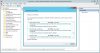
upload_2016-10-6_15-57-5.png

Thanks in advance.
 
This is a permission issue. Does this server has permissions to enroll the certificate ?. Also what is the user account that you are logged in with ?.
 
I'm logging in as domain administrator. I assume with domain admin you mush have permission. Isn't it? And also I'm not clear about the bellow statement that you have mentioned in the guid.
"Create a security group named SCCM IIS Servers that contains the member servers to install System Center 2012 Configuration Manager site systems that will run IIS."

I created the security group and added the SCCM server to that group. Is that correct? I'm wondering if that has anything to do with this issue.
 
So i guess what i have done is correct since the SCCM server is the DP. So if we go back to the initial issue. Any idea why i cant select the SCCM web server certificate?
 
Also, i see the status of the certificate shows Unavailable. So i guess the certificate has not been issued correctly. If you don't mind, you could re-create this cert from scratch and let me know how it goes. You could delete the existing cert template.
 
Okay so it's clearly permission related issue. Is the user a member of a security group that has Read and Enroll permission on the certificate template? That is required and you need to double-check this.
 
When you install certificates into the computer store and use auto-enrollment or manually request the certificate using the Certificates snap-in, the requesting computer account needs Read and Enroll permissions on the certificate template.

However, when you're using Certreq.exe to request certificates, even if they are computer certificates and use MachineKeySet = True, the requesting user needs Read and Enroll permissions on the certificate template. When you use Certreq.exe, the computer permissions are not used.
 
Hi Prajwal,
I just now double checked this and the user that I'm logging in has read & Enroll permission on the certificate template. I can confirm you that I have double checked this. Is their any other possible issue?
Thank You.
 

Forum statistics

Threads
7,135
Messages
27,868
Members
18,159
Latest member
jordysmits
Back
Top