Forums on Intune, SCCM, and Windows 11

Welcome to the forums. Register a free account today to become a member! Once signed in, you'll be able to participate on this site by adding your topics and posts, as well as connect with other members through your own private inbox!

SOLVED SCCM USB Stand alone media error

  • Thread starter Thread starter kakashi824
  • Start date Start date
  • Replies Replies 10
  • Views Views 8K
Status
Not open for further replies.

kakashi824

Active Member
Messages
35
Reaction score
2
Points
8
1571062463341.png
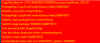
I am getting the following error when trying to make a USB stand alone bootable media. The error seems to only happen when I am using a certain task sequence, it works for others. Not sure what I am doing wrong.
 
I saw that, but my previous stand alone media that I made, the content is 4.2GB maybe it worked bc it was just slightly over 4GB? Do you have a suggestion on what I should do? Will making the media in NTFS work?
 
I've read where formatting NTFS won't do it for you. If it's indeed the size limit check.

Kinda involved and you don't need to use VCD at the end like he mentions just use native windows mounting.

No extra info inside adminui.log? This might not be the size limit issue, your original post's error means "incorrect function" which could be lots of things. Also the FAT32 limit is per file not total size.
 
Hi Sam,

Getting back to this finally and I'm having some trouble following the article. I opened cmd and entered the command in and hit enter and it does nothing. I tried to manually launch createmedia.exe and it also does nothing. Any ideas?
 
Status
Not open for further replies.

Forum statistics

Threads
7,170
Messages
27,982
Members
18,283
Latest member
mcristea

Trending content

Back
Top