Forums on Intune, SCCM, and Windows 11

Welcome to the forums. Register a free account today to become a member! Once signed in, you'll be able to participate on this site by adding your topics and posts, as well as connect with other members through your own private inbox!

SOLVED SCCM - Report of Client Browser Versions

Status
Not open for further replies.

Indy7

Member
Messages
15
Reaction score
2
Points
3
Hello, i'm still very new to SCCM and was recently asked by our security team for spreadsheet of the different types of browsers and their versions that are currently in our global environment. I am having trouble with finding any help in the "canned" reports within the console. We are currently using System Center 1906. Would anyone be able to help me with how to generate such a report for this type of information?
thank you!!
 
So what exactly are they looking for as this is fairly vague.
If they want to know the default browser for a computer, There is a built-in report for this.

If they want to know about any browser install on a computer, then use the built-in ARP reports.

If they want to know about any browser installed by the user (non-admin) then you need 3th party tools for this.
 
Thank you Garth. They are asking for a list of the versions of IE, Chrome, and Firefox that our clients currently have installed in our environment. I reached out again and they are wanting to target those that have older versions those browsers to get them updated to the latest.
i appreciate your direction! thank you.
 
Keep in mind that I work for a company that has a 3rd party tool to inventory User ARP.

As I pointed out, it depends on exactly what you are looking.

If you are ok with just computer based installed of the browser then leverage build in ARP reports.

However if you need to know both computer and user versions of browser then you will need to 3rd party tool like the one from the company I work for.

You can see that Firefox was installed by my test (low right) account called morgan.


Just to help prove the point.
Look at:
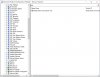
  • 1st screenshot Firefox 34 is installed for the computer. ARP x86
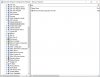
  • 2nd screenshot on firefox is listed ARP x64
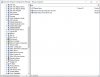
  • 3rd screenshot Firefox 34 is listed (AI)
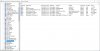
  • 4th screenshot Firefox 74 (x64) is listed for morgan only. (User ARP)
So what this is ultimately showing you is that User ARP software is not found by SCCM.

Again, keep in mind that I work for a company that can inventory this. I'm not trying to sell you anything I'm trying to show you the problem. Which BTW you gave me some great blog ideas, look for them in the next few months. :-)

arp x86.jpg
ARP Firefox.jpgAI firefox.jpg
User APR.jpg
 
Thank you very much for the information, i brought it up with our team. We are continuing to work with our vendor with this and some other questions we have.
Hope you have a great day!
 
Status
Not open for further replies.

Forum statistics

Threads
7,133
Messages
27,858
Members
18,151
Latest member
TonyGTR
Back
Top