Forums on Intune, SCCM, and Windows 11

Welcome to the forums. Register a free account today to become a member! Once signed in, you'll be able to participate on this site by adding your topics and posts, as well as connect with other members through your own private inbox!

PENDING SCCM PKI/HTTPS HTTP Error 500.0

Messages
5
Reaction score
0
Points
1
I've just updated our server to 2025 and SCCM 2409. Up until now I've been using Self-signed but now have to move to PKI/HTTPS. I've uploaded my Root certificate, and I've followed this guide twice with someone else's video that is pretty much the same. Twice.


I still cannot get my clients to talk to the server? I'm pretty sure something somewhere is either blocking the HTTPS or is missing. Happy to share log information, please let me know which are best to share.

Many thanks.
 
If you have followed the guides, there is no way you should encounter the issues. But since you're encountering issues, my suggestion is to start my analyzing the management point logs. Check if the clients are communicating with MP. And the MP is responding to the client requests.
 
Clients are not talking to the server. Even the servers client isn't talking. I open configuration manager and they all say Self-Signed still.
I cannot re-install the client either, just gives up.
 
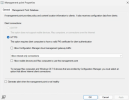
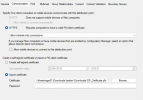
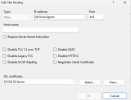
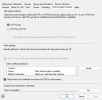
So some configuration has been either missing or not done correctly. Logs can tell you that but you will have to show us what have you configured under the MP properties, DP properties and IIS bindings.
 
Does this help?
 

Attachments

  • Screenshot 2025-04-25 162118.png
    Screenshot 2025-04-25 162118.png
    108.5 KB · Views: 12
  • Screenshot 2025-04-25 162145.png
    Screenshot 2025-04-25 162145.png
    112.8 KB · Views: 8
  • Screenshot 2025-04-25 162232.png
    Screenshot 2025-04-25 162232.png
    54.6 KB · Views: 10
  • Screenshot 2025-04-25 162349.png
    Screenshot 2025-04-25 162349.png
    126.3 KB · Views: 12
Looks good to me. Upload the management point logs. If you don't want to upload it here, you can send it to me by going to the contact form.
 
I trust you got the logs, I realise it may take time for them to be reviewed. To add on, as I'm convinced it's something to do with HTTP/HTTPS and the certificate. When I run this test link:
https://<server>/sms_mp/.sms_aut?mplist
I get:
HTTP Error 500.0 - Internal Server Error
The page cannot be displayed because an internal server error has occurred.

In the example video for testing this link it indicates I should get a 403 if there is no certificate, but should work if there is?
 
I trust you got the logs, I realise it may take time for them to be reviewed. To add on, as I'm convinced it's something to do with HTTP/HTTPS and the certificate. When I run this test link:
https://<server>/sms_mp/.sms_aut?mplist
I get:
HTTP Error 500.0 - Internal Server Error
The page cannot be displayed because an internal server error has occurred.

In the example video for testing this link it indicates I should get a 403 if there is no certificate, but should work if there is?
Getting a 500 error says that there is a problem with your MP. You need to look at it and fix it first.
 
Getting a 500 error says that there is a problem with your MP. You need to look at it and fix it first.
Well attempting to remove the Management Point role and putting it back on broke my SCCM. I restored the server and now things are gradually updating and switching to PKI today. https://<server>/sms_mp/.sms_aut?mplist is still giving me a 500 error though. I am most confused as I have not repaired anything.
 

Forum statistics

Threads
7,130
Messages
27,846
Members
18,145
Latest member
Rothgar
Back
Top