Forums on Intune, SCCM, and Windows 11

Welcome to the forums. Register a free account today to become a member! Once signed in, you'll be able to participate on this site by adding your topics and posts, as well as connect with other members through your own private inbox!

SOLVED PXE Booting Issue - Dell Precision 7680

Status
Not open for further replies.

clush

Member
Messages
23
Reaction score
0
Points
1
Hello,

We have a new model laptop and i am trying to PXE Boot to run a task sequence. It boots into the configuration manager (grey screen) however there is no wizard to proceed. The system eventually times out and reboots into Automatic Repair Mode. From past experience i know it has been usually a driver that has to be added to the boot image. It has an Intel I-219-LM ethernet. I went to the intel size to upload to the boot image and it appears that it was successfully loaded however the same outcome.

If i plug the laptop into an external nic or a docking station it works fine.

Any help would be greatly appreicated.

Thanks,

Craig
 
Solution
Try to include the storage drivers into your boot image.
The storage drivers weren't the issue. As it turned out I had to obtain the latest Intel network drivers directly from the Intel website. It is listed as Intel(R) Ethernet Connection I217-LM version 12.19.2.50. As soon as I added this driver to the boot image all worked once again. I was able to boot fully into WinPE and there was no issue joining the machine to the domain. So, if you are working with a Dell Precision 7680, are using PXE and are on version 2303 of MECM, you will need to update your boot image by downloading the Intel drivers from the following location...
Hi there, I got the exact same issue here.
Is it possible that the version of the MECM causes a problem when creating the PE boot image?
MECM version is 2203
 
I have the same version here as well 2303. Still trying to find a fix to this issue. Going to dig into the logs to see if i can figure out what is going on.
 
I figured out that you need to implement the storage drivers into your boot image.
This enables the MECM wizzard to access the harddrive.
But now I got to the problem that after this, the device won't do a domain join even though I already included all network driver
 
I figured out that you need to implement the storage drivers into your boot image.
This enables the MECM wizzard to access the harddrive.
But now I got to the problem that after this, the device won't do a domain join even though I already included all network driver
Did you review the logs?
 
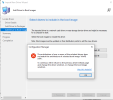
trying to upgrade the storage drivers in the boot image and i get this error.
 

Attachments

  • error.png
    error.png
    37.8 KB · Views: 25
Did you try to create a new boot image only just Dell 7680 network drivers?
If I remember well - I had a same problem - and a had to create a new boot image.
 
I figured out that you need to implement the storage drivers into your boot image.
This enables the MECM wizzard to access the harddrive.
But now I got to the problem that after this, the device won't do a domain join even though I already included all network driver
I'm having the same issue. Won't join the domain.
 
Tired creating a boot image for the 7680 and still have the same issues. It appears so far this is the only model out of all the dells we have is causing the issue so far. The only work around we have is to connect a docking station to it. Not the perfect solution but its a workaround at this point.
 
I just received a shipment of 7680 model Dells and I am also experiencing this issue. I just updated the boot image so it includes the: Intel (R) RAID Controller SRCSAS18E version 6.703.3.0 but when I boot to PXE all I get is a blue screen and the WinPE wizard never comes up. I can hit F8 to get to a command prompt but it doesn't look like it has started the network driver. I thought it was the network driver that was causing the issue but the WinPE package didn't locate a new network driver so I wasn't sure where to go from here. I am wondering if there is a BIOS setting that needs to be changed?
 
I just received a shipment of 7680 model Dells and I am also experiencing this issue. I just updated the boot image so it includes the: Intel (R) RAID Controller SRCSAS18E version 6.703.3.0 but when I boot to PXE all I get is a blue screen and the WinPE wizard never comes up. I can hit F8 to get to a command prompt but it doesn't look like it has started the network driver. I thought it was the network driver that was causing the issue but the WinPE package didn't locate a new network driver so I wasn't sure where to go from here. I am wondering if there is a BIOS setting that needs to be changed?
As a follow up, I changed the BIOS setting from RAID ON to AHCI/NVMe and that didn't seem to make a difference. Also, this time around I checked the C: drive after booting into PXE and it was accessible so I don't think the issue is with storage. I also checked networking again and running ipconfig from within CMD bore no results so I am feeling more and more like the problem is with the network driver. I am going to try loading a new network driver from Intel and see how that does.
 
As a follow up, I changed the BIOS setting from RAID ON to AHCI/NVMe and that didn't seem to make a difference. Also, this time around I checked the C: drive after booting into PXE and it was accessible so I don't think the issue is with storage. I also checked networking again and running ipconfig from within CMD bore no results so I am feeling more and more like the problem is with the network driver. I am going to try loading a new network driver from Intel and see how that does.
Try to include the storage drivers into your boot image.
 
Try to include the storage drivers into your boot image.
The storage drivers weren't the issue. As it turned out I had to obtain the latest Intel network drivers directly from the Intel website. It is listed as Intel(R) Ethernet Connection I217-LM version 12.19.2.50. As soon as I added this driver to the boot image all worked once again. I was able to boot fully into WinPE and there was no issue joining the machine to the domain. So, if you are working with a Dell Precision 7680, are using PXE and are on version 2303 of MECM, you will need to update your boot image by downloading the Intel drivers from the following location:
and then make sure that you load this driver into your boot image.

Also as a side note regarding the use of the Dell Integration Suite for Config Manager, Dell recently changed how they handle driver packages for newer systems. They used to exclusively use .CAB files and these work great with the Integration Suite but due to the increasing size of driver packages and limitations inherent in .CAB files, Dell switched to a new package type called Dell Update Package (DUP) which is download in the form of an .EXE file. You can't download DUP packages within the Integration Suite (it produces an error when attempted) but you can download the packages directly from support.dell.com and then manually import them into the Integration Suite for use with Config Manager. You will want to do this prior to attempting to image so your newly imaged machine includes all the correct system drivers.

I hope you all find this information useful and let me know if you have any questions.
 
Solution
Status
Not open for further replies.
Back
Top