
mitsuturbo
Member
- Messages
- 5
- Solutions
- 1
- Reaction score
- 0
- Points
- 1
We've set up a new Secondary site on VM (HyperV). It will not allow my test VM clients to PXE boot. It sticks on "downloading NBP file".
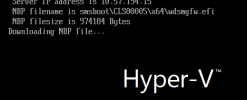
The client trying to PXE boot is on the same Hyper-V host as the DP/MP (secondary site).
Checking SMSPXE, i get the following:
CLibSMSMessageWinHttpTransport::Send: WinHttpOpenRequest - URL: MECMSS.x.contoso.com:80 GET /SMS_MP/.sms_aut?MPKEYINFORMATIONEX SCCMPXE 10/19/2023 8:31:57 AM 11088 (0x2B50)
Not in SSL. SCCMPXE 10/19/2023 8:31:57 AM 11088 (0x2B50)
CLibSMSMessageWinHttpTransport::Send: WinHttpOpenRequest - URL: MECMSS.x.contoso.com:80 CCM_POST /ccm_system/request SCCMPXE 10/19/2023 8:31:57 AM 3892 (0x0F34)
Not in SSL. SCCMPXE 10/19/2023 8:31:57 AM 3892 (0x0F34)
CLibSMSMessageWinHttpTransport::Send: WinHttpOpenRequest - URL: MECMSS.x.contoso.com:80 CCM_POST /ccm_system/request SCCMPXE 10/19/2023 8:31:57 AM 11088 (0x2B50)
Not in SSL. SCCMPXE 10/19/2023 8:31:57 AM 11088 (0x2B50)
Client Boot TS reply: <ClientIDReply><Identification Unknown="0" DuplicateSMBIOS="0" DuplicateMACAddress="0" ItemKey="16793208" ServerName=""><Machine><ClientID/><NetbiosName/></Machine></Identification><TSInfo DeploymentID="CLS2003C" PkgID="CLS0003D" BootImageID="CLS00005" Architecture="9" Required="1" AlreadyRun="0" ForPXE="1" Disabled="0" PackageAvailable="1" FutureAvailability="0" Expired="0" UEFIArchitectureMismatch="0" ArchitectureMismatch="0"/><TSInfo DeploymentID="CLS2004B" PkgID="CLS00091" BootImageID="CLS00005" Architecture="9" Required="0" AlreadyRun="0" ForPXE="0" Disabled="0" PackageAvailable="1" FutureAvailability="0" Expired="0" UEFIArchitectureMismatch="0" ArchitectureMismatch="0"/></ClientIDReply>
SCCMPXE 10/19/2023 8:31:57 AM 880 (0x0370)
PXE: 00:15:5D:C3:E1:02: Task Sequence deployment(s) to client machine with item key 16793208: SCCMPXE 10/19/2023 8:31:57 AM 880 (0x0370)
PXE: 00:15:5D:C3:E1:02: CLS2003C, CLS00005, 64-bit, required, is valid. SCCMPXE 10/19/2023 8:31:57 AM 880 (0x0370)
PXE: 00:15:5D:C3:E1:02: CLS2004B, CLS00005, 64-bit, optional, is not deployed for PXE. Discarding from list. SCCMPXE 10/19/2023 8:31:57 AM 880 (0x0370)
PXE: 00:15:5D:C3:E1:02: Using Task Sequence deployment CLS2003C. SCCMPXE 10/19/2023 8:31:57 AM 880 (0x0370)
Packet: Operation: 2 (reply), AdrType: 1, AdrLen: 6, HopCount: 1, TransactID: 910aa565, BootTime: 0, Addr: 00:15:5d:c3:e1:02:00:00:00:00:00:00:00:00:00:00, HostName: , BootFile: smsboot\CLS00005\x64\wdsmgfw.efi, ClientIP: 0.0.0.0, HostIP: 0.0.0.0, ServerIP: 10.57.194.15, RelayIP: 10.57.194.10
Options:
53, 1, MsgType: 05, ack
54, 4, SvrID: 0a 39 c2 0f
97, 17, UUID: 00 5a 70 c8 df a2 2f c3 4d 89 c5 30 6f d8 1f f3 fe
60, 9, ClassID: PXEClient
250, 3, Extension: 0b 01 02 SCCMPXE 10/19/2023 8:31:57 AM 880 (0x0370)
PXE: Sending reply to 10.57.194.10, DHCP. SCCMPXE 10/19/2023 8:31:57 AM 880 (0x0370)
Client Boot TS reply: <ClientIDReply><Identification Unknown="0" DuplicateSMBIOS="0" DuplicateMACAddress="0" ItemKey="16793208" ServerName=""><Machine><ClientID/><NetbiosName/></Machine></Identification><TSInfo DeploymentID="CLS2003C" PkgID="CLS0003D" BootImageID="CLS00005" Architecture="9" Required="1" AlreadyRun="0" ForPXE="1" Disabled="0" PackageAvailable="1" FutureAvailability="0" Expired="0" UEFIArchitectureMismatch="0" ArchitectureMismatch="0"/><TSInfo DeploymentID="CLS2004B" PkgID="CLS00091" BootImageID="CLS00005" Architecture="9" Required="0" AlreadyRun="0" ForPXE="0" Disabled="0" PackageAvailable="1" FutureAvailability="0" Expired="0" UEFIArchitectureMismatch="0" ArchitectureMismatch="0"/></ClientIDReply>
SCCMPXE 10/19/2023 8:31:57 AM 11088 (0x2B50)
PXE: 00:15:5D:C3:E1:02: Task Sequence deployment(s) to client machine with item key 16793208: SCCMPXE 10/19/2023 8:31:57 AM 11088 (0x2B50)
PXE: 00:15:5D:C3:E1:02: CLS2003C, CLS00005, 64-bit, required, is valid. SCCMPXE 10/19/2023 8:31:57 AM 11088 (0x2B50)
PXE: 00:15:5D:C3:E1:02: CLS2004B, CLS00005, 64-bit, optional, is not deployed for PXE. Discarding from list. SCCMPXE 10/19/2023 8:31:57 AM 11088 (0x2B50)
PXE: 00:15:5D:C3:E1:02: Using Task Sequence deployment CLS2003C. SCCMPXE 10/19/2023 8:31:57 AM 11088 (0x2B50)
Packet: Operation: 2 (reply), AdrType: 1, AdrLen: 6, HopCount: 1, TransactID: 910aa565, BootTime: 0, Addr: 00:15:5d:c3:e1:02:00:00:00:00:00:00:00:00:00:00, HostName: , BootFile: smsboot\CLS00005\x64\wdsmgfw.efi, ClientIP: 0.0.0.0, HostIP: 0.0.0.0, ServerIP: 10.57.194.15, RelayIP: 10.57.194.9
Options:
53, 1, MsgType: 05, ack
54, 4, SvrID: 0a 39 c2 0f
97, 17, UUID: 00 5a 70 c8 df a2 2f c3 4d 89 c5 30 6f d8 1f f3 fe
60, 9, ClassID: PXEClient
250, 3, Extension: 0b 01 02 SCCMPXE 10/19/2023 8:31:57 AM 11088 (0x2B50)
PXE: Sending reply to 10.57.194.9, DHCP. SCCMPXE 10/19/2023 8:31:57 AM 11088 (0x2B50)
Client Boot TS reply: <ClientIDReply><Identification Unknown="0" DuplicateSMBIOS="0" DuplicateMACAddress="0" ItemKey="16793208" ServerName=""><Machine><ClientID/><NetbiosName/></Machine></Identification><TSInfo DeploymentID="CLS2003C" PkgID="CLS0003D" BootImageID="CLS00005" Architecture="9" Required="1" AlreadyRun="0" ForPXE="1" Disabled="0" PackageAvailable="1" FutureAvailability="0" Expired="0" UEFIArchitectureMismatch="0" ArchitectureMismatch="0"/><TSInfo DeploymentID="CLS2004B" PkgID="CLS00091" BootImageID="CLS00005" Architecture="9" Required="0" AlreadyRun="0" ForPXE="0" Disabled="0" PackageAvailable="1" FutureAvailability="0" Expired="0" UEFIArchitectureMismatch="0" ArchitectureMismatch="0"/></ClientIDReply>
SCCMPXE 10/19/2023 8:31:57 AM 3892 (0x0F34)
PXE: 00:15:5D:C3:E1:02: Task Sequence deployment(s) to client machine with item key 16793208: SCCMPXE 10/19/2023 8:31:57 AM 3892 (0x0F34)
PXE: 00:15:5D:C3:E1:02: CLS2003C, CLS00005, 64-bit, required, is valid. SCCMPXE 10/19/2023 8:31:57 AM 3892 (0x0F34)
PXE: 00:15:5D:C3:E1:02: CLS2004B, CLS00005, 64-bit, optional, is not deployed for PXE. Discarding from list. SCCMPXE 10/19/2023 8:31:57 AM 3892 (0x0F34)
PXE: 00:15:5D:C3:E1:02: Using Task Sequence deployment CLS2003C. SCCMPXE 10/19/2023 8:31:57 AM 3892 (0x0F34)
Packet: Operation: 2 (reply), AdrType: 1, AdrLen: 6, HopCount: 0, TransactID: f97dd773, BootTime: 0, Addr: 00:15:5d:c3:e1:02:00:00:00:00:00:00:00:00:00:00, HostName: , BootFile: smsboot\CLS00005\x64\wdsmgfw.efi, ClientIP: 10.57.194.101, HostIP: 0.0.0.0, ServerIP: 10.57.194.15, RelayIP: 0.0.0.0
Options:
53, 1, MsgType: 05, ack
54, 4, SvrID: 0a 39 c2 0f
97, 17, UUID: 00 5a 70 c8 df a2 2f c3 4d 89 c5 30 6f d8 1f f3 fe
60, 9, ClassID: PXEClient
250, 3, Extension: 0b 01 02 SCCMPXE 10/19/2023 8:31:57 AM 3892 (0x0F34)
PXE: Sending reply to 10.57.194.101, PXE. SCCMPXE 10/19/2023 8:31:57 AM 3892 (0x0F34)
TFTP: 10.57.194.101: connected. SCCMPXE 10/19/2023 8:31:58 AM 3600 (0x0E10)
TFTP: 10.57.194.101: request for smsboot\CLS00005\x64\wdsmgfw.efi. SCCMPXE 10/19/2023 8:31:58 AM 3600 (0x0E10)
TFTP: 10.57.194.101: sending smsboot\CLS00005\x64\wdsmgfw.efi, 4, 1482, 0. SCCMPXE 10/19/2023 8:31:58 AM 3600 (0x0E10)
TFTP: TCount=1. SCCMPXE 10/19/2023 8:31:58 AM 11036 (0x2B1C)
TFTP: FCount=0. SCCMPXE 10/19/2023 8:31:58 AM 11036 (0x2B1C)
TFTP: 10.57.194.101: connected. SCCMPXE 10/19/2023 8:31:58 AM 3600 (0x0E10)
TFTP: 10.57.194.101: request for smsboot\CLS00005\x64\wdsmgfw.efi. SCCMPXE 10/19/2023 8:31:58 AM 3600 (0x0E10)
TFTP: 10.57.194.101: sending smsboot\CLS00005\x64\wdsmgfw.efi, 4, 1482, -1. SCCMPXE 10/19/2023 8:31:58 AM 3600 (0x0E10)
TFTP: TCount=1. SCCMPXE 10/19/2023 8:31:58 AM 920 (0x0398)
TFTP: 10.57.194.101: recvfrom() returned 0x8007274c. Waiting for 4. SCCMPXE 10/19/2023 8:32:23 AM 920 (0x0398)
TFTP: 10.57.194.101: recvfrom() returned 0x8007274c. Waiting for 4. SCCMPXE 10/19/2023 8:32:28 AM 920 (0x0398)
TFTP: 10.57.194.101: recvfrom() returned 0x8007274c. Waiting for 4. SCCMPXE 10/19/2023 8:32:33 AM 920 (0x0398)
TFTP: 10.57.194.101: timed-out. SCCMPXE 10/19/2023 8:32:43 AM 920 (0x0398)
TFTP: FCount=0. SCCMPXE 10/19/2023 8:32:43 AM 920 (0x0398)
Wireshark was showing a lot of fragmentation until i enabled jumbo packets, but the issue persisted.
I rescinded the jumbo packet change on MECMSS, and tried adding RamDisk Block & Window size regkeys as shown:

I've since disabled these as well, as you can see, as i feel it may be masking a root cause.
While this did enable the NBP (wdsmgfw.efi) file to download, afterward no more activity other than DHCP Request/Acknowledege shows for a few cycles on wireshark, then the connection times out.
If i disable PXE on this system and tell the VM to PXE from the primary site (helpers are there for redundancy), it will PXE boot fine and image completely. The strange thing i am noticing, is that in the SMSPXE log on the primary site, i see no such entries as i see on MECMSS - "CLibSMSMessageWinHttpTransport::Send: WinHttpOpenRequest - URL:" In fact there are no "CLibSMSMessage" entries, ever on that site. I'm beginning to wonder if this is an IIS issue.
I tried using the WDS responder service as well. I'm not going to go deeper into how that went, but it will suffice to say it didn't work any better. We simply don't use the WDS responder on our DPs, primary or other secondary sites.
Any ideas?
The client trying to PXE boot is on the same Hyper-V host as the DP/MP (secondary site).
Checking SMSPXE, i get the following:
CLibSMSMessageWinHttpTransport::Send: WinHttpOpenRequest - URL: MECMSS.x.contoso.com:80 GET /SMS_MP/.sms_aut?MPKEYINFORMATIONEX SCCMPXE 10/19/2023 8:31:57 AM 11088 (0x2B50)
Not in SSL. SCCMPXE 10/19/2023 8:31:57 AM 11088 (0x2B50)
CLibSMSMessageWinHttpTransport::Send: WinHttpOpenRequest - URL: MECMSS.x.contoso.com:80 CCM_POST /ccm_system/request SCCMPXE 10/19/2023 8:31:57 AM 3892 (0x0F34)
Not in SSL. SCCMPXE 10/19/2023 8:31:57 AM 3892 (0x0F34)
CLibSMSMessageWinHttpTransport::Send: WinHttpOpenRequest - URL: MECMSS.x.contoso.com:80 CCM_POST /ccm_system/request SCCMPXE 10/19/2023 8:31:57 AM 11088 (0x2B50)
Not in SSL. SCCMPXE 10/19/2023 8:31:57 AM 11088 (0x2B50)
Client Boot TS reply: <ClientIDReply><Identification Unknown="0" DuplicateSMBIOS="0" DuplicateMACAddress="0" ItemKey="16793208" ServerName=""><Machine><ClientID/><NetbiosName/></Machine></Identification><TSInfo DeploymentID="CLS2003C" PkgID="CLS0003D" BootImageID="CLS00005" Architecture="9" Required="1" AlreadyRun="0" ForPXE="1" Disabled="0" PackageAvailable="1" FutureAvailability="0" Expired="0" UEFIArchitectureMismatch="0" ArchitectureMismatch="0"/><TSInfo DeploymentID="CLS2004B" PkgID="CLS00091" BootImageID="CLS00005" Architecture="9" Required="0" AlreadyRun="0" ForPXE="0" Disabled="0" PackageAvailable="1" FutureAvailability="0" Expired="0" UEFIArchitectureMismatch="0" ArchitectureMismatch="0"/></ClientIDReply>
SCCMPXE 10/19/2023 8:31:57 AM 880 (0x0370)
PXE: 00:15:5D:C3:E1:02: Task Sequence deployment(s) to client machine with item key 16793208: SCCMPXE 10/19/2023 8:31:57 AM 880 (0x0370)
PXE: 00:15:5D:C3:E1:02: CLS2003C, CLS00005, 64-bit, required, is valid. SCCMPXE 10/19/2023 8:31:57 AM 880 (0x0370)
PXE: 00:15:5D:C3:E1:02: CLS2004B, CLS00005, 64-bit, optional, is not deployed for PXE. Discarding from list. SCCMPXE 10/19/2023 8:31:57 AM 880 (0x0370)
PXE: 00:15:5D:C3:E1:02: Using Task Sequence deployment CLS2003C. SCCMPXE 10/19/2023 8:31:57 AM 880 (0x0370)
Packet: Operation: 2 (reply), AdrType: 1, AdrLen: 6, HopCount: 1, TransactID: 910aa565, BootTime: 0, Addr: 00:15:5d:c3:e1:02:00:00:00:00:00:00:00:00:00:00, HostName: , BootFile: smsboot\CLS00005\x64\wdsmgfw.efi, ClientIP: 0.0.0.0, HostIP: 0.0.0.0, ServerIP: 10.57.194.15, RelayIP: 10.57.194.10
Options:
53, 1, MsgType: 05, ack
54, 4, SvrID: 0a 39 c2 0f
97, 17, UUID: 00 5a 70 c8 df a2 2f c3 4d 89 c5 30 6f d8 1f f3 fe
60, 9, ClassID: PXEClient
250, 3, Extension: 0b 01 02 SCCMPXE 10/19/2023 8:31:57 AM 880 (0x0370)
PXE: Sending reply to 10.57.194.10, DHCP. SCCMPXE 10/19/2023 8:31:57 AM 880 (0x0370)
Client Boot TS reply: <ClientIDReply><Identification Unknown="0" DuplicateSMBIOS="0" DuplicateMACAddress="0" ItemKey="16793208" ServerName=""><Machine><ClientID/><NetbiosName/></Machine></Identification><TSInfo DeploymentID="CLS2003C" PkgID="CLS0003D" BootImageID="CLS00005" Architecture="9" Required="1" AlreadyRun="0" ForPXE="1" Disabled="0" PackageAvailable="1" FutureAvailability="0" Expired="0" UEFIArchitectureMismatch="0" ArchitectureMismatch="0"/><TSInfo DeploymentID="CLS2004B" PkgID="CLS00091" BootImageID="CLS00005" Architecture="9" Required="0" AlreadyRun="0" ForPXE="0" Disabled="0" PackageAvailable="1" FutureAvailability="0" Expired="0" UEFIArchitectureMismatch="0" ArchitectureMismatch="0"/></ClientIDReply>
SCCMPXE 10/19/2023 8:31:57 AM 11088 (0x2B50)
PXE: 00:15:5D:C3:E1:02: Task Sequence deployment(s) to client machine with item key 16793208: SCCMPXE 10/19/2023 8:31:57 AM 11088 (0x2B50)
PXE: 00:15:5D:C3:E1:02: CLS2003C, CLS00005, 64-bit, required, is valid. SCCMPXE 10/19/2023 8:31:57 AM 11088 (0x2B50)
PXE: 00:15:5D:C3:E1:02: CLS2004B, CLS00005, 64-bit, optional, is not deployed for PXE. Discarding from list. SCCMPXE 10/19/2023 8:31:57 AM 11088 (0x2B50)
PXE: 00:15:5D:C3:E1:02: Using Task Sequence deployment CLS2003C. SCCMPXE 10/19/2023 8:31:57 AM 11088 (0x2B50)
Packet: Operation: 2 (reply), AdrType: 1, AdrLen: 6, HopCount: 1, TransactID: 910aa565, BootTime: 0, Addr: 00:15:5d:c3:e1:02:00:00:00:00:00:00:00:00:00:00, HostName: , BootFile: smsboot\CLS00005\x64\wdsmgfw.efi, ClientIP: 0.0.0.0, HostIP: 0.0.0.0, ServerIP: 10.57.194.15, RelayIP: 10.57.194.9
Options:
53, 1, MsgType: 05, ack
54, 4, SvrID: 0a 39 c2 0f
97, 17, UUID: 00 5a 70 c8 df a2 2f c3 4d 89 c5 30 6f d8 1f f3 fe
60, 9, ClassID: PXEClient
250, 3, Extension: 0b 01 02 SCCMPXE 10/19/2023 8:31:57 AM 11088 (0x2B50)
PXE: Sending reply to 10.57.194.9, DHCP. SCCMPXE 10/19/2023 8:31:57 AM 11088 (0x2B50)
Client Boot TS reply: <ClientIDReply><Identification Unknown="0" DuplicateSMBIOS="0" DuplicateMACAddress="0" ItemKey="16793208" ServerName=""><Machine><ClientID/><NetbiosName/></Machine></Identification><TSInfo DeploymentID="CLS2003C" PkgID="CLS0003D" BootImageID="CLS00005" Architecture="9" Required="1" AlreadyRun="0" ForPXE="1" Disabled="0" PackageAvailable="1" FutureAvailability="0" Expired="0" UEFIArchitectureMismatch="0" ArchitectureMismatch="0"/><TSInfo DeploymentID="CLS2004B" PkgID="CLS00091" BootImageID="CLS00005" Architecture="9" Required="0" AlreadyRun="0" ForPXE="0" Disabled="0" PackageAvailable="1" FutureAvailability="0" Expired="0" UEFIArchitectureMismatch="0" ArchitectureMismatch="0"/></ClientIDReply>
SCCMPXE 10/19/2023 8:31:57 AM 3892 (0x0F34)
PXE: 00:15:5D:C3:E1:02: Task Sequence deployment(s) to client machine with item key 16793208: SCCMPXE 10/19/2023 8:31:57 AM 3892 (0x0F34)
PXE: 00:15:5D:C3:E1:02: CLS2003C, CLS00005, 64-bit, required, is valid. SCCMPXE 10/19/2023 8:31:57 AM 3892 (0x0F34)
PXE: 00:15:5D:C3:E1:02: CLS2004B, CLS00005, 64-bit, optional, is not deployed for PXE. Discarding from list. SCCMPXE 10/19/2023 8:31:57 AM 3892 (0x0F34)
PXE: 00:15:5D:C3:E1:02: Using Task Sequence deployment CLS2003C. SCCMPXE 10/19/2023 8:31:57 AM 3892 (0x0F34)
Packet: Operation: 2 (reply), AdrType: 1, AdrLen: 6, HopCount: 0, TransactID: f97dd773, BootTime: 0, Addr: 00:15:5d:c3:e1:02:00:00:00:00:00:00:00:00:00:00, HostName: , BootFile: smsboot\CLS00005\x64\wdsmgfw.efi, ClientIP: 10.57.194.101, HostIP: 0.0.0.0, ServerIP: 10.57.194.15, RelayIP: 0.0.0.0
Options:
53, 1, MsgType: 05, ack
54, 4, SvrID: 0a 39 c2 0f
97, 17, UUID: 00 5a 70 c8 df a2 2f c3 4d 89 c5 30 6f d8 1f f3 fe
60, 9, ClassID: PXEClient
250, 3, Extension: 0b 01 02 SCCMPXE 10/19/2023 8:31:57 AM 3892 (0x0F34)
PXE: Sending reply to 10.57.194.101, PXE. SCCMPXE 10/19/2023 8:31:57 AM 3892 (0x0F34)
TFTP: 10.57.194.101: connected. SCCMPXE 10/19/2023 8:31:58 AM 3600 (0x0E10)
TFTP: 10.57.194.101: request for smsboot\CLS00005\x64\wdsmgfw.efi. SCCMPXE 10/19/2023 8:31:58 AM 3600 (0x0E10)
TFTP: 10.57.194.101: sending smsboot\CLS00005\x64\wdsmgfw.efi, 4, 1482, 0. SCCMPXE 10/19/2023 8:31:58 AM 3600 (0x0E10)
TFTP: TCount=1. SCCMPXE 10/19/2023 8:31:58 AM 11036 (0x2B1C)
TFTP: FCount=0. SCCMPXE 10/19/2023 8:31:58 AM 11036 (0x2B1C)
TFTP: 10.57.194.101: connected. SCCMPXE 10/19/2023 8:31:58 AM 3600 (0x0E10)
TFTP: 10.57.194.101: request for smsboot\CLS00005\x64\wdsmgfw.efi. SCCMPXE 10/19/2023 8:31:58 AM 3600 (0x0E10)
TFTP: 10.57.194.101: sending smsboot\CLS00005\x64\wdsmgfw.efi, 4, 1482, -1. SCCMPXE 10/19/2023 8:31:58 AM 3600 (0x0E10)
TFTP: TCount=1. SCCMPXE 10/19/2023 8:31:58 AM 920 (0x0398)
TFTP: 10.57.194.101: recvfrom() returned 0x8007274c. Waiting for 4. SCCMPXE 10/19/2023 8:32:23 AM 920 (0x0398)
TFTP: 10.57.194.101: recvfrom() returned 0x8007274c. Waiting for 4. SCCMPXE 10/19/2023 8:32:28 AM 920 (0x0398)
TFTP: 10.57.194.101: recvfrom() returned 0x8007274c. Waiting for 4. SCCMPXE 10/19/2023 8:32:33 AM 920 (0x0398)
TFTP: 10.57.194.101: timed-out. SCCMPXE 10/19/2023 8:32:43 AM 920 (0x0398)
TFTP: FCount=0. SCCMPXE 10/19/2023 8:32:43 AM 920 (0x0398)
Wireshark was showing a lot of fragmentation until i enabled jumbo packets, but the issue persisted.
I rescinded the jumbo packet change on MECMSS, and tried adding RamDisk Block & Window size regkeys as shown:
I've since disabled these as well, as you can see, as i feel it may be masking a root cause.
While this did enable the NBP (wdsmgfw.efi) file to download, afterward no more activity other than DHCP Request/Acknowledege shows for a few cycles on wireshark, then the connection times out.
If i disable PXE on this system and tell the VM to PXE from the primary site (helpers are there for redundancy), it will PXE boot fine and image completely. The strange thing i am noticing, is that in the SMSPXE log on the primary site, i see no such entries as i see on MECMSS - "CLibSMSMessageWinHttpTransport::Send: WinHttpOpenRequest - URL:" In fact there are no "CLibSMSMessage" entries, ever on that site. I'm beginning to wonder if this is an IIS issue.
I tried using the WDS responder service as well. I'm not going to go deeper into how that went, but it will suffice to say it didn't work any better. We simply don't use the WDS responder on our DPs, primary or other secondary sites.
Any ideas?

