Forums on Intune, SCCM, and Windows 11

Welcome to the forums. Register a free account today to become a member! Once signed in, you'll be able to participate on this site by adding your topics and posts, as well as connect with other members through your own private inbox!

SOLVED Problem with running TS OSD from Windows

  • Thread starter Thread starter msud
  • Start date Start date
  • Replies Replies 15
  • Views Views 3K

msud

Member
Messages
13
Solutions
1
Reaction score
0
Points
1
Hello everyone.

I have a problem that I can't solve for a long time...

This trouble is happening during with only running TS OSD from Windows (step - Restart in Winpe). If booted from PXE - works ok.

I having trouble with a particular model (Acer Veriton Vero B650). There is no problem on many other different models.

UEFI. Bitlocker and antivirus disabled. Windows 10 x64 ltsc 2021.

SecureBoot enabled or disabled - does not matter.

All drivers added to boot.wim

Maybe someone has encountered something similar. Could you please explain the mechanism of deployment not from PXE, but from Windows, or help to find out the reason for the impossibility of TS OSD running from Windows (step - Restart in Winpe).
 
What is the TS supposed to do? and what does it look like?
Standard osd ts
1. Restart in winpe
2. Format
3. Apply os
4. Apply drivers
5. Install sccm client

When run f12 (pxe) - its ok
When run from os - error in step 1 - restart in winpe
 
Standard osd ts
1. Restart in winpe
2. Format
3. Apply os
4. Apply drivers
5. Install sccm client

When run f12 (pxe) - its ok
When run from os - error in step 1 - restart in winpe
Just last year I began upgrading to w11 with a TS deployed to software center and it works fine. Did you create a specific upgrade TS?
 
Just last year I began upgrading to w11 with a TS deployed to software center and it works fine. Did you create a specific upgrade TS?

nothing helps. OSD TS works well on all computers, except for one single computer model
 
here is a great post on how OSD works during PXE installs. Does anyone know how OSD works from a running Windows?
 
Did you create an upgrade TS as mentioned in the link i posted above?
Why are you persisting with a standard TS and not an upgrade TS when you mention you have "had this issue for a very long time"?
 
I didn't create a TS update as mentioned in the link because I don't plan to upgrade 10 to 11. I'm moving from 10 to 11 only by reinstalling Windows.
I'll try to make a TS update for the sake of testing
 
Did you create an upgrade TS as mentioned in the link i posted above?
Why are you persisting with a standard TS and not an upgrade TS when you mention you have "had this issue for a very long time"?

I created a test upgrade task as in the article and it works. But I need to format the disk before reinstalling windows. The upgrade does not allow you to do this. The error occurs exactly when you need to apply boot.wim and boot into Windows PE. Task Restart in Windows PE replaces bootloader but I don't know why it ends with an error. Apparently some scripts are executed after replacing the bootloader, but which ones?
 
there is such an entry in the log
"Fatal error is returned in check for reboot request of the action (Restart Computer) (0x80004005)"

what procedure is performed to check this? what script? what command?

Maybe is being checked Task Sequence Variable "_SMSTSInWinPE=false" at the end of the step "Restart in Windows PE". How is this done? Some WMI command? If so, which one? So that I can check manually.
 
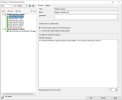
Could you post the task sequence details screenshot? So, if PXE works, why are you trying to reimage using this method?
 
Could you post the task sequence details screenshot? So, if PXE works, why are you trying to reimage using this method?

Standard task sequence. This method is used to not get up from the chair, reinstall the operating system without going to the computer.Win11TS.jpg
 

Forum statistics

Threads
7,130
Messages
27,846
Members
18,145
Latest member
Rothgar
Back
Top