Forums on Intune, SCCM, and Windows 11

Welcome to the forums. Register a free account today to become a member! Once signed in, you'll be able to participate on this site by adding your topics and posts, as well as connect with other members through your own private inbox!

SOLVED Past due - will be installed explained

  • Thread starter Thread starter avi_ei
  • Start date Start date
  • Replies Replies 21
  • Views Views 69K
Status
Not open for further replies.

avi_ei

Active Member
Messages
34
Solutions
1
Reaction score
2
Points
8
Hi all,

I'll appreciate an explanation about "Past due - will be installed" message on application deploy in software centre and how i can initiate an installation of an application with that status or fixing it - I don't want the user to press and make a manual install.
The application is required and distributed to a user collection.

As i understand on the SCCM console those clients with that status (Past due - will be ...) will show in "In Progress" that as "Content Downloaded"

TNX
 
Solution
Well,
Since it was happening on 10 workstations only I've tried to uninstall manually from a remote workstation using powershell.
After the manual uninstall of the superseded application the deployment ran OK and installed the required app.
Still even there is no issue anymore the reason for the problem is not understandable.
Thank you for all your help
do you have maintenance window ? Go to Client Settings / Computer Agent / Additional software manages the deployment of applications and software updates and set it to NO .
 
do you have maintenance window ? Go to Client Settings / Computer Agent / Additional software manages the deployment of applications and software updates and set it to NO .
Hi,

Checked that setting in the client settings before-hand and it's set to NO from the beginning.
I don't recall that I've setup "Maintenance Window". "Maintenance Window" is set to computer collection and this application is deployed to user collection.

If i don't set "Maintenance Window" is there a default "Maintenance Window" that the clients get ? Can i view/check from the SCCM console the "Maintenance Window" on a specific endpoint ?

Regards,
 
Hi there , Here it goes .
What is maintenance window - It's nothing but a window inside that activity should happen. We can set the start and end time for a deployment. Deployment will run inside the window , and if in case its not happen . it will show past due will be installed
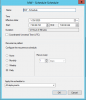
You can set the maintenance window for a collection , but makes sure that we are removing the MW once the activity done or else the same MW is applicable to the same machines in future collection. You can check the MW by right click on the collection and select the MW option ,attaching for your reference
SS.png

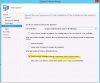
If you want to ignore MW you can do it while deployment
Attach.JPG

Hope this will resolve your issue ..
 
Hi there , Here it goes .
What is maintenance window - It's nothing but a window inside that activity should happen. We can set the start and end time for a deployment. Deployment will run inside the window , and if in case its not happen . it will show past due will be installed
You can set the maintenance window for a collection , but makes sure that we are removing the MW once the activity done or else the same MW is applicable to the same machines in future collection. You can check the MW by right click on the collection and select the MW option ,attaching for your reference
View attachment 2645

If you want to ignore MW you can do it while deployment
View attachment 2646

Hope this will resolve your issue ..
Thank you for your explanation but:

I don't have any MW configured on any collection but those 2 deployments are set to "Commit changes at deadline or during a maintenance window)" - as you explained if this option is set the deployments will run without considering the MW !!?

As can i understand it says that the deployment will run according to the MW if that option is set !?

I'm confused or did you meant that in order to ignore the MW i should unselect this option on the deployment (Commit changes....) !?

If i need to uncheck this option on my deployments i should redistribute the content !?

Sorry for the rookie questions, but i find it confusing :(

Regards,
 
Sorry but the checked option highlighted in your screenshot refers only to "Windows Embedded" devices as stated.
The deployment is still not working and stays as "Past Due - Will be Installed"
Didn't understood if i must set a "Maintenance Window" for it to work.
Made a test on a collection containing only one device but it doesn't work - the MW was set inside the Working Hours and now i'll do a second test to set the MW outside the Working Hours.
I'll need to fully understand this cause it seems to be blurry (Deployments and device re-checking for deployments using "Maintenance Hours", "Working Hours", "Deadline Date" for "Required" & "Available" deployments.

Regards,
 
can u do a deployment using below SS without MW
Thank you for your explanation but:

I don't have any MW configured on any collection but those 2 deployments are set to "Commit changes at deadline or during a maintenance window)" - as you explained if this option is set the deployments will run without considering the MW !!?

As can i understand it says that the deployment will run according to the MW if that option is set !?

I'm confused or did you meant that in order to ignore the MW i should unselect this option on the deployment (Commit changes....) !?

If i need to uncheck this option on my deployments i should redistribute the content !?

Sorry for the rookie questions, but i find it confusing :(

Regards,

Hi there ,, Yes you have to select the option.
Did your content distributed successfully?
Did you checked application command line ?cause i had faced same issue like this .
Have a look at appenf log too .
Try below also
create a test deployment with below option . Hope this would help you
Type of deployment - required
Schedule - As soon as possible
user experience -check for software update installation
-Suppress reboot if you want
-check for commit changes at deadline
Download setting - Check for download software update from Dp
- check for Download and install SU
Note -Don't set MW for this
 
Are you able to deploy MS update to same clients ?
Currently i'm not using SCCM to deploy Microsoft updates.
I have to mention that the application was deployed to several computers - some of them the deployment as been installed OK and on others i get the "Past Due..." message in the "Software Center" so the deployment is OK including the content distribution.
If i open the "Software Center" on one of the effected computers and press the install - it installs OK - but i want this to be done automatically without the user action.

Regards,
 
But if you will run the application deployment evaluation cycle client will check for any pending actions . And there may be a chance that content could not downloaded or client is waiting for other machines to complete the installation to avoid bandwidth chock (This is depends on your infra)

I would recommend to run application deployment evaluation cycle and check the logs
 
Hi,
All workstations that have the "Past Due - Will be installed" in the "Software Center" appears in my end - on the SCCM console as "Content Downloaded"
I'll try to track the client log - Any specific log files ?
Regards,
 
for policy you can check -Policyagent.log
for app related - Appdiscovery.log
- Appenforce.log
 
Hi,
It seems that nothing helps.
Seen now that on the "User Experience" tab on the Deployment - the "Software Installation" under the "When the installation deadline reached allow the following activities" was not selected so I've enabled this option and made a Download policies inc. Evaluate application deployment but 10 min afterwards nothing happens and the "Past due -.." still remains in the clients "Software Center".
I really get frustrated about this with no solutions to help (All the online solutions didn't help or didn't apply to my scenario).
Regards,
 
Have you checked your software center work info tab , compare with any working client and check the business hours . If still issue persist pls log MS

SS.JPG
 
Hi,
All our clients are set to the default "Working Hours" - 05:00-22:00 Mon-Fri.
I've tried to set a deadline date on my deployment and only one workstation is in the "Content Download - In Progress" / "Past- due" - One workstation has been installed OK and 4 others failed with "Failed to uninstall superseded deployment" - Error 1603.

About the 1603 Error i had one workstation that got this error(with another deployment) and after a restart to the workstation the installation completed successfully.

What can be the reason for 1602 error (Read a lot on the web about this but with no success for my issue).

P.S.
What do you mean in log MS ?

Regards,
 
Have a look

2.If Less no: of affected clients , then try manually

3. MS in the sense Microsoft .If your issue persist for a longer period better raise MS call
 
Well,
Since it was happening on 10 workstations only I've tried to uninstall manually from a remote workstation using powershell.
After the manual uninstall of the superseded application the deployment ran OK and installed the required app.
Still even there is no issue anymore the reason for the problem is not understandable.
Thank you for all your help
 
Solution
Status
Not open for further replies.
Back
Top