
m.hessling
Member
- Messages
- 5
- Reaction score
- 1
- Points
- 3
Hi
We use three ADRs (Windows Updates and Office). The Windows updates work for clients and servers.
The Office update is visible in the Software Centre and aborts shortly after starting with the error 0x801901A0. This has already been recreated and the error still remains.
UpdatesStore.log

UpdatesHandler.log

We have installed 6 languages and these are also selected in the update process. I can not find any Errors in the CAS.Log
UpdatesDeployment.log
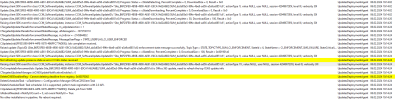
We use version 2211 on a Server 2016
Any ideas?
Thanks
Michael
We use three ADRs (Windows Updates and Office). The Windows updates work for clients and servers.
The Office update is visible in the Software Centre and aborts shortly after starting with the error 0x801901A0. This has already been recreated and the error still remains.
UpdatesStore.log
UpdatesHandler.log
We have installed 6 languages and these are also selected in the update process. I can not find any Errors in the CAS.Log
UpdatesDeployment.log
We use version 2211 on a Server 2016
Any ideas?
Thanks
Michael


