Forums on Intune, SCCM, and Windows 11

Welcome to the forums. Register a free account today to become a member! Once signed in, you'll be able to participate on this site by adding your topics and posts, as well as connect with other members through your own private inbox!

PENDING New Installation SCCM 2012 *Error*

ThePunisher

Member
Messages
22
Solutions
1
Reaction score
2
Points
3
Hi everyone. I have a problem that is driving me crazy !!! I describe my scenario :

SCCM SERVER:
WINDOWS SERVER 2012 R2 STANDARD;
SCCM 2012 SP2


SQL SERVER (EXTERNAL):
WINDOWS SERVER 2012 R2 STANDARD;
SQL 2012 SP3 CU7


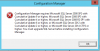
When I start the installation I get the following error:
 

Attachments

  • Capture.PNG
    Capture.PNG
    14.6 KB · Views: 7
is there a reason why you are installing a old version of cm? why not install cmcb?
 
The error message is clear, the version of your SQL Server is not supported with SCCM 2012 SP2, you must need at least SQL Server 2012 SP3 with cumulative update 6 or higher.

Check if the CU7 is correctly installed and give us please the build version number of your SQL Server.
 
The error message is clear, the version of your SQL Server is not supported with SCCM 2012 SP2, you must need at least SQL Server 2012 SP3 with cumulative update 6 or higher.

Check if the CU7 is correctly installed and give us please the build version number of your SQL Server.
Sorry, but for me not very clear the error message :)
The version installed on my sql server is SP3 CU7.
I do not understand..... :(
 
Don't worry, we are here for you. :)

To get SQL server version, you can use one of the following steps:
  1. On the SQL Server, Open SQL Server Management Studio, connect to your SQL Server instance.
    Run a new query: SELECT @@version
    Execute the query to get the result.

    Or:

  2. On the SQL Server Management Studio, right click on the SQL Server instance name (MSSQLSERVER by default) and select Properties ; you have a box version.

Tell me if you want more details about this.
 
Don't worry, we are here for you. :)

To get SQL server version, you can use one of the following steps:
  1. On the SQL Server, Open SQL Server Management Studio, connect to your SQL Server instance.
    Run a new query: SELECT @@version
    Execute the query to get the result.

    Or:

  2. On the SQL Server Management Studio, right click on the SQL Server instance name (MSSQLSERVER by default) and select Properties ; you have a box version.

Tell me if you want more details about this.
I already executed the query on the sql server and the version is the one I posted.
The only thing I don't remember (not working now) is the BUILD number
 
I do not understand.
unfortunately the version is imposed by my company

CM12 is an outdated version of CM. I would go back to management and make sure that they know you are setting up an outdated version on CM. For example it does really support Windows 10. Do you plan to support Window 10?
 
Just wondered why your Team don't want to install SCCM CB? As said by Garth, you can explore a lot of features and make your daily tasks easier to manage the clients.
 
I agree with you, but the company has decided at this time not to make any upgrades, in fact the clients are windows 7.
I am proposing to wait and take a new product, but many times it is difficult to make people understand the technical aspect
 
CM12 is an outdated version of CM. I would go back to management and make sure that they know you are setting up an outdated version on CM. For example it does really support Windows 10. Do you plan to support Window 10?
But R2 support Windows 10? I'm a wrong?
 
I agree with you, but the company has decided at this time not to make any upgrades, in fact the clients are windows 7.
I am proposing to wait and take a new product, but many times it is difficult to make people understand the technical aspect
Windows 7 extended support is expiring in 5 months time. It is better for you to use the CMCB as it has the in-place upgrade feature.
 

Forum statistics

Threads
7,165
Messages
27,971
Members
18,271
Latest member
prashantrm

Trending content

Back
Top