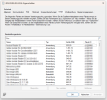
There are many thing you could check, is you MP also your DP?
What does the distribution and pckagemger loogs look like?
what does component status look like?
what actually happens whenyou boot pxe?
What does the smspxe log say?
Can you see the content on your DP?
Hey
@Stanley Road,
thanks for your reply.
1. is you MP also your DP?
Yes, it is MP and DP
2. What does the distribution and pckagemger loogs look like?
Which logs exactly do you mean?
3. what does component status look like?
Component status is critical due to HTTP and HTTPS-Problem we got like Months ago but it still worked until yesterday
4. what actually happens whenyou boot pxe?
The Clients are getting the following error:
Server IP address is XX.XX.XX.XX
NBP filename is boot\x64\wdsmgfw.efi
NBP filesize is 0 Bytes
PXE-E23: Client received TFTP error from server.
-> The File exists and has a size of 952kb
5. What does the smspxe log say?
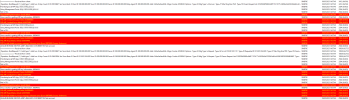
Text-format:
============> Received from client: SMSPXE 06.05.2025 14:57:40 3412 (0x0D54)
Operation: BootRequest (1) Addr type: 1 Addr Len: 6 Hop Count: 0 ID: FDFCBEE7
Sec Since Boot: 0 Client IP: 000.000.000.000 Your IP: 000.000.000.000 Server IP: 000.000.000.000 Relay Agent IP: 000.000.000.000
Addr: 24:6a:0e:9e:e9:8b:
Magic Cookie: 63538263
Options:
Type=53 Msg Type: 1=Discover
Type=57 Max Msg Size: 05c0
Type=55 Param Request List: 0102030405060c0d0f111216171c28292a2b3233363a3b3c4243618081828384858687
Type=97 UUID: 0035f3e503b7ad4448b4c0c35ceb887195
Type=94 UNDI: 010310
Type=93 Client Arch: EFI BC
Type=60 ClassId: PXEClient:Arch:00007:UNDI:003016 SMSPXE 06.05.2025 14:57:40 3412 (0x0D54)
Prioritizing local MP XXX SMSPXE 06.05.2025 14:57:40 2504 (0x09C8)
Using Management Point: XXX SMSPXE 06.05.2025 14:57:40 2504 (0x09C8)
Not in SSL. SMSPXE 06.05.2025 14:57:40 2504 (0x09C8)
RequestMPKeyInformation: Send() failed. SMSPXE 06.05.2025 14:57:40 2504 (0x09C8)
Unsuccessful in getting MP key information. 80004005. SMSPXE 06.05.2025 14:57:40 2504 (0x09C8)
PXE::MP_InitializeTransport failed; 0x80004005 SMSPXE 06.05.2025 14:57:40 2504 (0x09C8)
PXE::MP_LookupDevice failed; 0x80070490 SMSPXE 06.05.2025 14:57:40 2504 (0x09C8)
Prioritizing local MP XXX. SMSPXE 06.05.2025 14:57:40 2504 (0x09C8)
Using Management Point: XXX SMSPXE 06.05.2025 14:57:40 2504 (0x09C8)
Not in SSL. SMSPXE 06.05.2025 14:57:40 2504 (0x09C8)
RequestMPKeyInformation: Send() failed. SMSPXE 06.05.2025 14:57:40 2504 (0x09C8)
Unsuccessful in getting MP key information. 80004005. SMSPXE 06.05.2025 14:57:40 2504 (0x09C8)
PXE::MP_InitializeTransport failed; 0x80004005 SMSPXE 06.05.2025 14:57:40 2504 (0x09C8)
PXE::MP_ReportStatus failed; 0x80070490 SMSPXE 06.05.2025 14:57:40 2504 (0x09C8)
PXE Provider failed to process message.
Unknown error (Error: 80070490; Source: Unknown) SMSPXE 06.05.2025 14:57:40 2504 (0x09C8)
24:6A:0E:9E:E9:8B, 03E5F335-ADB7-4844-B4C0-C35CEB887195: Not serviced. SMSPXE 06.05.2025 14:57:40 2504 (0x09C8)
============> Received from client: SMSPXE 06.05.2025 14:57:44 10028 (0x272C)
Operation: BootRequest (1) Addr type: 1 Addr Len: 6 Hop Count: 0 ID: FDFCBEE7
Sec Since Boot: 0 Client IP: 000.000.000.000 Your IP: 000.000.000.000 Server IP: 000.000.000.000 Relay Agent IP: 000.000.000.000
Addr: 24:6a:0e:9e:e9:8b:
Magic Cookie: 63538263
Options:
Type=53 Msg Type: 3=Request
Type=54 Svr id: 010.001.001.101
Type=50 Requested IP: 010.001.034.029
Type=57 Max Msg Size: ff00
Type=55 Param Request List: 0102030405060c0d0f111216171c28292a2b3233363a3b3c4243618081828384858687
Type=97 UUID: 0035f3e503b7ad4448b4c0c35ceb887195
Type=94 UNDI: 010310
Type=93 Client Arch: EFI BC
Type=60 ClassId: PXEClient:Arch:00007:UNDI:003016 SMSPXE 06.05.2025 14:57:44 10028 (0x272C)
============> Received from client: SMSPXE 06.05.2025 14:57:44 10028 (0x272C)
Operation: BootRequest (1) Addr type: 1 Addr Len: 6 Hop Count: 0 ID: FAE4CB0A
Sec Since Boot: 0 Client IP: 010.001.034.029 Your IP: 000.000.000.000 Server IP: 000.000.000.000 Relay Agent IP: 000.000.000.000
Addr: 24:6a:0e:9e:e9:8b:
Magic Cookie: 63538263
Options:
Type=53 Msg Type: 3=Request
Type=55 Param Request List: 0102030405060c0d0f111216171c28292a2b3233363a3b3c4243618081828384858687
Type=57 Max Msg Size: 05c0
Type=60 ClassId: PXEClient:Arch:00007:UNDI:003016
Type=93 Client Arch: EFI BC
Type=94 UNDI: 010310
Type=97 UUID: 0035f3e503b7ad4448b4c0c35ceb887195 SMSPXE 06.05.2025 14:57:44 10028 (0x272C)
Prioritizing local MP XXX. SMSPXE 06.05.2025 14:57:44 2504 (0x09C8)
Using Management Point: XXX SMSPXE 06.05.2025 14:57:44 2504 (0x09C8)
Not in SSL. SMSPXE 06.05.2025 14:57:44 2504 (0x09C8)
RequestMPKeyInformation: Send() failed. SMSPXE 06.05.2025 14:57:44 2504 (0x09C8)
Unsuccessful in getting MP key information. 80004005. SMSPXE 06.05.2025 14:57:44 2504 (0x09C8)
PXE::MP_InitializeTransport failed; 0x80004005 SMSPXE 06.05.2025 14:57:44 2504 (0x09C8)
PXE::MP_LookupDevice failed; 0x80070490 SMSPXE 06.05.2025 14:57:44 2504 (0x09C8)
Prioritizing local MP XXX. SMSPXE 06.05.2025 14:57:44 2504 (0x09C8)
Using Management Point: XXX SMSPXE 06.05.2025 14:57:44 2504 (0x09C8)
Not in SSL. SMSPXE 06.05.2025 14:57:44 2504 (0x09C8)
RequestMPKeyInformation: Send() failed. SMSPXE 06.05.2025 14:57:44 2504 (0x09C8)
Unsuccessful in getting MP key information. 80004005. SMSPXE 06.05.2025 14:57:44 2504 (0x09C8)
PXE::MP_InitializeTransport failed; 0x80004005 SMSPXE 06.05.2025 14:57:44 2504 (0x09C8)
PXE::MP_ReportStatus failed; 0x80070490 SMSPXE 06.05.2025 14:57:44 2504 (0x09C8)
PXE Provider failed to process message.
Unknown error (Error: 80070490; Source: Unknown) SMSPXE 06.05.2025 14:57:44 2504 (0x09C8)
24:6A:0E:9E:E9:8B, 03E5F335-ADB7-4844-B4C0-C35CEB887195: Not serviced. SMSPXE 06.05.2025 14:57:44 2504 (0x09C8)
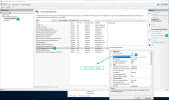
6. Can you see the content on your DP?
Yes, the Content is listed: