Forums on Intune, SCCM, and Windows 11

Welcome to the forums. Register a free account today to become a member! Once signed in, you'll be able to participate on this site by adding your topics and posts, as well as connect with other members through your own private inbox!

SOLVED MECM/SCCM showing no reports under Monitoring/Reports

Status
Not open for further replies.

lalajee2018

Well-Known Member
Messages
143
Reaction score
6
Points
18
On new build sccm server I cant seem to get the reporting work.

I try following steps

  1. Remove Report role from sccm
  2. Uninstall Report Services
  3. Reboot Server
  4. Reinstall Report Services
  5. Configure Report Services
  6. Reinstall the Report Service Role in ConfigMgr
I still see following errors in rrsp.log

  1. Wait timed out. SMS_SRS_REPORTING_POINT 27/09/2022 15:03:13 4168 (0x1048)
  2. Updating SRS Configuration. SMS_SRS_REPORTING_POINT 27/09/2022 15:03:13 4168 (0x1048)
  3. Checking reporting server health. SMS_SRS_REPORTING_POINT 27/09/2022 15:03:13 4168 (0x1048)
  4. Successfully created srsserver instance to monitor reporting service. SMS_SRS_REPORTING_POINT 27/09/2022 15:03:13 4168 (0x1048)
  5. Reporting Services URL from Registry [http://SCCM/ReportServer/ReportService2005.asmx] SMS_SRS_REPORTING_POINT 27/09/2022 15:03:13 4168 (0x1048)
  6. Client found response content type of '', but expected 'text/xml'.~~The request failed with an empty response. SMS_SRS_REPORTING_POINT 27/09/2022 15:03:13 4168 (0x1048)
  7. (!) SRS not detected as running SMS_SRS_REPORTING_POINT 27/09/2022 15:03:13 4168 (0x1048)
  8. Failures reported during periodic health check by the SRS Server SCCM.Domain.co.uk. SMS_SRS_REPORTING_POINT 27/09/2022 15:03:13 4168 (0x1048)
  9. Verifing registry change notification is configured. SMS_SRS_REPORTING_POINT 27/09/2022 15:03:13 4168 (0x1048)
  10. Waiting for change or shutdown for 1 minutes SMS_SRS_REPORTING_POINT 27/09/2022 15:03:13 4168 (0x1048)
 
Solution
Hello!
I see this is an old post but it seems to be very closely related to an issue I am having. The issue is that reports are not showing up in SCCM, but can be used and accessed from the Reports URL. The ReportsServer URL also works.

In srsrp.log I see these entries repeated every minute.
Updating SRS Configuration. SMS_SRS_REPORTING_POINT 7/14/2023 12:47:17 PM 10264 (0x2818)
Checking reporting server health. SMS_SRS_REPORTING_POINT 7/14/2023 12:47:17 PM 10264 (0x2818)
Successfully created srsserver instance to monitor reporting service. SMS_SRS_REPORTING_POINT 7/14/2023 12:47:17 PM 10264 (0x2818)
Reporting Services URL from Registry [https://servername/Reports/ReportService2005.asmx]...
Did you check to see if SSRS is working correctly?
ssrs log show errors
ssrssetup log show it was installed without any issue
Did you browse to the website? if this is NOT working then either will CM be able to do anything.
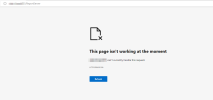
I can visit Reports without any issue but ReportServer show erorr

This page isn't working at the moment​

sccmserver can't currently handle this request.


HTTP ERROR 500
 
Last edited:
If you can't server to the reportserver url then SSRS is not properly setup. You will need to fix that first before RP can work.
 
If you can't server to the reportserver url then SSRS is not properly setup. You will need to fix that first before RP can work.
Any fix I try, get same issue.

What do I need to do to get this fixed.

I removed SSRS role and application but still same issue after the install.

I also remove the database and remove/disable anti virus software
 
this is what I get when I try to access reportserver url


245552-image.png


245561-image.png
 
Do you see any error here - Click on Monitoring, expand System Status, select Component Status, and look for SMS_SRS_REPORTING_POINT.

Also ensure your default "80" is not blocked by other apps.
 
Can you remove the reporting services role and follow this guide to set it up correctly - https://www.prajwaldesai.com/install-sccm-reporting-services-point-ssrs/
If you still encounter the same issue, we will further troubleshoot it.
I have removed SSRP and SQL database. Then Install it with above guide but still same issue

When I try to access ReportServer URL i get error 500 but Reports URL works fine

1665391813701.png
I have removed antivirus/disabled but still same issue
SSRP and sql is on same box
Firewall ports are open
 
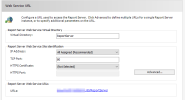
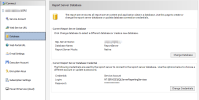
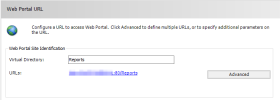
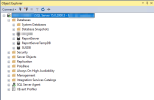
In that guide which I sent you, did you configure the Web Service URL and Web Portal URL?. Also, do you see the report server DB created in the SQL server?.
 
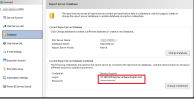
I suspect the issue may be an in-built account. Can you change to a domain account and restart service? Also please ensure whether you have assigned correct permission to the domain account?
1665394526785.png
 
Status
Not open for further replies.
Back
Top