Forums on Intune, SCCM, and Windows 11

Welcome to the forums. Register a free account today to become a member! Once signed in, you'll be able to participate on this site by adding your topics and posts, as well as connect with other members through your own private inbox!

PENDING Issue with PXE booting PXE error
RetroKJ14

Member
Messages
6
Reaction score
0
Points
1
Good Day,

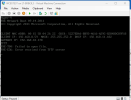
I am receiving this error on all PXE initiated boots on all new devices.

TFTP:
PXE-T00: Failed to open file
PXE-E36: Error received from TFTP server

on the next screen no bootable devices found. Could you please assist.
 

Attachments

  • Screenshot 2024-09-11 124552.png
    Screenshot 2024-09-11 124552.png
    24.4 KB · Views: 17
Hi Prajwal,

Thank you for coming back, the steps I followed so far was to:
1. Check if all services are running on the SCCM server.
2. Drive space and permissions
3. Re-distribute the BOOT files to the DP
4. Test with VM and Physical machine legacy and UEFI
5. Check the SMSLog. - See attached.
 

Attachments

Hi Prajwal,

Thank you for coming back, the steps I followed so far was to:
1. Check if all services are running on the SCCM server.
2. Drive space and permissions
3. Re-distribute the BOOT files to the DP
4. Test with VM and Physical machine legacy and UEFI
5. Check the SMSLog. - See attached.

Looks like you may have an expired DP certificate (which we just went through recently at our site). Prajwal has a good summary of the process at https://www.prajwaldesai.com/deploying-the-client-certificate-for-distribution-points/

We ran into an issue where the certificate was bound to both the IPv4 and IPv6 addresses on the server, but only one showed in the IIS management GUI. If you find replacing the DP certificate doesn't clear up the issue, run "netsh http show sslcert" and confirm whether you have an old certificate bound to one of the addresses on your server. You'll have to go by the certificate hash, then compare that with the current and expired certs in your certificate store.
 
Looks like you may have an expired DP certificate (which we just went through recently at our site). Prajwal has a good summary of the process at https://www.prajwaldesai.com/deploying-the-client-certificate-for-distribution-points/

We ran into an issue where the certificate was bound to both the IPv4 and IPv6 addresses on the server, but only one showed in the IIS management GUI. If you find replacing the DP certificate doesn't clear up the issue, run "netsh http show sslcert" and confirm whether you have an old certificate bound to one of the addresses on your server. You'll have to go by the certificate hash, then compare that with the current and expired certs in your certificate store.
Hi JP,

Thanks very much for your help. This fixed the issue. Appreciated
 

Forum statistics

Threads
7,196
Messages
28,079
Members
18,352
Latest member
skanaguk

Trending content

Back
Top