
Hello everyone! Greetings from Poland!
I have a small issue and I need your help!
I need to set the regional settings in Windows 11 using SCCM (preferably using Task Sequnce)- I cannot use GPO. I tried to use the settings for this:
Input Local:
System Local:
UI Language:
UI Language Failback
User Local
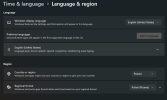
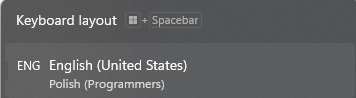
But the effect was not what I would expect. How can I achieve what is shown in the screenshot. What is important is that the keyboard must also have a layout like the one in the screenshot.
Thank you for help!
Best Regards!
I have a small issue and I need your help!
I need to set the regional settings in Windows 11 using SCCM (preferably using Task Sequnce)- I cannot use GPO. I tried to use the settings for this:
Input Local:
System Local:
UI Language:
UI Language Failback
User Local
But the effect was not what I would expect. How can I achieve what is shown in the screenshot. What is important is that the keyboard must also have a layout like the one in the screenshot.
Thank you for help!
Best Regards!

