Forums on Intune, SCCM, and Windows 11

Welcome to the forums. Register a free account today to become a member! Once signed in, you'll be able to participate on this site by adding your topics and posts, as well as connect with other members through your own private inbox!

SOLVED how to delete driver categories

  • Thread starter Thread starter pcb
  • Start date Start date
  • Replies Replies 4
  • Views Views 6K

pcb

Well-Known Member
Messages
45
Solutions
2
Reaction score
0
Points
6
I inherited a mess and I can't find a way to clean it up: Driver categories - does anyone know where this list comes from? I've deleted all drivers and it is still there. How do I delete the categories so I can start fresh?
View attachment 5270
 
I inherited a mess and I can't find a way to clean it up: Driver categories - does anyone know where this list comes from? I've deleted all drivers and it is still there. How do I delete the categories so I can start fresh?
View attachment 5270

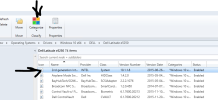
under software library / operating systems / Drivers / choose any driver from the list on the right or any driver under any folder you have. in the menu the category button will show up. click on categorize then manage categories. you will get a list in which you can select the ones you want to delete
1684935533456.png
 
Yes, thank you. There must be at least one driver in the list to get to the category dialog.
 
Hello! Is there a way to permanently delete the category so it doesn't show up in the category list anymore? The method shown removes the category from the driver itself.
 
Back
Top