Forums on Intune, SCCM, and Windows 11

Welcome to the forums. Register a free account today to become a member! Once signed in, you'll be able to participate on this site by adding your topics and posts, as well as connect with other members through your own private inbox!

SOLVED Help: Adding NIC driver to MDT Boot Image

Status
Not open for further replies.

Edy

Well-Known Member
Messages
310
Solutions
3
Reaction score
33
Points
28
Hi guys,

We recently acquired a new laptop model and pxe failed because the network driver doesnt exist (not getting IP address).

I have imported the required drivers + the right network driver to SCCM.

When Pxe booting, it is using a MDT Wim Boot Image file and there is no option to add the network driver to the boot image (Drivers tab is not listed)

Can anyone please help on how can i import the nic driver to that boot image?

Thanks
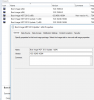
 

Attachments

  • Boot_Image.PNG
    Boot_Image.PNG
    27.1 KB · Views: 26
Do you have permission(s) to edit the boot image? You seem to be missing a few other tabs too...

NoBZhXJ.png


Can you add the driver by finding the Driver under Software Library, and selecting to Edit the Boot Images that way??

ZcMUrfI.png


Alternatively, you could import the drivers manually, using DISM.

Here are the steps to setup for and inject the drivers into the boot.wim file with DISM.


Preparation:
  1. Create the following folders on the root of the C drive:
    C:\Mount
    C:\Mount\Drivers
    C:\Mount\BootWIM
  2. Copy the drivers you wish to inject into the C:\Mount\Drivers folder
  3. Copy boot.wim to the C:\Mount folder.


Execution:
  1. Open a CMD prompt as Administrator.
  2. Navigate to "C:\Mount".
  3. Use the following DISM commands to mount the Boot.wim:
    DISM /Mount-Wim /WimFile:C:\Mount\boot.wim /Index:1 /MountDir:C:\Mount\BootWIM
  4. Use the following DISM command to add the driver:
    DISM /Image:C:\Mount\BootWIM /Add-Driver /Driver:C:\Mount\Drivers /recurse
  5. Use the following DISM command to unmount the Boot.wim:
    DISM /Unmount-Wim /MountDir:C:\Mount\BootWIM /Commit


Cleanup and Deploy:

  1. Copy the newly updated Boot.WIM file from the mount folder to your Boot File folder and re-import to SCCM.
  2. If desired, you can delete the C:\Mount folder and its contents.
  3. Redeploy/redistribute.
  4. PXE Boot your client and verify the drivers are being correctly recognised now.
 
Last edited:
Hi Vini,

Thanks for your response.

I have just realised that we recently upgraded SCCM from SP1 to 1702 and installed Windows 10 ADK 10.1.15063.0. This caused the boot image version mismatch.

Is it possible for me to uninstall the new ADK and reinstall the old one to update the nic driver? and then create win10 boot image when we ready.

Thanks
 
I just changed my Task Sequence to use the right winpe boot image, delete the deployment to re-advertise and it is now using the new boot image.
 
Status
Not open for further replies.
Back
Top