Forums on Intune, SCCM, and Windows 11

Welcome to the forums. Register a free account today to become a member! Once signed in, you'll be able to participate on this site by adding your topics and posts, as well as connect with other members through your own private inbox!

SOLVED GetDPLocations failed with error 0x80072efe

Status
Not open for further replies.

PH25

Well-Known Member
Messages
62
Reaction score
1
Points
8
I have set up a fresh instance of SCCM for the first time. Everything looks in order, just the one boundary (AD site) and boundary group. Client deploy but only shows 2 tasks (machine cycle and user cycle) and doesn't talk back to SCCM, therefore shows as clients 'none' in the console.

I can see the following errors:

failed to send management point list location request
failed to send registration request 0x87d00231

GetDPLocations failed with error 0x80072efe
Failed to get DP locations as the expected versions from MP 'ServerName' error 0x80072efe

I've been looking into this for some time to no avail. Help would be massively appreciated.
 
Client deploy but only shows 2 tasks (machine cycle and user cycle) - The client agent is not able to communicate to the MP.
failed to send registration request 0x87d00231 - Looks like its an issue with the certificate which is preventing these clients from communicating with the new SCCM 2012 environment.

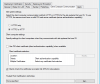
Could you check Client computer communication settings in ConfigMgr 2012 Administration > Site Configuration > Site properties ? Post the screenshot here.
If you have tried all the steps, you could try reinstalling the MP once.
 
Thanks for your reply. I have already reinstalled the MP, to no avail.

Here's the screen shot..

upload_2015-7-27_15-16-24.png
 
open Cert store on client machine , check under Certificates-->SMS-->If there is any cert . If yes compare that with the one in clientIDmanager startup log .It should be showing like cert is expired.
If this is the case delete the certificate , and do a clean manual uninstallation of SCCM agent , check if all registries are removed delete all folders related to SCCM agent CCM CCM setup and cache . Reinstall SCCM agent and then monitor clientidmanager log
If still it shows pending reg , assign forcefully it to the reporting primary .You can download Client Action tool for doing this task .
 
Thanks. Sorry, i only just noticed this reply. I'll check this tomorrow and let you know how i get on.

If i have to forcefully assign it, does that mean i'll have to do this for each client? This problem has happened on the only 2 PCs i've tested this on, so am concerned push install isn't going to work, domain-wide.

Do the setting in the screenshot look okay, or have i missed some certificate setup somewhere?
 
Hi, It's looking like this might have been a central firewall issue, it's been flagged up and a firmware upgrade is taking place, so fingers crossed it might kick into life tomorrow. I don't think the rules in place were actually taking effect. Thanks for all your help, i'll write back if this is solved.
 
Status
Not open for further replies.

Forum statistics

Threads
7,126
Messages
27,829
Members
18,139
Latest member
KumarGourav

Latest posts

Trending content

Back
Top