Forums on Intune, SCCM, and Windows 11

Welcome to the forums. Register a free account today to become a member! Once signed in, you'll be able to participate on this site by adding your topics and posts, as well as connect with other members through your own private inbox!

PENDING Feature Updates for Windows 10 not Available

  • Thread starter Thread starter RetailTrust
  • Start date Start date
  • Replies Replies 2
  • Views Views 3K

RetailTrust

New Member
Messages
2
Reaction score
0
Points
1
Hi, I'm very new to SCCM and have inherited a very messy deployment which does work for "regular" updates for our Windows 10 Workstations and 2016 / 2019 Servers but within the Windows 10 Servicing area, there are zero updates showing in "All Windows 10 Updates". Under the SUP, I can see that under the Sync Settings Tab, we are set to "synchronise from Microsoft Update" and under classifications, "upgrades" (as well as "Critical updates", "Security Updates" etc.., are selected. The "regular" updates appear to deployed via ADR's, that package up the updates and push them to the clients. Note, we do have a dedicated WSUS server (that is bizarrely set to Sync off itself - LOL) and also there is a WSUS role is installed on the SCCM server (but not configured), is it possible that for the Feature updates to work via SCCM, that it needs to sync off a WSUS server (with amongst others, "upgrades" chosen) ?
 
So when you select All Windows 10 updates, it's blank ?. Can you also confirm if the sync is working fine and what classifications have you selected under SUP.
 
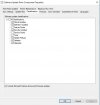
Thanks Prajwal, sorry for the delay - busy with an Azure migration project. Yes, "All Windows 10 updates" are totally blank The selections in the classifications are as shown in the attached screenshot.
 

Attachments

  • SCCM_SUP_Classifications.jpg
    SCCM_SUP_Classifications.jpg
    39.4 KB · Views: 2

Forum statistics

Threads
7,133
Messages
27,856
Members
18,151
Latest member
TonyGTR
Back
Top