
I'm trying to install a printerdriver using CM using this PowerShell scripts
Get-ChildItem ".\UNIV_5.617.7.0_PS_x64\UNIV_5.617.7.0_PS_x64_Driver.inf" -Recurse -Filter "*inf" | ForEach-Object { PNPUtil.exe /add-driver $_.FullName /install }
Add-PrinterDriver -Name "Xerox GPD PS V5.617.7.0"
Manually running the PS script works fine, when running it via Software Center I get this error:
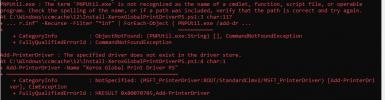
Anyone any ideas?
Get-ChildItem ".\UNIV_5.617.7.0_PS_x64\UNIV_5.617.7.0_PS_x64_Driver.inf" -Recurse -Filter "*inf" | ForEach-Object { PNPUtil.exe /add-driver $_.FullName /install }
Add-PrinterDriver -Name "Xerox GPD PS V5.617.7.0"
Manually running the PS script works fine, when running it via Software Center I get this error:
Anyone any ideas?
