david.gardner
Member
- Messages
- 10
- Reaction score
- 0
- Points
- 1
Hi guys,
We have 1 DP that is working fine but 3 that have suddenly stopped working.
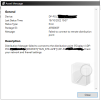
This is the error we get.
This is the data from the distmgr.log
DP 1
Failed to find a valid drive on the distribution point ["Display=\\DP-POL.XXXXX.local\"]MSWNET:["SMS_SITE=DAG"]\\DP-POL.XXXXX.local\ SMS_DISTRIBUTION_MANAGER 18/10/2022 19:06:19 22628 (0x5864)
Finished GetDPUsableDrives - ["Display=\\DP-POL.XXXXX.local\"]MSWNET:["SMS_SITE=DAG"]\\DP-POL.XXXXX.local\ SMS_DISTRIBUTION_MANAGER 18/10/2022 19:06:19 22628 (0x5864)
Cannot find or create the signature share. SMS_DISTRIBUTION_MANAGER 18/10/2022 19:06:19 22628 (0x5864)
Failed to make a network connection to \\DP-POL.XXXXX.local\ADMIN$ (0x5). SMS_DISTRIBUTION_MANAGER 18/10/2022 17:46:28 33980 (0x84BC)
DP 2
CWmi::Connect() failed to connect to \\["Display=\\DP-ZH.XXXXX.local\"]MSWNET:["SMS_SITE=DAG"]\\DP-ZH.XXXXX.local\\root\CIMv2. Error = 0x800706BA SMS_DISTRIBUTION_MANAGER 18/10/2022 19:06:18 39636 (0x9AD4)
STATMSG: ID=2391 SEV=E LEV=M SOURCE="SMS Server" COMP="SMS_DISTRIBUTION_MANAGER" SYS=DAG2WINSCCM01P.PROD.XXXXX.local SITE=DAG PID=16164 TID=39636 GMTDATE=ma. oct. 18 17:06:18.990 2022 ISTR0="["Display=\\DP-ZH.XXXXX.local\"]MSWNET:["SMS_SITE=DAG"]\\DP-ZH.XXXXX.local\" ISTR1="" ISTR2="" ISTR3="" ISTR4="" ISTR5="" ISTR6="" ISTR7="" ISTR8="" ISTR9="" NUMATTRS=1 LE=0X0 AID0=404 AVAL0="["Display=\\DP-ZH.XXXXX.local\"]MSWNET:["SMS_SITE=DAG"]\\DP-ZH.XXXXX.local\" SMS_DISTRIBUTION_MANAGER 18/10/2022 19:06:18 39636 (0x9AD4)
ERROR DPConnection::ConnectWMI() - Failed to connect to DP-ZH.XXXXX.local. error = 0x800706ba SMS_DISTRIBUTION_MANAGER 18/10/2022 19:06:18 39636 (0x9AD4)
DP 3
Failed to find a valid drive on the distribution point ["Display=\\DP-ITA.XXXXX.local\"]MSWNET:["SMS_SITE=DAG"]\\DP-ITA.XXXXX.local\ SMS_DISTRIBUTION_MANAGER 18/10/2022 19:06:19 68604 (0x10BFC)
Finished GetDPUsableDrives - ["Display=\\DP-ITA.XXXXX.local\"]MSWNET:["SMS_SITE=DAG"]\\DP-ITA.XXXXX.local\ SMS_DISTRIBUTION_MANAGER 18/10/2022 19:06:19 68604 (0x10BFC)
Cannot find or create the signature share. SMS_DISTRIBUTION_MANAGER 18/10/2022 19:06:19 68604 (0x10BFC)
I´ve checked the time sync and it´s ok.
I´ve also checked firewall ports and that´s ok too.
Does anyone have any suggestions?
Many thanks in anticipation.
We have 1 DP that is working fine but 3 that have suddenly stopped working.
This is the error we get.
This is the data from the distmgr.log
DP 1
Failed to find a valid drive on the distribution point ["Display=\\DP-POL.XXXXX.local\"]MSWNET:["SMS_SITE=DAG"]\\DP-POL.XXXXX.local\ SMS_DISTRIBUTION_MANAGER 18/10/2022 19:06:19 22628 (0x5864)
Finished GetDPUsableDrives - ["Display=\\DP-POL.XXXXX.local\"]MSWNET:["SMS_SITE=DAG"]\\DP-POL.XXXXX.local\ SMS_DISTRIBUTION_MANAGER 18/10/2022 19:06:19 22628 (0x5864)
Cannot find or create the signature share. SMS_DISTRIBUTION_MANAGER 18/10/2022 19:06:19 22628 (0x5864)
Failed to make a network connection to \\DP-POL.XXXXX.local\ADMIN$ (0x5). SMS_DISTRIBUTION_MANAGER 18/10/2022 17:46:28 33980 (0x84BC)
DP 2
CWmi::Connect() failed to connect to \\["Display=\\DP-ZH.XXXXX.local\"]MSWNET:["SMS_SITE=DAG"]\\DP-ZH.XXXXX.local\\root\CIMv2. Error = 0x800706BA SMS_DISTRIBUTION_MANAGER 18/10/2022 19:06:18 39636 (0x9AD4)
STATMSG: ID=2391 SEV=E LEV=M SOURCE="SMS Server" COMP="SMS_DISTRIBUTION_MANAGER" SYS=DAG2WINSCCM01P.PROD.XXXXX.local SITE=DAG PID=16164 TID=39636 GMTDATE=ma. oct. 18 17:06:18.990 2022 ISTR0="["Display=\\DP-ZH.XXXXX.local\"]MSWNET:["SMS_SITE=DAG"]\\DP-ZH.XXXXX.local\" ISTR1="" ISTR2="" ISTR3="" ISTR4="" ISTR5="" ISTR6="" ISTR7="" ISTR8="" ISTR9="" NUMATTRS=1 LE=0X0 AID0=404 AVAL0="["Display=\\DP-ZH.XXXXX.local\"]MSWNET:["SMS_SITE=DAG"]\\DP-ZH.XXXXX.local\" SMS_DISTRIBUTION_MANAGER 18/10/2022 19:06:18 39636 (0x9AD4)
ERROR DPConnection::ConnectWMI() - Failed to connect to DP-ZH.XXXXX.local. error = 0x800706ba SMS_DISTRIBUTION_MANAGER 18/10/2022 19:06:18 39636 (0x9AD4)
DP 3
Failed to find a valid drive on the distribution point ["Display=\\DP-ITA.XXXXX.local\"]MSWNET:["SMS_SITE=DAG"]\\DP-ITA.XXXXX.local\ SMS_DISTRIBUTION_MANAGER 18/10/2022 19:06:19 68604 (0x10BFC)
Finished GetDPUsableDrives - ["Display=\\DP-ITA.XXXXX.local\"]MSWNET:["SMS_SITE=DAG"]\\DP-ITA.XXXXX.local\ SMS_DISTRIBUTION_MANAGER 18/10/2022 19:06:19 68604 (0x10BFC)
Cannot find or create the signature share. SMS_DISTRIBUTION_MANAGER 18/10/2022 19:06:19 68604 (0x10BFC)
I´ve checked the time sync and it´s ok.
I´ve also checked firewall ports and that´s ok too.
Does anyone have any suggestions?
Many thanks in anticipation.