Forums on Intune, SCCM, and Windows 11

Welcome to the forums. Register a free account today to become a member! Once signed in, you'll be able to participate on this site by adding your topics and posts, as well as connect with other members through your own private inbox!

SOLVED Devices still pointing to old SCCM server

Status
Not open for further replies.

Strahinja JANACEK

Active Member
Messages
40
Solutions
5
Reaction score
0
Points
6
Hi all!
I'm facing the problem that my computers are still pointing to the old SCCM01 server. After forcing the Client installation manually, then they get the new SCCM02.
But I removed:
- all boundaries from the old server
- client settings
- disabled the discovery method for the OU where the clients are
.... and configured everything on the new SCCM02. But after a while they get the old SCCM01 assigned.

Any idea what I forgot to remove or adjust?

Best regards,
Strahinja
 
Solution
Yes, the boundaries are correct. I double-checked them. Because I transfered them to the new server and removed the old server entry within every boundary. We are using only IP ranges.

Where can I find the boundaries in AD?

We don't use a GPO for deploying the client. This has been also checked by me. And if we use GPO, this would change the SCCM server on the clients within a day. But in my case it's happening after few days that it changed to the old one.
Yesterday I pushed again the sccm client manually as shown in my last reply (screenshot) and for now everything is fine. Let see how long this will stay.
The boundaries in Ad are in the system container but they should have been removed when you deleted the boundaries on...
What command did you use to install the client manually ?. Was the site code specified in the command ?.
 
What command did you use to install the client manually ?. Was the site code specified in the command ?.
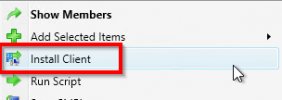
I'm using the feature "Install client" within configuration manager. I'm doing right-click on the device or on the collection and then "Install client"

1638795852803.png

It's installing it fine, but after the weekend I saw that software center was not loading after a while and when I checked within configuration manager I saw that the old SCCM01 was again there.
 
Are you sure that the boundaries are correct? aka are you ONLY using IP Ranges?
Did you clean the boundaries out of AD?
Di you EVER use GPO to deploy the Client on the old site?
 
Are you sure that the boundaries are correct? aka are you ONLY using IP Ranges?
Did you clean the boundaries out of AD?
Di you EVER use GPO to deploy the Client on the old site?
Yes, the boundaries are correct. I double-checked them. Because I transfered them to the new server and removed the old server entry within every boundary. We are using only IP ranges.

Where can I find the boundaries in AD?

We don't use a GPO for deploying the client. This has been also checked by me. And if we use GPO, this would change the SCCM server on the clients within a day. But in my case it's happening after few days that it changed to the old one.
Yesterday I pushed again the sccm client manually as shown in my last reply (screenshot) and for now everything is fine. Let see how long this will stay.
 
Yes, the boundaries are correct. I double-checked them. Because I transfered them to the new server and removed the old server entry within every boundary. We are using only IP ranges.

Where can I find the boundaries in AD?

We don't use a GPO for deploying the client. This has been also checked by me. And if we use GPO, this would change the SCCM server on the clients within a day. But in my case it's happening after few days that it changed to the old one.
Yesterday I pushed again the sccm client manually as shown in my last reply (screenshot) and for now everything is fine. Let see how long this will stay.
The boundaries in Ad are in the system container but they should have been removed when you deleted the boundaries on the old SCCM server. Have you got client push installation setup on the old server as this maybe the reason why the clients get reconnected to the old server.
 
Solution
Yes, the boundaries are correct. I double-checked them. Because I transfered them to the new server and removed the old server entry within every boundary. We are using only IP ranges.

Where can I find the boundaries in AD?

We don't use a GPO for deploying the client. This has been also checked by me. And if we use GPO, this would change the SCCM server on the clients within a day. But in my case it's happening after few days that it changed to the old one.
Yesterday I pushed again the sccm client manually as shown in my last reply (screenshot) and for now everything is fine. Let see how long this will stay.
You will need to review the log and things like logon scripts to see what is changing your computers to the old site. Maybe even look at logon scripts.
 
I'll need to wait for my colleagues after they have checked everything.
Then we will switch off the old server and I will remove everything what I will find and give you a feedback asap.
 
Status
Not open for further replies.

Forum statistics

Threads
7,165
Messages
27,967
Members
18,269
Latest member
alexshem

Trending content

Back
Top