Forums on Intune, SCCM, and Windows 11

Welcome to the forums. Register a free account today to become a member! Once signed in, you'll be able to participate on this site by adding your topics and posts, as well as connect with other members through your own private inbox!

PENDING Deploy Lync 2016 with SCCM 2016 without user's action.

  • Thread starter Thread starter Faisal Raza
  • Start date Start date
  • Replies Replies 23
  • Views Views 7K

Faisal Raza

Member
Messages
12
Reaction score
0
Points
1
Hi All,

I am having an issue with SCCM 2016. Need to deploy Skype for Business 2016 through System Center Configuration Manager 2016 without user's action. All the process should go through fully automated and install Lync 2016 if its not installed.

I've tried the procedure provided in Form but it gives "Install Skype" option at end user side. This is what I don't want.

Thanks in well Adv.
Regards

Faisal
 
May i ask what procedure did you refer and package SFB ?. Please check this thread.

Hello Mr. Desai,

I am following the link provided by you. Its very helpful sites and have many best solutions too :)


In our environment we are using Lync 2016 and Office 15 and 16 mixed (x32, x64). The issue is we don't want user to take his action to click on Install option under Softer Center. It should be install silently.

Thanks
Regards.
 
In our environment we are using Lync 2016 and Office 15 and 16 mixed (x32, x64). The issue is we don't want user to take his action to click on Install option under Softer Center. It should be install silently.

Just make the deployment required when you deploy the application.
 
Go to the deployment, under "Deployment Settings" tab set Action to "Install" and Purpose to "required" .
This won't get rid of the item listed in the Software Center, however it will force the installation of the software without end user input. It will also NOT allow them to uninstall the software.
 
Go to the deployment, under "Deployment Settings" tab set Action to "Install" and Purpose to "required" .
This won't get rid of the item listed in the Software Center, however it will force the installation of the software without end user input. It will also NOT allow them to uninstall the software.
Hello Mark,

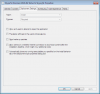
Its fine to show under Applications in Client machine. This is how the setup is with "Install" and "Required"

2026

Please advise further if there's any other settings need to be modify.

Best Regards
Faisal
 
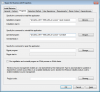
What does your scheduling setting look like?
Does it have an installation deadline of a specific end date or did you set it to "As soon as possible after the available time" ?
Also what type of deployment type did you make? .msi installer, Script, etc?
 
What does your scheduling setting look like?
Does it have an installation deadline of a specific end date or did you set it to "As soon as possible after the available time" ?
Also what type of deployment type did you make? .msi installer, Script, etc?
This is set to As soon as possible. Using the exe file "lyncentry_4417-1000_x64_en-us.exe" I've tried with xml file but didn't work then I didn't use any script. If you have any document or steps please share. Thanks in well Adv.

Regards
Faisal
 
O.k. it seems like you haven't added any command line switches to your deployment therefore the installer won't run unattended/without end user interaction. This is what is keeping your deployment from running by itself (expected behavior)

See here for switch info https://social.technet.microsoft.co...nt-basic-silent-installation?forum=lyncdeploy

From what I can tell the silent switch for your installer (and syntax) is:
lyncentry_4417-1000_x64_en-us.exe /quiet /passive

I am not using Lync Basic so I'm not able to test over here.

What I've started doing is using a .cmd or .bat file to run installs and uninstalls. This allows flexibility for the times you may need to do complex things before or after installing software (change, remove, desktop icons, add or remove registry settings, etc.).

Also I tend to test the silent install and uninstall commands on a test PC before deploying via SCCM, (open CMD as admin, then paste in "\\path\lyncentry_4417-1000_x64_en-us.exe /quiet /passive" press enter) that way you can figure out which exact command switches are needed for your installer.
Also sometimes you have to try a bunch of things to figure out what switches work with your particular installer. Personally I enjoy that part of the process!

Hopefully this helps
 
Last edited:
O.k. it seems like you haven't added any command line switches to your deployment therefore the installer won't run unattended/without end user interaction. This is what is keeping your deployment from running by itself (expected behavior)

See here for switch info https://social.technet.microsoft.co...nt-basic-silent-installation?forum=lyncdeploy

From what I can tell the silent switch for your installer (and syntax) is:
lyncentry_4417-1000_x64_en-us.exe /quiet /passive

I am not using Lync Basic so I'm not able to test over here.

What I've started doing is using a .cmd or .bat file to run installs and uninstalls. This allows flexibility for the times you may need to do complex things before or after installing software (change, remove, desktop icons, add or remove registry settings, etc.).

Also I tend to test the silent install and uninstall commands on a test PC before deploying via SCCM, (open CMD as admin, then paste in "\\path\lyncentry_4417-1000_x64_en-us.exe /quiet /passive" press enter) that way you can figure out which exact command switches are needed for your installer.
Also sometimes you have to try a bunch of things to figure out what switches work with your particular installer. Personally I enjoy that part of the process!

Hopefully this helps
Hello Mark,

I'll try this way and will update you with impact.

2032
 
Did you run the command off a PC to see if it installs and uninstalls in silent mode?

As long as your deployment is downloading the .exe to the local workstation that should work.
 
Did you run the command off a PC to see if it installs and uninstalls in silent mode?

As long as your deployment is downloading the .exe to the local workstation that should work.
Hello Mark,

Using the arguments you provided didn't work and popped up with Office Customization action. Below are the help of the exe I've. Is there nay msi for Lync 2016?


lyncentry_4417-1000_x64_en-us.exe /quiet /passive


---------------------------
Skype for Business Basic
---------------------------
Usage:
/extract:path, extracts the content of the package to the path folder
/log[:path to log file], enables verbose logging for the update installation
/lang:lcid, sets the user interface to the specified locale when multiple locales are available within the package
/quiet, runs the package in silent mode
/passive, runs the update without any interaction from the user
/norestart, prevents prompting of user when reboot of machine is needed
/forcerestart, forced restart of machine once update is complete
/?, shows this help message
---------------------------
OK
---------------------------

Thanks
Regards

Faisal
 
You would be better off upgrading those Office 2010 to 2016 and make everything x64.
 

Forum statistics

Threads
7,166
Messages
27,975
Members
18,278
Latest member
MLab

Latest posts

Trending content

Back
Top