
Hello,
Been trying to fix this for a few days now but a couple of our server have been failing their client checks and have their defender clients disabled as well.
So when running the client health check I get the following error;
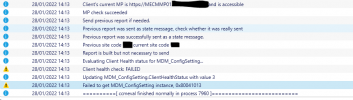
This also coincides with the Windows Defender Client also being disabled (not on purpose).
I have also checked the certificate it is using works for communication with the MP;

Used the following Powershell to test it;
I've tried blasting away the client, its associated registry entries, directories & the cleaning out of the WMI repos etc.
Please send help I'm going loopy here.
Been trying to fix this for a few days now but a couple of our server have been failing their client checks and have their defender clients disabled as well.
So when running the client health check I get the following error;
This also coincides with the Windows Defender Client also being disabled (not on purpose).
I have also checked the certificate it is using works for communication with the MP;
Used the following Powershell to test it;
Code:
$externalUrl = "https://YOURMPFQDN/sms_mp/.sms_aut?mpcert"
$certStorePath = "Cert:\LocalMachine\My"
$certificate   = Get-ChildItem -Path $certStorePath | Where-Object {$_.Thumbprint -like "*THUMBPRINTDISPLAYEDINLOGS*"}   # Returns one result
Invoke-WebRequest -Uri $externalUrl -UseBasicParsing -Certificate $certificate
I've tried blasting away the client, its associated registry entries, directories & the cleaning out of the WMI repos etc.
Please send help I'm going loopy here.


