Forums on Intune, SCCM, and Windows 11

Welcome to the forums. Register a free account today to become a member! Once signed in, you'll be able to participate on this site by adding your topics and posts, as well as connect with other members through your own private inbox!

PENDING Change local admin password via sccm

  • Thread starter Thread starter Nitin_ted
  • Start date Start date
  • Replies Replies 8
  • Views Views 6K

Nitin_ted

Well-Known Member
Messages
87
Solutions
1
Reaction score
2
Points
8
Hi All,
Can anyone share a powershell script to reset/change current admin (local account) password? i need to change all local admin password but the scripts i get from web not really working. We disable in-build local administrator account and create admin account. So we like to change all admin password.
 
Hi All,
Can anyone share a powershell script to reset/change current admin (local account) password? i need to change all local admin password but the scripts i get from web not really working. We disable in-build local administrator account and create admin account. So we like to change all admin password.
What is not working with them? Have you looked at laps?
 
sure you can use PowerShell. But you still having told us what didn't work with the script you tested.
Hi @Garth , i do not have. That's why i'm asking if anyone can share. I check online but couldn't find any also not sure if those can be work.
 
Use this script to change the local Administrator password. Note that before executing this script you should test in a single machine and then execute in whole machines.

Code:
Set-ExecutionPolicy -ExecutionPolicy Unrestricted -Scope Process -Force
# Define the new password
$newPassword = "Your New Password"

# Change the password for the local Administrator account
$adminAccount = [ADSI]"WinNT://./Administrator,user"
$adminAccount.SetPassword($newPassword)
$adminAccount.SetInfo()

# Check if the password change was successful
if ($?) {
    Write-Host "Local Administrator password changed successfully."
} else {
    Write-Host "Failed to change Local Administrator password."
}
 
Use this script to change the local Administrator password. Note that before executing this script you should test in a single machine and then execute in whole machines.

Code:
Set-ExecutionPolicy -ExecutionPolicy Unrestricted -Scope Process -Force
# Define the new password
$newPassword = "Your New Password"

# Change the password for the local Administrator account
$adminAccount = [ADSI]"WinNT://./Administrator,user"
$adminAccount.SetPassword($newPassword)
$adminAccount.SetInfo()

# Check if the password change was successful
if ($?) {
    Write-Host "Local Administrator password changed successfully."
} else {
    Write-Host "Failed to change Local Administrator password."
}
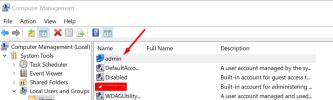
Hi @manesh1983 thanks for your response and script. I wanted to change the password for the Admin account (not built-in Administrator). So I just changed the script to "admin from Administrator"? 1710984126349.png
 
Back
Top