Forums on Intune, SCCM, and Windows 11

Welcome to the forums. Register a free account today to become a member! Once signed in, you'll be able to participate on this site by adding your topics and posts, as well as connect with other members through your own private inbox!

SOLVED Apps are not installing at the time of Android enrollment (Corporate Owned with work profile)

MJ-Tech

Well-Known Member
Messages
217
Solutions
25
Reaction score
21
Points
18
Good Afternoon Team,

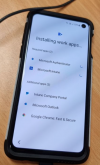
Followed the steps below and logged with the user credentials but for some reason work apps are not installing and stuck for long time,

1. Scan the code

2. Login as company credentials.

3. Setup the pin number.

After that I am stuck at installing the apps.

Please see the screenshot and help me if you can .

Thanks
1663943919496.png
 
Solution
If the device has already been enrolled in a fully managed profile with Microsoft Intune, it won't allow you to enroll it in a different profile.
Just did a factory reset of the device and added it to an existing work profile. It was fine afterward
Is the device enrolling in Intune at all? Do you have any Conditional Access (Compliance) or something else blocking it?
 
Sometimes Yes. The device was available in AAD but the compliance status was "
Not Evaluated".
I don't think the issue is related to conditional access because I am able to enroll other android devices with the same compliance policies and configuration profiles.

Moreover i enabled only recommended policies and profiles,

i.e.,

Compliance Policies:
Minimum OS version - 8.0

Configuration profiles:
Factory reset - Block
App auto-updates (work profile-level)
Always
Allow access to all apps in Google Play store - Allow


Is it possible to find and delete the Not evaluated enrolled devices in Intune using powershell? or any other suggestion pl?
 
Last edited:
Same issue on another android device. tried different users as well. no luck. if there is no restriction from compliance and configuration profiles, then where is it blocking then?

I have raised a few tickets with Microsoft but no fix yet. Any help would be appreciated.
 
I think i have found the issue but prior to that, i need to double check whether my assumption is correct or not.
The affected devices were already enrolled in COBO enrollment profile & wiped from Intune .
After wiped the devices, we also verified that the existing device were removed from both ends. i.e., Endpoint manager and Azure Active directory .
Currently we are trying to enroll the same devices into different enrollment type- i.e., COPE profile (different enrollment) but no success.
Is there any way that i can wipe the device entries completely from intune or Azure AD?
 
If the device has already been enrolled in a fully managed profile with Microsoft Intune, it won't allow you to enroll it in a different profile.
Just did a factory reset of the device and added it to an existing work profile. It was fine afterward
 
Solution

Forum statistics

Threads
7,136
Messages
27,873
Members
18,159
Latest member
jordysmits
Back
Top